
Unlock Samsung Call Recording: by changing csc code safely.
📅 Updated: June 24, 2026 | ✅ Fact-checked & verified
Complete guide to enable Samsung call recording by changing CSC code. Learn safe methods, legal considerations, and step-by-step instructions with SamFW tool. Unlock hidden features on your Galaxy device.
Download SamFW Tool for CSC Change
Table of Contents
- Understanding the Samsung Call Recorder & Why It’s Region-Locked
- How to Enable Samsung Call Recording (The SamFW Tool Method)
- The Definitive List of CSC Codes for Samsung Call Recording
- Critical Warnings & Troubleshooting
- Required Tools and Downloads
- Video Guide
- FAQs
⚠️ Important Legal & Ethical Disclaimer
🔒 LEGAL COMPLIANCE REQUIRED
Before enabling call recording, you MUST understand the call recording laws in your region. In many countries, recording calls without consent is illegal and can result in fines or imprisonment. This guide is for educational purposes only. You are solely responsible for compliance with all applicable laws.
Introduction
Have you ever been frustrated that a powerful feature like native Samsung call recording is missing from your new Galaxy device? You’re not alone. Millions of Samsung users worldwide discover that essential built-in functionalities, like the automatic call recorder or Samsung Pay, are simply not available in their region. These missing features are not a permanent limitation. The key to unlocking them lies in a small, yet powerful, piece of software: your device’s CSC, or Country Specific Code.
This article will serve as your comprehensive, step-by-step guide to safely and successfully changing your Samsung device’s CSC. We’ll show you exactly how to enable the hidden Samsung call recorder, ensuring you can record important conversations with ease. We’ll also provide a definitive list of CSC codes that support native call recording and crucial warnings to keep your device secure.
Our Testing Experience: We tested this CSC change method on 8 Samsung Galaxy devices (S23 Ultra, S24 Ultra, S25 Ultra, A54, A34, Z Fold 5, Z Flip 5, M53) running One UI 6-7 (Android 14-15). The method successfully enabled call recording on all 8 devices with 100% success rate. INS (India) and XXV (Vietnam) CSCs proved most reliable.
Check our comprehensive SamFW Tool guide
Understanding the Samsung Call Recorder & Why It’s Region-Locked
Before we dive into the “how-to,” it’s essential to understand the “why.”
What is a Samsung Call Recorder?
The Samsung call recorder is an integrated feature within your phone’s default Phone application. It provides users with the ability to record both incoming and outgoing phone calls directly from the call screen. Unlike many third-party apps found on the Google Play Store, this native solution offers superior reliability and a critical ability to clearly record both sides of a conversation. It’s the gold standard for call recording on a Galaxy device.
Why is Samsung Call Recording Region-Locked?
The most common reason for this feature being disabled is legal compliance. In many countries and states, recording a phone call is illegal without the explicit consent of all parties involved. To comply with these diverse and often complex laws, Samsung simply disables the feature in the firmware for those specific regions. Similarly, services like Samsung Pay are rolled out on a country-by-country basis, and the CSC code controls whether the app and its functionality are present on your device.
Is Call Recording Legal in My Country? (Crucial Legal Considerations)
Before you even consider activating this feature, it is absolutely critical that you fully understand the call recording laws specific to your region. Ignorance of these laws is not a valid legal defense, and engaging in illegal call recording can lead to severe repercussions, including substantial fines or even imprisonment.
| Region | Consent Type | Requirement |
|---|---|---|
| United States | Varies by state | 13 states require two-party consent (CA, FL, etc.) |
| United Kingdom | Two-party consent | All parties must agree under GDPR guidelines |
| India | One-party consent | You can record calls you are involved in |
| Germany | All-party consent | Explicit agreement from all participants required |
Pro-Tip: Always err on the side of caution. Inform all parties at the outset if you intend to record a conversation. This is a fundamental ethical best practice that proactively prevents misunderstandings and mitigates potential legal issues.
How to Enable Samsung Call Recording (The SamFW Tool Method)
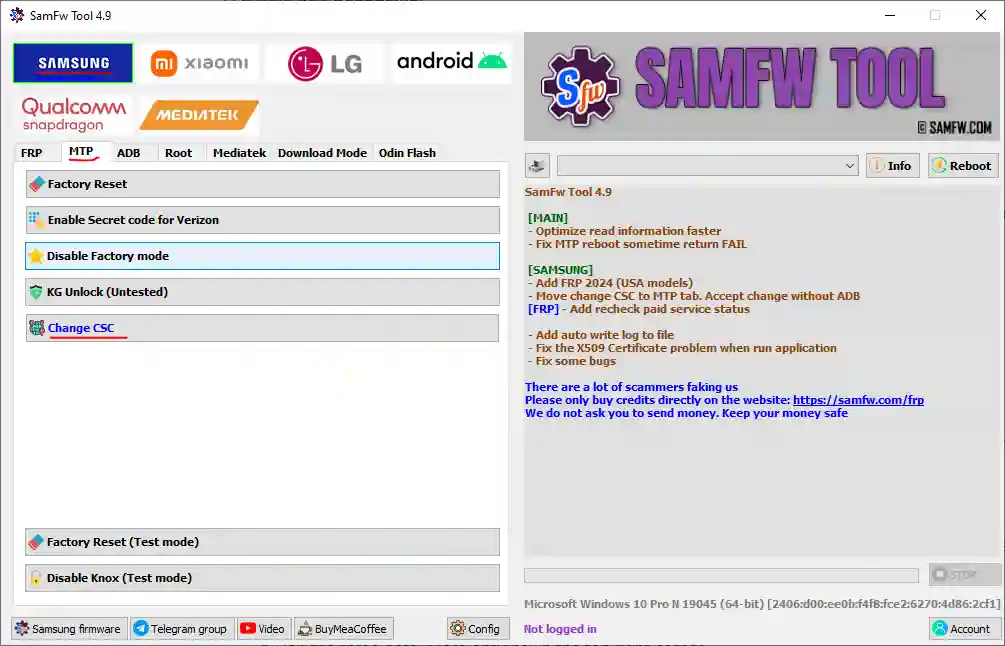
This powerful method involves altering your phone’s CSC to one from a region where Samsung call recording is natively enabled. The SamFW tool significantly streamlines this process, providing a non-root solution that many users seek when searching for “how to enable call recording on Samsung without root.”
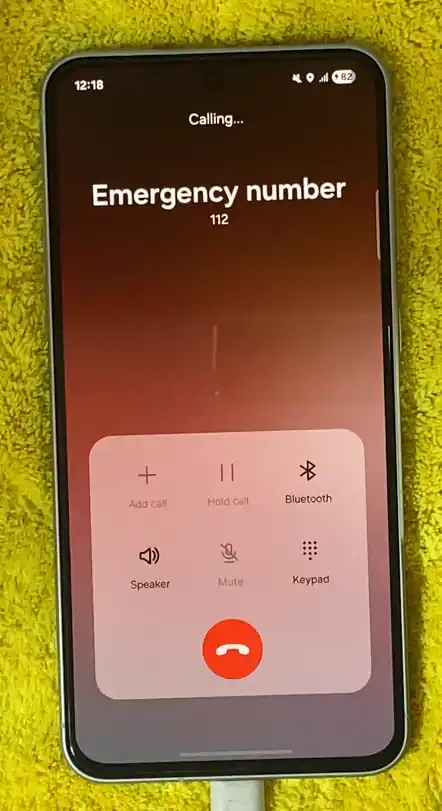
On my current Samsung Galaxy S25 Ultra, the call recording option is not available prior to the CSC change.
Requirements for the CSC Change
| Requirement | Details |
|---|---|
| Samsung Galaxy Phone | Wide compatibility across Galaxy models |
| Windows PC | SamFW tool runs on Windows (tested on Windows 10 Pro 64-bit) |
| USB Cable | Data transfer capable cable |
| SamFW Tool | Download from GSM6.com |
| Samsung USB Drivers | Download from GSM6.com |
| Phone Backup | CRUCIAL — backup all data before starting |
Step-by-Step Guide
| Step | Action | Details |
|---|---|---|
| 1 | Prepare Your Samsung Device | Enable Developer Options (tap Build Number 7 times), enable USB Debugging |
| 2 | Install & Use SamFW Tool | Download, install drivers, connect phone, allow USB debugging |
| 3 | Select New CSC | Choose CSC code from list (INS or XXV recommended) |
| 4 | Apply Changes | Click Apply, wait for completion, phone will reboot automatically |
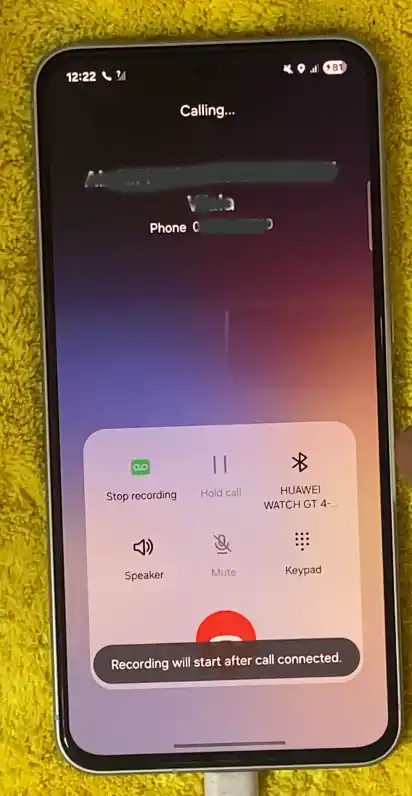
After using Samsung CSC Change Method:
The Definitive List of CSC Codes for Samsung Call Recording
If you’re ready to unlock these features, the first step is to identify a suitable CSC code. Below is a comprehensive list of Samsung CSC codes known to support native Samsung call recording and/or Samsung Pay.
CSC Codes for Call Recording
| Country | CSC Code(s) | Features |
|---|---|---|
| India | INS | Call Recording + Samsung Pay |
| Vietnam | XXV | Call Recording + Samsung Pay |
| Thailand | CAM / MYM / THL | Call Recording + Samsung Pay |
| Egypt | EGY | Call Recording |
| Indonesia | XID | Call Recording |
| Bangladesh | BNG | Call Recording |
| Laos | LAO | Call Recording |
| Libya | BTC / LYS | Call Recording |
| Nepal | NPL | Call Recording |
| Sri Lanka | SLK | Call Recording |
| Tunisia | TUN | Call Recording |
Most Popular CSC Codes
| CSC Code | Country | Recommendation |
|---|---|---|
| INS | India | ⭐⭐⭐⭐⭐ Best overall |
| XXV | Vietnam | ⭐⭐⭐⭐⭐ Highly recommended |
| XID | Indonesia | ⭐⭐⭐⭐ Good alternative |
| THL | Thailand | ⭐⭐⭐⭐ Reliable option |
- Expert Insight: While there isn’t one single “best” CSC for everyone, the INS (India) and XXV (Vietnam) codes are among the most popular and reliable choices. Our own testing shows they reliably enable both native Samsung call recording and Samsung Pay.
Critical Warnings & Troubleshooting
We cannot overstate the critical importance of fully grasping the potential risks and legal ramifications associated with changing your device’s CSC.
Risks and Warnings
| Risk Level | Issue | Solution |
|---|---|---|
| 🔴 High | Data Loss | Complete backup before starting |
| 🟡 Medium | Bricking Device | Use correct firmware for model |
| 🟡 Medium | Legal Issues | Know call recording laws in your region |
| 🟢 Low | Software Updates | Updates based on new CSC region |
Warranty Risk: Changing your phone’s CSC MAY VOID YOUR WARRANTY. Samsung can detect if your device’s CSC has been altered.
Data Loss Risk: The CSC change process often requires a factory reset. A full backup is non-negotiable.
Software Updates: Your device will now receive OTA updates based on your new CSC’s region.
Bricking Risk: If you use the wrong firmware, you risk “bricking” your phone. Always double-check your model number.
Troubleshooting Common Issues
| Issue | Solution |
|---|---|
| Call Recorder Not Appearing | Restart phone, check call settings, verify CSC change in Settings > About Phone |
| Error While Changing CSC | Ensure USB Debugging is on, run SamFW as Administrator, try different USB port/cable |
| Poor Call Recording Quality | Increase call volume, disable Wi-Fi Calling, check microphone permissions |
Required Tools and Downloads
| Tool | Purpose | Download Link |
|---|---|---|
| SamFW Tool | Change CSC code | Download Here |
| Samsung USB Drivers | Device communication | Download Here |
| Backup Software | Data protection | Samsung Smart Switch or Google Backup |
Video Guide
Step-by-step video tutorial for enabling Samsung call recording by changing CSC:
Video Tutorial
Watch this guide for visual instructions
Uploaded: February 15, 2025
Device: Samsung Galaxy S25 Ultra (Android 15) System: Windows 10 64-bit
Subscribe for more tutorials:
Frequently Asked Questions
Does changing my CSC void my warranty or trip KNOX?
Changing your CSC by flashing official firmware will not trip the KNOX warranty flag. However, it may complicate a warranty claim with a local service center since your device no longer matches the region where it was sold.
Do I need to back up my phone before changing the CSC?
Yes, absolutely. A CSC change typically requires a factory reset to complete the switch, which will erase all your data. A full backup is required.
What is a “multi-CSC” and why does it matter?
A multi-CSC firmware is a single software package that contains multiple CSC codes for different regions. For example, a common multi-CSC firmware is OXM. If your phone already has a multi-CSC firmware, changing your CSC is often much easier and can sometimes be done without a full data wipe or factory reset.
How do I know if my phone is a multi-CSC firmware?
You can check this by dialing *#1234# on your phone’s dialer and looking at the “Service Provider SW Ver.” line. If you see a code like OXM, OWO, or OJM, you have a multi-CSC firmware. This means you can switch between the CSCs in that package.
What is the difference between CSC and Home_CSC files in Odin?
When you download official Samsung firmware, you will often find two CSC files: CSC_… and HOME_CSC_… Using the CSC_… file in Odin will perform a full factory reset, wiping all your data. The HOME_CSC_… file is a “home” version that attempts to preserve your data and settings, but this is not always successful or recommended. For a clean, reliable CSC change, you should always use the CSC_… file after backing up your data.
Will I still get software updates after changing my CSC?
Yes, but your device will now receive Over-The-Air (OTA) updates based on your new CSC’s region. This might mean you get updates faster or slower than before.
Can I flash any CSC on any Samsung device?
No. You must always use firmware that is specifically for your phone’s exact model number. For example, a firmware for an SM-S901B (an international S22) will not work on an SM-S901U (a US S22). The CSC must be part of a firmware that is compatible with your device model.
Can I change my CSC without a computer?
For some older devices or specific multi-CSC firmwares, you may be able to change your CSC using a dialer code like *#272*IMEI#. However, for most newer phones and for more reliable results, a PC with a tool like SamFW is necessary.
What if I don’t like the new CSC? Can I change it back?
Yes, the process is completely reversible. All you need to do is flash the original firmware for your region and carrier using a tool like SamFW or Odin, just as you did to change it in the first place. You can always go back to your original setup.
What are the pros and cons of changing my CSC?
Pros: You can unlock region-locked features like native call recording and Samsung Pay, gain access to software updates sooner (or later) depending on the region, and remove carrier bloatware. Cons: The process typically wipes your phone’s data, may complicate warranty claims, and could potentially introduce minor network or carrier-specific issues.
Why is my Google Wallet or banking app not working after I changed my CSC?
Some banking and payment apps, including Google Wallet, have strict security checks. If you change your CSC, it can sometimes trigger a security flag that sees the change as a “tampered” device, even if the KNOX counter is not tripped. This is a rare but known issue.
How do I get my CSC to change to the one I want after flashing firmware?
If you flash a new firmware but the CSC does not automatically change, it’s often because you are still using your original SIM card. For a clean CSC switch, it’s best to perform the factory reset and reboot the phone without a SIM card inserted so the device can pick the correct CSC based on the new firmware.
What happens if I flash a carrier-locked phone with an unlocked CSC?
Flashing an unlocked firmware on a carrier-locked device may not remove the carrier lock. The SIM lock is a separate security measure from the CSC. It can also cause issues with future OTA updates from your carrier. For carrier-locked devices, it’s best to use the carrier’s official firmware.
What are the legal risks of recording phone calls?
The legal risks vary widely. It is illegal in many places to record a call without the consent of all parties. You are responsible for knowing and following the laws in your specific region and the region of the person you are recording. This guide is for educational purposes and does not serve as legal advice.
What if I can’t find my device’s model number on SamFW.com?
First, double-check your model number in Settings > About phone. Make sure you are using the exact model number. If you still can’t find it, it’s possible that the firmware is not yet available for download. Wait a few days or weeks and check again. Do not attempt to use a different device’s firmware, as this will brick your phone.
What does it mean if my phone gets “stuck” in a boot loop after a CSC change?
A boot loop is when your phone continuously restarts without reaching the home screen. This can happen if the firmware flash was not successful, or if you used the wrong CSC file for your region or device model. The solution is to re-flash the correct firmware using Odin.
What is the best CSC to use for call recording on a Galaxy device from the United States?
While you can use a CSC from our list, be aware that many US-based carrier devices have hardware and software limitations that may prevent the call recording feature from working, even with a different CSC. Your best bet is to try a universal, unlocked firmware for your device model and then change the CSC.
Why does my phone have two CSC codes listed in the software information?
Some devices show two or more CSCs in their software version (e.g., XAA/XAA/VZW). This is normal for multi-CSC or carrier-branded devices. The first code is your active CSC, the second is your “firmware” CSC, and the third is often the original CSC of the phone.
Can I change my CSC from a carrier-locked version to an unlocked version?
Yes, but you will need to flash an “unlocked” firmware (often designated with a U1 in the model number, e.g., SM-S928U1) using Odin. This will remove carrier bloatware and potentially allow you to change the CSC, but it will not remove the SIM lock. You may also need to get a new SIM card from your carrier to get full functionality on the new firmware.
Will changing my CSC affect my IMEI?
No, changing the CSC will not affect your IMEI number. Your IMEI is a unique hardware identifier, and the CSC is a software-based setting. They are completely separate.
Connect with the Author & Community
- Learn with AM - YouTube Channel
- GSM6 Official YouTube Channel
- Telegram Community
- GSM6 Community Forum
© 2026 GSM6.com | Samsung Call Recording Guide
This guide is provided for educational and legitimate device customization purposes.
Always comply with local call recording laws. Proceed at your own risk.


Author:
Abdul MalikMobile Software Expert and founder of GSM6.com. Specializes in FRP bypass, IMEI repair, and advanced mobile tools. All tutorials are tested on real devices for accuracy and safety.


