
• Abdul Malik (AM) • android • 1 min
Google Pixel Network Unlock in 2025 - Complete Technician's Guide (Safe & Educational)
Updated for 2025 ” If you’ve recently purchased a Google Pixel that’s locked to a single carrier (T-Mobile, AT&T, Verizon, etc.), you may feel limited in how you can use your device. Maybe you travel often, want to switch to a cheaper SIM card, or bought a second-hand Pixel but can’t use it with your local provider. That’s where carrier unlocking comes in.
In this step-by-step Pixel Carrier Unlock guide, we’ll cover everything:
- œ… What “carrier unlock” actually means
- œ… Whether it’s legal & safe
- œ… Free vs. official unlock methods
- œ… Step-by-step ADB method (technical but effective)
- œ… Carrier unlock request process (official way)
- œ… Important disclaimers for safe usage
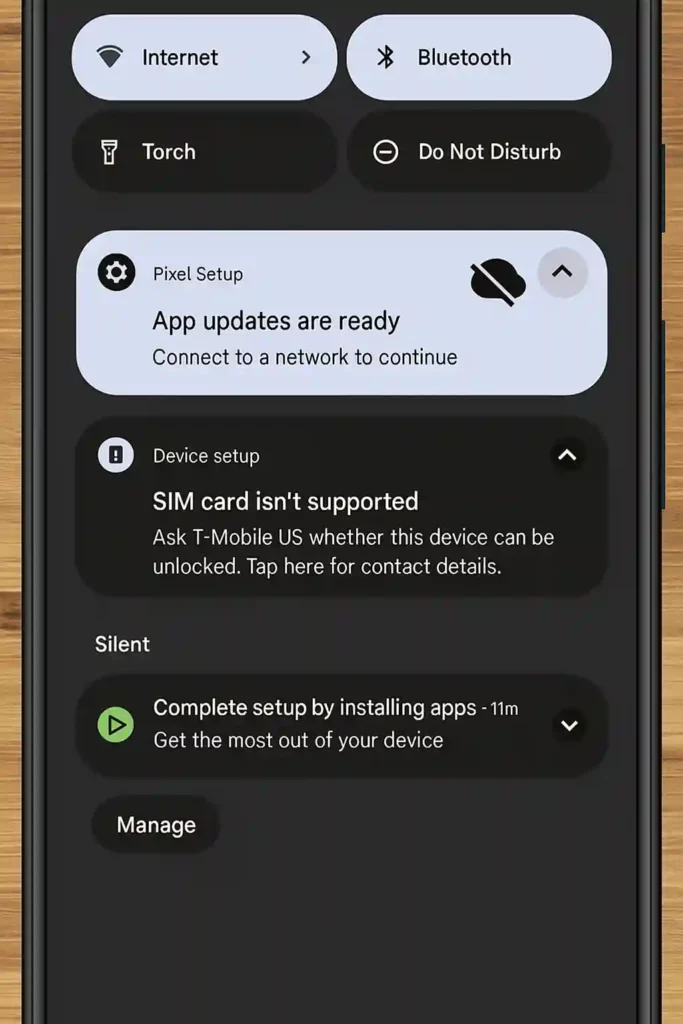
By the end, you’ll know how to unlock your Google Pixel from any carrier, safely and legally, so you can enjoy true freedom with your device.
What Is Carrier Unlocking on a Google Pixel?
“Carrier unlocking” means removing the restrictions that bind your Google Pixel to a specific carrier’s SIM card. For example:
- A Pixel purchased through T-Mobile may not accept an AT&T SIM until it’s unlocked.
- Carrier locks are usually added to ensure you stay on their network until your contract or installment plan is complete.
👉 After unlocking:
- You can use any compatible SIM card worldwide.
- Your Pixel works with local SIMs while traveling (saving roaming costs).
- The resale value of your Pixel increases.
Is Carrier Unlocking Legal?
Yes. Unlocking your Pixel is legal under U.S. law and in many other regions as long as you own the device outright or have explicit permission.
🔒 Illegal cases:
- Unlocking stolen or unpaid devices.
- Using bypass methods for fraud or reselling blacklisted devices.
œ… Legal cases:
- Unlocking your own Pixel.
- Requesting unlock from your carrier after meeting requirements.
- Using tools like ADB (Android Debug Bridge) for educational and repair purposes.
📢 Disclaimer: This guide is intended strictly for educational and repair purposes. GSM6.com does not encourage unauthorized access. You are responsible for ensuring compliance with local laws and carrier policies.
Pixel Carrier Unlock Methods (2025)
There are two main ways to carrier unlock your Pixel:
Official Carrier Unlock
- Request an unlock directly from your carrier (free if eligible).
- Usually permanent and safe.
- Takes 24“72 hours in most cases.
ADB / Technical Unlock (Advanced Method)
- Uses command-line tools (ADB).
- Works for technicians, advanced users, or when carrier unlock is not available.
- Requires following technical steps carefully.
We’ll cover both below 👇
Method 1: Official Carrier Unlock (Recommended)
The easiest and most secure option is to request an unlock from your carrier. Most U.S. and international carriers allow this once certain conditions are met.
Carrier Unlock Requirements
- The Pixel must be paid off in full.
- The device must not be reported lost, stolen, or blacklisted.
- The device must be active on the network for a set time (e.g., 40“60 days).
Carrier Unlock Request Process
- Insert your carrier SIM card (e.g., AT&T, T-Mobile, Verizon).
- Call or chat with carrier support:
- Example: “I would like to request a carrier unlock for my Google Pixel, IMEI: [your IMEI here].”
- Wait for confirmation (usually 1“3 business days).
- Once approved, restart your Pixel with a new SIM card.
👉 If approved, your Pixel will now work with any carrier worldwide.
Method 2: Technical Unlock (ADB Command Guide)
If your carrier refuses or you want to learn the manual method, you can use ADB commands to disable restrictions.
Warning
This method is for technicians and advanced users only. A mistake could cause errors in your device setup. Proceed at your own risk.
Step 1: Prepare Your Device for free carrier unlock pixel phone (all models)
- Remove the SIM card.
- Perform a factory reset (Settings > System > Reset).
- Set up the Pixel offline (do not connect to Wi-Fi yet).
Step 2: Disable Device Setup App Background Data
- Go to Settings > Apps > Show system apps.
- Search Device Setup.
- Open Data Usage settings.
- Turn OFF Background Data and Unrestricted Data Access.
Step 3: Install & Use ADB
- Download and install Minimal ADB & Fastboot on your PC. (download from here)
- Download & Install Compatible Android USB drivers. (Download from here)
- Enable Developer Options on Pixel:
- Go to Settings > About Phone > Tap Build Number 7 times.
- Enable USB Debugging.
- Connect your Pixel to PC with a USB cable.
- Open Command Prompt (Windows) or Terminal (Mac/Linux).
- Type the following commands one by one:
adb shell cmd appops set com.google.android.apps.work.oobconfig WAKE_LOCK deny adb shell cmd appops set com.google.android.apps.work.oobconfig RUN_IN_BACKGROUND deny adb shell cmd appops set com.google.android.apps.work.oobconfig RUN_ANY_IN_BACKGROUND deny adb shell cmd appops set com.google.android.apps.work.oobconfig START_FOREGROUND deny adb shell cmd appops set com.google.android.apps.work.oobconfig ACCESS_RESTRICTED_SETTINGS deny
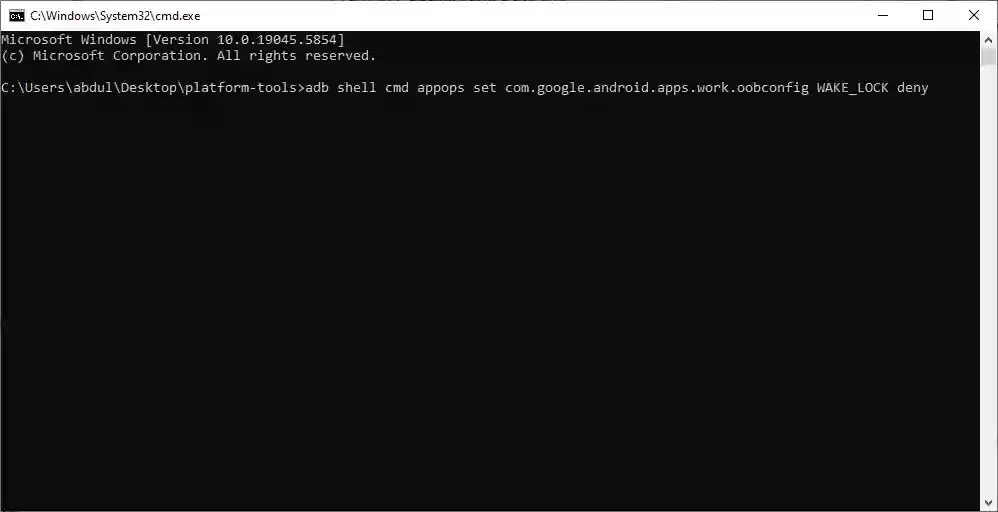
adb commands to unlock carrier on google pixel.
Step 4: Finalize Unlock
- Insert your SIM card.
- Reboot your Pixel.
- Complete the setup process.
œ… Your Pixel should now accept carrier SIM cards.
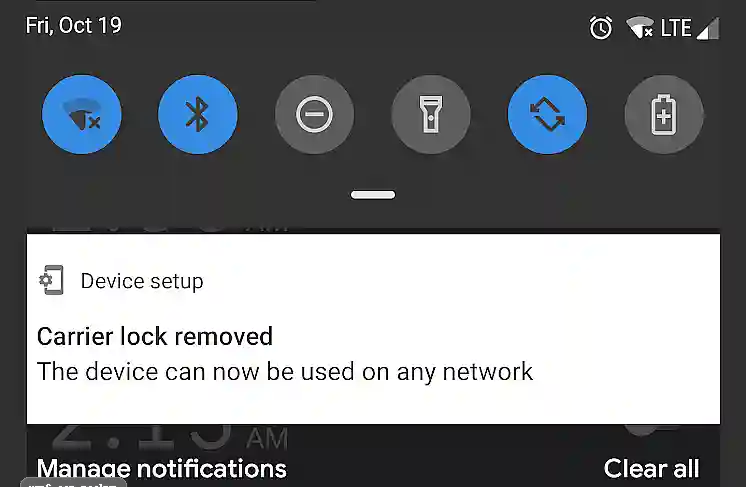
For Future Software Updates
If you used the ADB method:
- Download the update.
- Before rebooting, turn on Airplane Mode.
- Reboot the Pixel.
- Clear Device Setup cache and repeat Step 2 above.
- Turn off Airplane Mode.
Carrier Unlock Tools & Requirements
| Requirement | Details |
|---|---|
| Device | Google Pixel (any model) |
| Carrier Status | Not blacklisted, paid in full |
| PC OS | Windows 10/11, macOS, Linux |
| Tools Needed | ADB & Fastboot, Android USB Drivers |
| Connection | USB Cable (data capable) |
| Time Required | 30-45 minutes |
| Risk Level | Low (Official), Medium (ADB) |
ADB Commands Reference
| Command | Purpose |
|---|---|
adb shell cmd appops set ... WAKE_LOCK deny | Prevents wake lock for carrier app |
adb shell cmd appops set ... RUN_IN_BACKGROUND deny | Blocks background execution |
adb shell cmd appops set ... RUN_ANY_IN_BACKGROUND deny | Disables all background tasks |
adb shell cmd appops set ... START_FOREGROUND deny | Prevents foreground service |
adb shell cmd appops set ... ACCESS_RESTRICTED_SETTINGS deny | Blocks restricted settings access |
Final Disclaimer
📢 Disclaimer
All APKs, tools, and commands in this guide are shared for educational and repair purposes only. GSM6.com does not promote illegal usage, bypassing ownership verification, or tampering with stolen devices.
- We do not host copyrighted or malicious files.
- All resources are either original, open-source, or publicly available.
- Use at your own risk.
- GSM6.com is not responsible for any damage, data loss, or legal issues caused by misuse.
By using this guide, you agree that:
- You are the rightful device owner or have explicit permission.
- You are not violating local laws or carrier terms.
Conclusion
Unlocking your Google Pixel’s carrier restrictions gives you freedom, flexibility, and value.
- If eligible, the official carrier unlock is the best, safest choice.
- If not, the ADB technical method works as a fallback (for advanced users).
- Always act legally, responsibly, and with full ownership rights.
Whether you travel internationally, want to switch carriers, or plan to resell your Pixel, an unlocked device ensures you’re never locked down again.
👉 Follow this 2025 Pixel Carrier Unlock Guide step by step, and your Google Pixel will be free to use on any network worldwide
This Guide Resolves Following Search Queries.
- Pixel Carrier Unlock
- Unlock Carrier on Google Pixel
- Google Pixel Sim Unlock
- Carrier Unlock Guide for Pixel
- Free carrier unlock pixel phone
Frequently Asked Questions
What does carrier unlock mean on a Google Pixel?
It means removing the restriction that ties your Pixel to a single carrier, allowing you to use any compatible SIM worldwide.
Is carrier unlocking my Google Pixel permanent?
If done through your carrier, yes ” it’s permanent. If done via ADB or technical tweaks, it may reset after major software updates.
How do I check if my Google Pixel is carrier unlocked?
Insert a SIM card from another carrier. If you get a signal and can make calls, your Pixel is unlocked.
Can I unlock a Pixel bought from Verizon, T-Mobile, or AT&T?
Yes, but each carrier has its own requirements. Verizon usually auto-unlocks after 60 days; T-Mobile and AT&T require an unlock request.
Can Google unlock my Pixel directly?
If you purchased it from the Google Store, it usually comes factory unlocked. Otherwise, Google cannot override carrier locks.
Is it legal to unlock my Pixel with ADB commands?
Yes, if you own the phone. However, using ADB to bypass locks on someone else’s device is illegal.
Does unlocking void my Pixel’s warranty?
Carrier unlocks do not void warranties. But unofficial modifications (ADB tweaks) could affect warranty coverage.
Will my Pixel receive updates after carrier unlock?
Yes. Carrier unlock does not block updates. But with the ADB method, you must redo some steps after updates.
Can I unlock a blacklisted or stolen Pixel?
No. Blacklisted devices cannot be unlocked legally and will not work on most carriers even if technically bypassed.
Can I unlock Google Pixel 9, Pixel 8, or older models the same way?
Yes. Pixel Carrier unlock requests work across all Pixel models. The ADB method also applies to most versions.
How long does an official carrier unlock take?
It usually takes 24“72 hours. Some carriers (like Verizon) auto-unlock after 60 days without a request.
Can I use eSIM after carrier unlocking?
Yes. Once unlocked, both physical SIM and eSIM can be used with any supported carrier.
Can I unlock my Pixel if it’s under contract?
Most carriers require full payment of installments before unlocking. If still under contract, they may decline.
Do I need special software to unlock my Pixel?
For official unlocks, no. For technical unlocks, you need ADB & Fastboot tools installed on your PC.
Does unlocking erase my data?
Official unlocks don’t. But if you use the ADB method, you must factory reset first ” wiping your data. you cn safely follow this Carrier Unlock guide for Pixel step-by-step.
Can I travel internationally with an unlocked Pixel?
Yes. An unlocked Pixel works with local SIM cards in most countries, saving you expensive roaming charges.
What is the difference between Google Pixel SIM unlock and bootloader unlock on Pixel?
SIM/Carrier Unlock: Lets you use any SIM card. Bootloader Unlock: Lets you install custom ROMs ” not related to carrier unlocking.
Can I relock my Pixel to a carrier later?
No. Once officially unlocked, it cannot be relocked. But if you used ADB, updating your phone may “re-enable” restrictions, requiring you to redo the steps.
Do I need root access for Pixel Carrier Unlock?
No. Pixel Carrier unlock does not require root. ADB tweaks also don’t require rooting ” just USB debugging enabled.
What’s the safest way to unlock my Pixel in 2025?
The safest method is always the official carrier unlock request. Use the ADB method only if you’re an advanced user and accept the risks.


Author:
Abdul MalikMobile Software Expert and founder of GSM6.com. Specializes in FRP bypass, IMEI repair, and advanced mobile tools. All tutorials are tested on real devices for accuracy and safety.


