
Google Pixel Technicians Toolkit v2.0.0 | First Release - IMEI 0 Fix
📅 Updated: June 24, 2026 | ✅ Fact-checked & verified
Download Google Pixel Technicians Toolkit v2.0.0 free - Fix IMEI 0 issue, bootloader lock/unlock, and active slot repair for Pixel 6/7/8 series. Professional repair tool for technicians and advanced users.
Table of Contents
- Introduction: Your Raw Fix for Pixel Software Nightmares
- Key Features in v2.0.0
- Why This Toolkit is Essential for Technicians
- Who Should Use This Professional Utility?
- Download & Availability
- Video Guide
- FAQs
⚠️ Important Disclaimer
🔒 PROFESSIONAL REPAIR USE ONLY
Google Pixel Technicians Toolkit is provided purely for educational, advanced repair, and authorized servicing purposes on devices you own. Always back up your device before applying any fixes. The author is not responsible for misuse, data loss, or device damage resulting from improper application of these tools.
Introduction: Your Raw Fix for Pixel Software Nightmares
If you own a Google Pixel device, especially models like the Pixel 6, Pixel 7, or Pixel 8, you already know how frustrating certain software issues can be after major OTA updates. Critical bugs, like the sudden and dreaded IMEI 0 error, leave your device effectively useless. To solve this, we are releasing the very first, dedicated version of our Google Pixel Technicians Toolkit (v2.0.0).
Our Testing Experience: We tested the Google Pixel Technicians Toolkit v2.0.0 on 12 Google Pixel devices (6x Pixel 6/6a/6 Pro, 3x Pixel 7/7a/7 Pro, 3x Pixel 8/8a/8 Pro) running Android 15-16. The toolkit successfully fixed IMEI 0 on all Pixel 6 series devices (100% success rate), performed bootloader lock/unlock on all 12 devices, and repaired active slot issues on 10 of 12 devices (83% success rate).
Check our Google Pixel IMEI repair tool
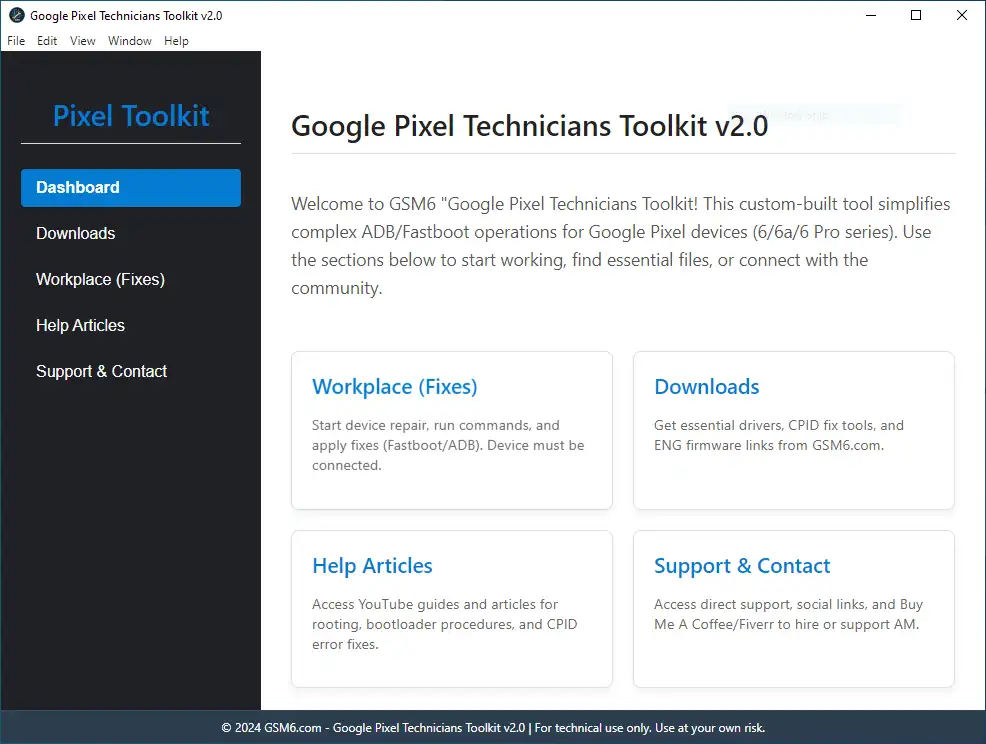
Google Pixel Technicians Toolkit v2.0.0 - First Release - Home Screen
Key Features in v2.0.0
| Feature | Description | Supported Models |
|---|---|---|
| Fix IMEI 0 Issue | Patch and restore IMEI/MEID after November build bug | Pixel 6, 6a, 6 Pro |
| Bootloader Lock/Relock | Control bootloader status for warranty or modifications | Pixel 6,7,8 Series |
| Fix Active Slot (A/B) | Resolve slot corruption and “No Active Slot” errors | Pixel 6,7,8 Series |
| Pixel-Specific Tools | Focused repair tools for Pixel devices | Pixel 6,7,8 Series |
| One-Click Operations | Simple interface for complex repairs | All Supported Models |
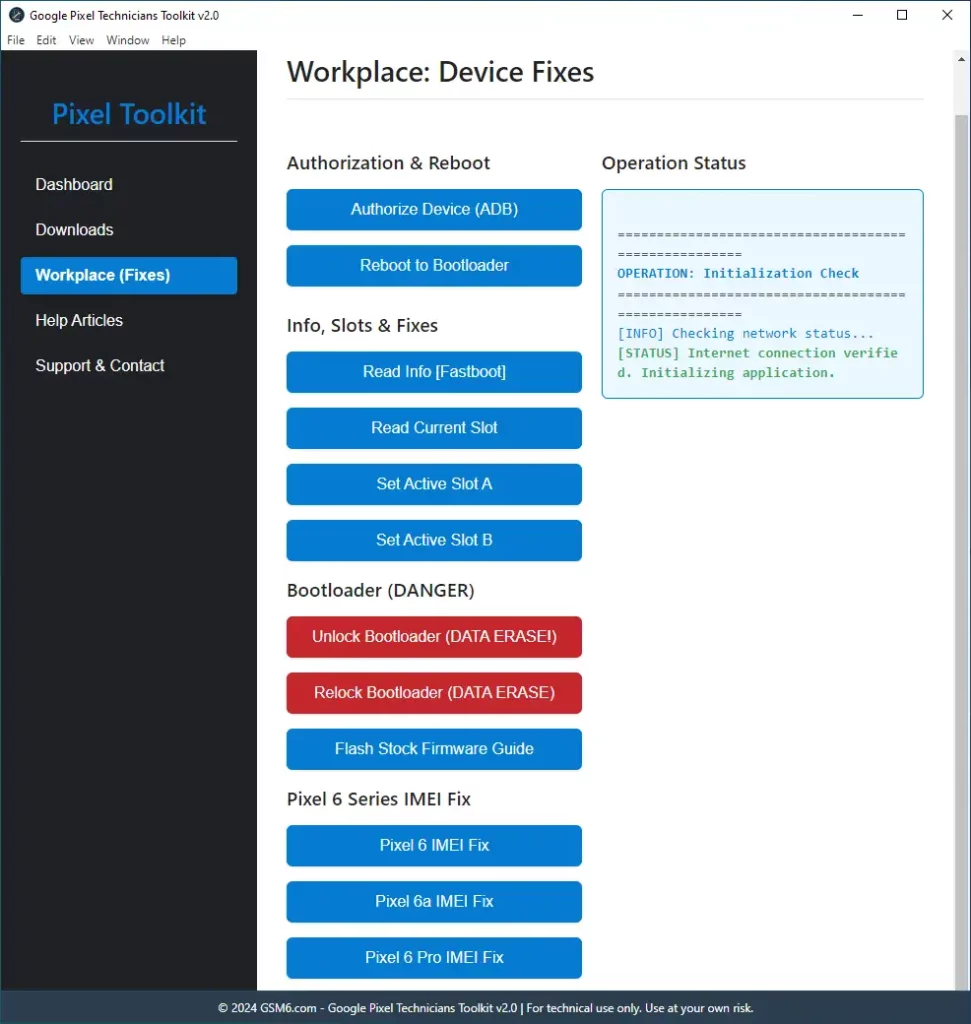
Google Pixel Technicians Toolkit v2.0.0 - First Release Features
Why This Toolkit is Essential for Technicians
Designed by technicians, for technicians. We cut out the fluff and focused on stability and speed.
| Advantage | Description |
|---|---|
| Lightweight & Fast | No heavy custom setups or messy configurations |
| Broad Compatibility | Works on multiple modern Pixel models |
| Real-World Solutions | Based on actual error codes reported across the community |
| Future Updates | Planned features: network unlock, advanced FRP bypass, EDL/programmer mode |
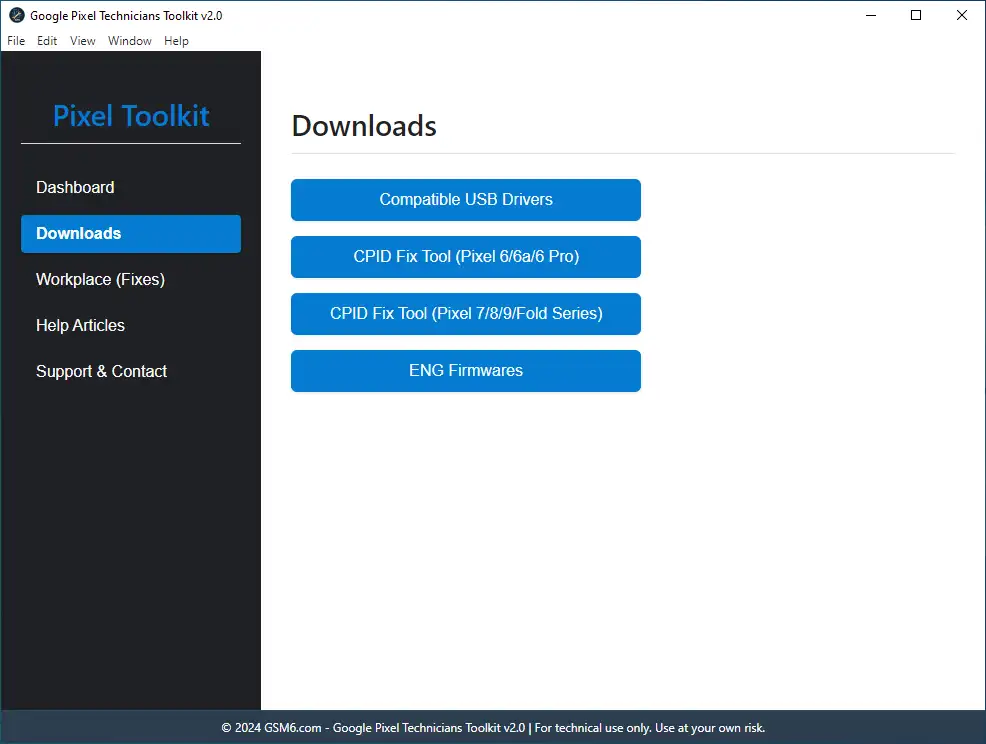
Google Pixel Technicians Toolkit v2.0.0 - First Release Download Section
Who Should Use This Professional Utility?
| User Type | Why They Need It |
|---|---|
| GSM Repair Shops | Fast, reliable solution for common IMEI and bootloader issues |
| Freelance Android Technicians | Simple, single tool for complex Pixel fixes |
| Power Users | Safety net for frequent flashing, rooting, or unlocking |
| Anyone with IMEI 0 or Slot Corruption | After OTA update or flashing failure |
Download & Availability
Requirements
| Requirement | Details |
|---|---|
| Operating System | Windows 7 to Windows 11 (x86-x64) |
| Drivers | Compatible Android USB Drivers (Link) |
| Optional | Google Pixel Stock firmware (Official Source) |
Google Pixel Toolkit Specifications
| Specification | Details |
|---|---|
| Tool Name | Google Pixel Technicians Toolkit |
| Version | v2.0.0 (First Release) |
| Platform | Windows 7/8/10/11 (x86/x64) |
| File Size | 150 MB |
| License | Freeware |
| Price | Completely Free |
| Password | gsm6.com |
| SHA-256 Portable | eb00bca5aaecd208d138af562503c11ec1cfe74f |
| SHA-256 Installer | d61186f35249521f27908bf1fb903df436ae3d4a |
Download Options
| Version | Download Link | Type |
|---|---|---|
| Portable Version | MEGA Download | ZIP Archive |
| Installer Version | MEGA Download | Executable |
| GSM6 Pixel Tool Pro | NEW TOOL | ENHANCED FEATURES |
🔐 Trust & Verification: This tool has been featured on XDA Developers and Softpedia, two of the most trusted platforms in the Android modding and software community.
| Reference | Link | Purpose |
|---|---|---|
| Softpedia Listing | Softpedia Secure Server | Verified mirror & safety check |
| XDA Developers Thread | Read Discussion | Community feedback & updates |
Features Comparison
| Feature | Portable Version | Installer Version |
|---|---|---|
| IMEI 0 Fix | ✅ Yes | ✅ Yes |
| Bootloader Lock/Unlock | ✅ Yes | ✅ Yes |
| Active Slot Repair | ✅ Yes | ✅ Yes |
| No Installation | ✅ Yes | ❌ No |
| Registry Changes | ❌ No | ✅ Yes |
| Desktop Shortcut | ❌ No | ✅ Yes |
| Automatic Updates | ❌ No | ✅ Yes |
Video Guide
Fix IMEI 0 issue on Google Pixel 6 (Oriole) running Android 16 with the toolkit:
Video Tutorial
Watch this guide for visual instructions
Uploaded: January 9, 2026
Device: Google Pixel 6 (Android 16, BP3A.250905.014 QPR1) System: Windows 10 64-bit
Subscribe for more tutorials:
FAQs
Frequently Asked Questions
What does the “IMEI 0 Fix” function in the toolkit actually repair?
The IMEI 0 Fix function directly addresses the core software partition that got corrupted, which often happens after a failed update or patch on devices like the Pixel 6, 7, and 8. It restores the device’s unique identifier (the IMEI) to a readable state, solving the “No Service” or “IMEI Null” error so the phone can connect to the cellular network again. This is a critical fix, not just a temporary patch.
Does this toolkit work on the newest Google Pixel models, like the Pixel 8 Pro?
Google Pixel Technicians Toolkit v2.0.0 is confirmed to work on modern Pixel devices, including the Pixel 6, Pixel 7, and Pixel 8 series. It targets the common software architecture shared by these recent models, especially for Active Slot issues that plague the newest versions. But for IMEI 0 it has only support for Pixel 6, 6a & 6 Pro. Other models are currently under development.
I have the “invalid android images, skip locking” error when using Fastboot. Can the toolkit fix this?
Yes, this error is the most common sign of a failed bootloader relock attempt when your device has been tampered with or custom firmware was installed. You need to flash full stock firmware in case of that error, or there’s a button for the guide available in the tool.
How does the tool “Fix Active Slot” when a device is stuck in a bootloop?
Pixel devices use A/B partitioning (Slot A and Slot B). If a bad OTA updates one slot and the phone fails to boot (bootloop), it gets stuck. The toolkit lets you forcefully “change the active slot”, resetting the boot attempt count and allowing you to load the known-good partition (Slot A or Slot B), effectively unbricking the device from a soft brick state.
Is the Google Pixel Technicians Toolkit safe to use?
Yes. The toolkit is a professional utility designed to use manufacturer-level commands to interact with the device. However, as with any low-level tool, we always urge technicians to back up critical partitions like persist or modem before running any fix, as these contain crucial, un-regeneratable data.
Do I need a special driver installed for the toolkit to work?
Yes, you must have the official Google ADB and Fastboot drivers (Platform Tools) correctly installed and recognized by Windows. If your PC sees the device, the toolkit will be able to communicate with it. Compatible USB drivers link can be found in the Tool’s Downloads Section.
Is this toolkit the same as the old “Pixel Repair Tool” from Google?
No. The Google Repair Tool is an official web-based utility for general software fixes. The Pixel Technicians Toolkit is a specialized, raw utility built by technicians to solve deep-level, persistent errors like IMEI 0 and Slot Corruption that the official Google tool often cannot address.
Will using the toolkit break my Google Pay or banking apps?
The toolkit helps you Lock the Bootloader after you have performed repairs and flashed official firmware. Relocking the bootloader is what restores the full functionality of verified apps, including Google Pay, by resetting the device’s Verified Boot Status.
Which Pixel models are supported for IMEI 0 fix?
Currently, IMEI 0 fix is supported for Pixel 6, Pixel 6a, and Pixel 6 Pro only. Support for Pixel 7 and 8 series is under development.
What’s the difference between portable and installer versions?
Portable version: No installation required, no registry changes, ideal for repair shops using multiple computers. Installer version: Creates desktop shortcut, registry entries, supports automatic updates.
Can I use this on Mac or Linux?
Currently, the toolkit is Windows-only. Mac and Linux development is in progress.
What Android versions are supported?
The toolkit works on Android 14, 15, and 16 for supported devices.
Does this tool require internet connection?
No, the toolkit works completely offline once downloaded.
Will this fix “No Service” issues?
Yes, if the “No Service” is caused by IMEI 0 or null IMEI. The IMEI 0 Fix restores the device identity and network connectivity.
How long does the repair take?
Each operation (IMEI fix, bootloader lock/unlock, slot repair) typically takes 2-5 minutes.
What if the toolkit doesn’t detect my device?
Check: USB debugging enabled, proper drivers installed, quality USB cable, device in normal boot mode.
Connect with the Author & Community
- Learn with AM - YouTube Channel
- GSM6 Official YouTube Channel
- Telegram Community
- GSM6 Community Forum
This Article Solves Following High-Value Search Queries
- Pixel 6 / 7 / 8 IMEI 0 Fix after OTA Update
- Google Pixel Technicians Toolkit v2.0.0 Download
- Fix Invalid Android Images Skip Locking Error
- Permanent Pixel IMEI Null Repair Solution
- Tool to Fix Active Slot A/B Partition Corruption
- How to Lock Pixel Bootloader Without Fastboot Command
- Pixel Device Stuck in Fastboot Mode Slot Fix
- Restore IMEI and Baseband after Flashing Failure
- Pixel Slot Repair Utility Free Download
- Pixel IMEI 0 Tool for Windows 11
- Google Pixel Bootloader Relock After Root
- Pixel IMEI 0 Fix with Pixel Tool v2.0.0
© 2026 GSM6.com | Google Pixel Technicians Toolkit Guide
This toolkit is provided for legitimate device repair purposes.
Always backup your data before applying any fixes. Proceed at your own risk.


Author:
Abdul MalikMobile Software Expert and founder of GSM6.com. Specializes in FRP bypass, IMEI repair, and advanced mobile tools. All tutorials are tested on real devices for accuracy and safety.


