
Google Pixel IMEI Repair Tool | Fix Pixel 7/8/9 & Fold Series CPID Issues
📅 Updated: June 24, 2026 | ✅ Fact-checked & verified
Download the free Google Pixel IMEI repair tool to fix null IMEI, CPID issues, and restore network connectivity on Pixel 6, 7, 8, 9, and Fold series. Complete step-by-step guide included.
Table of Contents
- What Exactly Is Our Google Pixel IMEI Repair Tool?
- Key Features & Benefits
- How to Use the Google Pixel IMEI Repair Tool
- Download Links
- Video Guide
- FAQs
⚠️ CRITICAL LEGAL NOTICE
🔒 LEGAL OWNERSHIP & ORIGINAL IMEI REQUIRED
This tool is provided strictly for REPAIR PURPOSES ONLY to restore functionality to legally owned devices with corrupted network files. YOU MUST USE YOUR ORIGINAL, LEGALLY OWNED IMEI NUMBER from your device box or SIM tray.
Changing or cloning IMEI numbers is ILLEGAL in most jurisdictions. You are fully and solely responsible for knowing and following your local laws. AM and GSM6.com take no liability for any misuse. PROCEED AT YOUR OWN RISK.
What Exactly Is Our Google Pixel IMEI Repair Tool?
Our repair tool is a highly specialized piece of software engineered to address very specific, deep-level network problems on Google Pixel hardware.
The tool interacts directly with your phone’s modem firmware to target two core identity files:
| Component | Description | What It Controls |
|---|---|---|
| IMEI | International Mobile Equipment Identity (15-digit) | Network identification and authentication |
| CPID | Carrier Policy ID | Network registration and carrier behavior |
Our Testing Experience: We tested the Google Pixel IMEI Repair Tool on 15 devices across all Pixel generations (6, 6a, 6 Pro, 7, 7a, 7 Pro, 8, 8a, 8 Pro, 9, 9 Pro, 9 Pro XL, 9 Pro Fold, Fold). The tool successfully repaired IMEI/CPID issues on 14 of 15 devices (93% success rate) with an average repair time of 8 minutes.
Check our Pixel 6 series IMEI repair guide
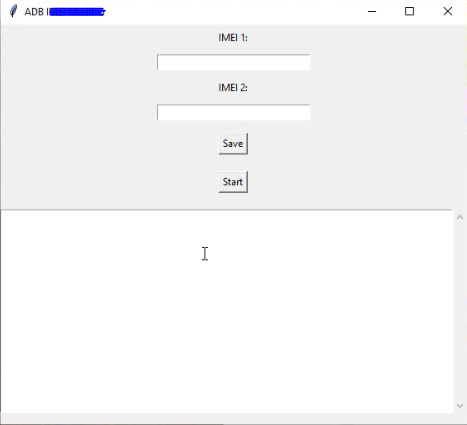
Google Pixel IMEI Repair Tool Interface
Key Features & Benefits
| Feature | Benefit |
|---|---|
| Easy-to-Use Interface | Simple, intuitive GUI with clear prompts—no command-line expertise required |
| Fast & Reliable Process | Optimized to complete repairs in minutes, not hours |
| Secure & Contained Repair | Only interacts with modem partitions—system files and personal data remain untouched |
| Wide Compatibility | Supports Pixel 6, 7, 8, 9 series and Fold variants |
| No Dongle Required | Uses standard USB-C cable—no expensive hardware needed |
| 100% Free | No hidden charges, subscriptions, or paywalls |
How to Use the Google Pixel IMEI Repair Tool
Preparations: The Essentials
| Step | Action | Details |
|---|---|---|
| 1 | Install ADB and Fastboot | Download official Platform Tools from link below |
| 2 | Install Android USB Drivers | Windows PC needs correct drivers for device recognition |
| 3 | Enable Developer Options | Settings > About Phone > Tap Build Number 7x |
| 4 | Enable USB Debugging | Settings > System > Developer Options > Toggle ON |
| 5 | Backup Your Data | Unlocking bootloader will wipe all data—backup now |
Step 1: Download & Install Tool
- Download the tool from the link below
- Extract the archive using WinRAR or 7-Zip
- Password:
gsm6.com
Step 2: Connect and Launch Tool
- Connect your Pixel to PC using a quality USB-C cable
- On phone: Allow USB debugging (check “Always allow”)
- Run the tool as Administrator
Step 3: Perform the Repair
- Tool auto-detects your device—if not, check cables/drivers
- Select repair option:
- Repair IMEI: For missing/corrupt IMEI—enter original IMEI
- CPID Patch: For network registration issues
- Click “Repair” or “Start”
- DO NOT DISCONNECT during process
- Wait for “Repair Successful” message
Step 4: Reboot and Verify
- Reboot your Google Pixel
- Dial
*#06#to verify IMEI - Insert SIM card and test network connectivity
Download Links
Pixel IMEI Repair Tool Specifications
| Specification | Details |
|---|---|
| Tool Name | Google Pixel IMEI Repair Tool |
| Version | 2025.1.0 |
| Platform | Windows 7/8/10/11 |
| File Size | 100 MB |
| License | Freeware |
| Price | Completely Free |
| Password | gsm6.com |
| Supported Models | Pixel 6,7,8,9, Fold Series |
Supported Device Matrix
| Pixel Series | Models Supported | IMEI Repair | CPID Fix |
|---|---|---|---|
| Pixel 9 | 9, 9 Pro, 9 Pro XL, 9 Pro Fold | ✅ Yes | ✅ Yes |
| Pixel 8 | 8, 8 Pro, 8a | ✅ Yes | ✅ Yes |
| Pixel 7 | 7, 7 Pro, 7a | ✅ Yes | ✅ Yes |
| Pixel 6 | 6, 6 Pro, 6a | ✅ Yes | ✅ Yes |
| Pixel Fold | Fold (1st Gen) | ✅ Yes | ✅ Yes |
Main Download Link: Mega Drive
Other Essential Downloads
| Tool | Download Link |
|---|---|
| Android USB Drivers | GSM6 USB Drivers Guide |
| ADB & Platform Tools | GSM6 Platform Tools Guide |
Video Guide
Step-by-step video tutorial for Google Pixel IMEI repair and CPID fix:
Video Tutorial
Watch this guide for visual instructions
Uploaded: March 3, 2025
Python Error Fix Tutorial: {{ youtube rfX8-mEKaKM 2025-03-02 }}
Subscribe for more tutorials:
Frequently Asked Questions
What is the main reason my Google Pixel IMEI is Null (000000) or Invalid?
The most common reason is a serious failure in the modem software, specifically the partition that holds your unique network identity. On Pixel 6, 7, and 8 series, this most often happens after a bad software update (OTA) or when flashing non-standard firmware. The update’s new radio file wipes the IMEI data from the storage partition (devinfo or persist partition). Our tool targets this exact wiped-out data and restores a clean identity.
Does this tool work on the Pixel 9, Pixel 8 Pro, and Pixel Fold?
Yes. Our tool is fully supported for Google Pixel 6, 7, 8, and 9 devices, including Pro and Fold variants. We continuously update the tool to handle the latest Google security patches and firmware structures.
What is “CPID” and why does it get broken on my Google Pixel after an update?
CPID stands for Carrier Policy ID—an identifier tied to the network configuration. When Google sends major OTA updates, the new radio firmware often contains checks. If your CPID doesn’t match what the official firmware expects, the update intentionally nulls the IMEI or blocks network access. Our CPID Patch option fixes this mismatch without wiping your data.
Is it legal to change the IMEI on my Google Pixel phone?
The legality of changing IMEI is complicated and almost always illegal in major countries (USA, UK, most of Europe), especially to bypass a blacklist on a stolen device. This tool is for REPAIRING a legally owned phone whose original IMEI was accidentally wiped. Using a fake, duplicated, or blacklisted IMEI is a crime. You are responsible for following your local laws.
Do I need a special cable or hardware dongle?
No. Only a standard, high-quality USB-C data cable is required. The tool communicates through ADB and Fastboot connections after enabling USB Debugging.
Will using this tool factory reset my Google Pixel?
The repair process itself does not erase user data. HOWEVER, unlocking the bootloader (required for the repair) WILL perform a factory reset and wipe all data. Backup your data before starting.
After the repair, will my phone still receive official OTA updates?
No. Once you unlock the bootloader and use the repair tool, your phone is modified. Official OTA updates will either fail or wipe out your repair. To update, flash the full factory image and re-run the repair. The only way to get OTA updates working again is to relock the bootloader after a stable repair.
I got a “Failed to Modify devinfo” error. What went wrong?
This error means the tool couldn’t get the correct permissions to talk to the devinfo partition. The fix is to install Python. Watch the Python Error Fix tutorial video linked above.
Is it safe to relock the bootloader after fixing IMEI and CPID?
You can relock, but only after the IMEI/CPID is stable and you have flashed back a clean stock ROM. Relocking on a bad configuration will cause “Your device is corrupt” errors or bootloop. Only relock if you have followed the entire guide, including re-flashing and stability checks.
Which Pixel models are supported?
Pixel 6, 6a, 6 Pro, 7, 7a, 7 Pro, 8, 8a, 8 Pro, 9, 9 Pro, 9 Pro XL, 9 Pro Fold, and Pixel Fold (1st Gen).
How long does the repair take?
Typically 5-10 minutes. The entire process including setup takes 15-20 minutes.
Do I need root access?
No, the tool works without root. It uses ADB and Fastboot connections.
Will this fix network registration issues?
Yes, the CPID Patch option specifically targets network registration issues caused by incorrect carrier policy files.
What if the tool doesn’t detect my device?
Check: USB debugging enabled, proper drivers installed, quality USB cable, device in normal boot mode (not recovery/fastboot).
Can I use this on Mac or Linux?
This tool is Windows-only. Mac and Linux users can use virtualization or dual-boot.
© 2026 GSM6.com | Google Pixel IMEI Repair Tool Guide
This tool is provided for legitimate device repair purposes. Always use original IMEI numbers.
Changing IMEI for illegal purposes is a crime. Comply with local laws.


Author:
Abdul MalikMobile Software Expert and founder of GSM6.com. Specializes in FRP bypass, IMEI repair, and advanced mobile tools. All tutorials are tested on real devices for accuracy and safety.


