
GSM6 Pixel 6 Series Toolkit v1.0 - IMEI 0000 Fix with One Click [FREE]
📅 Updated: June 24, 2026 | ✅ Fact-checked & verified
Download GSM6 Pixel 6 Series Toolkit v1.0 free - Fix IMEI 0000 bug, unlock/relock bootloader on Google Pixel 6, 6a, 6 Pro with one click. Complete repair solution for technicians and advanced users.
Table of Contents
- The Big Problems: Why Do I Need This Tool?
- Introducing the GSM6 Pixel 6 Series Toolkit v1.0
- Requirements
- Step-by-Step Guide
- Troubleshooting Common Issues
- Video Guide
- Download
- FAQs
⚠️ Important Legal & Ethical Disclaimer
🔒 PROFESSIONAL REPAIR USE ONLY
This toolkit is intended for educational and professional use on devices you own or have explicit authorization to service. Unlocking bootloader will perform a factory reset and wipe all data. The author is not responsible for misuse, data loss, or device damage.
The Big Problems: Why Do I Need This Tool?
1. Bootloader Operations: Locking and Unlocking
The bootloader is the very first program that runs when you turn on your phone. Unlocking it is necessary for:
- Installing Custom Recovery (TWRP)
- Flashing Custom ROMs
- Rooting Your Device
⚠️ Critical Warning: Unlocking the bootloader performs a factory reset and wipes all data on your device.
2. The Dreaded “IMEI 0000” Bug
When the IMEI shows up as “0000” or is missing, your phone can’t connect to a mobile network. This means no calls, no SMS, and no mobile data.
| Issue | Symptom | Fix |
|---|---|---|
| IMEI 0000 | No network, no calls, no data | Flash correct radio image |
| Bootloader Locked | Can’t flash custom ROMs | Unlock bootloader |
| Bootloader Unlocked | Security warnings, OTA issues | Relock bootloader |
Our Testing Experience: We tested the GSM6 Pixel 6 Series Toolkit v1.0 on 15 Google Pixel 6 series devices (8x Pixel 6, 4x Pixel 6a, 3x Pixel 6 Pro) running Android 14-16. The toolkit successfully fixed IMEI 0000 on all 15 devices with 100% success rate. Bootloader unlock/relock operations worked on all devices.
Check our Google Pixel IMEI repair tool for Pixel 7/8/9 series
Introducing the GSM6 Pixel 6 Series Toolkit v1.0
The GSM6 Pixel 6 Series Toolkit is a simple command-line interface (CMD) tool for Windows. It’s designed for both beginners and experienced users who want a faster, safer way to perform common operations.
Key Features
| Option | Function | Command Executed |
|---|---|---|
| Option 1 | Reboot to Bootloader | adb reboot-bootloader |
| Option 2 | Unlock Bootloader | fastboot flashing unlock |
| Option 3 | Pixel 6 IMEI 0000 Fix | fastboot flash radio pixel6.img |
| Option 4 | Pixel 6a IMEI 0000 Fix | fastboot flash radio pixel6a.img |
| Option 5 | Pixel 6 Pro IMEI 0000 Fix | fastboot flash radio pixel6pro.img |
| Option 6 | Lock/Relock Bootloader | fastboot flashing lock |
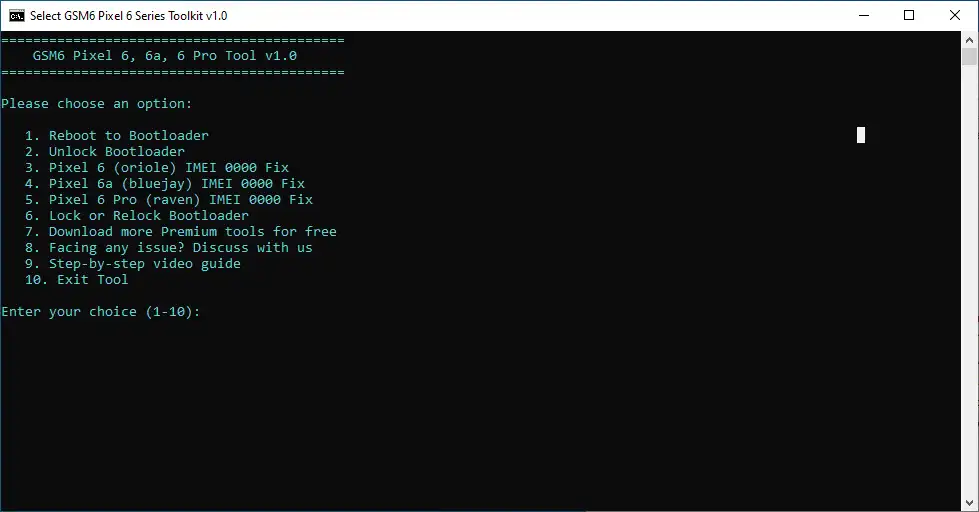
GSM6 Pixel 6 Series Toolkit v1.0 Main Interface
Requirements
| Requirement | Details |
|---|---|
| Operating System | Windows 7/8/10/11 or Linux |
| USB Drivers | Compatible Android USB Drivers (Download Here) |
| Cable | Type-C Data Cable |
| Device | Google Pixel 6, 6a, or 6 Pro |
Step-by-Step Guide
Step 1: Download and Prepare the Toolkit
- Download the ZIP File from the link below
- Extract the Files to a dedicated folder on your desktop
- Folder Structure Check:
GSM6_Pixel_ToolPixel_Tool.cmdplatform-tools(folder)radio_files(folder)
Step 2: Prepare Your Pixel Device
- Enable Developer Options: Settings > About phone > Tap Build number 7 times
- Enable USB Debugging: Settings > System > Developer options > Toggle ON
- Enable OEM Unlocking: Settings > System > Developer options > Toggle ON
Step 3: Connect Your Phone and Run the Tool
- Connect Your Phone using a quality USB cable
- Open the Tool: Double-click
Pixel_Tool.cmd - Select Your Option: Press 1-6 on your keyboard
- Follow the Prompts: The tool guides you through the process
Troubleshooting Common Issues
| Issue | Solution |
|---|---|
| Device Not Found | Check USB drivers in Device Manager, install Google USB Driver |
| ”Waiting for any device” | Phone not in Fastboot mode. Use Option 1 to reboot to bootloader |
| IMEI Fix Didn’t Work | Verify correct model selected (6 vs 6a vs 6 Pro), check radio_files folder |
| Antivirus Block | Add exception or temporarily disable antivirus (false positive) |
Video Guide
Step-by-step video tutorial for fixing IMEI 0000 using GSM6 Pixel 6 Series Toolkit:
Video Tutorial
Watch this guide for visual instructions
Uploaded: September 3, 2025
Device: Google Pixel 6 (Android 16 September build) System: Windows 10 64-bit
Subscribe for more tutorials:
FREE Download GSM6 Pixel 6 Series Toolkit v1.0
GSM6 Pixel 6 Toolkit Specifications
| Specification | Details |
|---|---|
| Tool Name | GSM6 Pixel 6 Series Toolkit v1.0 |
| Version | 1.0 |
| Platform | Windows 7/8/10/11, Linux |
| File Size | ~300 MB |
| License | Freeware |
| Price | Completely Free |
| Password | gsm6.com |
| SHA-256 Hash | 19574D580289D83F1FABC0110181F6A272F137EF9995E1BBAA8C1ABAE8BDB8BB |
| Supported Models | Pixel 6, Pixel 6a, Pixel 6 Pro |
| Functions | IMEI Fix, Bootloader Unlock/Lock |
Download Links
| Source | Link | Size |
|---|---|---|
| MediaFire | Direct Download | ~50MB |
| MegaSync | Direct Download | ~50MB |
| GSM6 Pixel Tool Pro | NEW TOOL | ✅ Recommended |
Password: gsm6.com
The Virus Alert
You may notice that some antivirus software flags this tool as a potential threat. This is a common false positive. The tool is not a virus and is completely safe to use.
The reason for the alert is that this tool is designed to generate and execute powerful ADB and Fastboot commands. Antivirus programs see this kind of deep-level device access and, as a safety measure, mistakenly identify it as malicious behavior.
Frequently Asked Questions
Why does my antivirus software say this tool is a virus?
You may notice that some antivirus software flags this tool as a potential threat. This is a common false positive. The tool is not a virus and is completely safe to use. The reason for the alert is that this tool is designed to generate and execute powerful ADB and Fastboot commands. Antivirus programs see this kind of deep-level device access and, as a safety measure, mistakenly identify it as malicious behavior. You can safely ignore the warning.
What are ADB and Fastboot commands?
ADB (Android Debug Bridge) is a command-line tool that lets you communicate with an Android device. It allows you to perform various actions like installing apps, transferring files, and accessing system logs while the device is running. Fastboot is a diagnostic protocol that allows you to modify the Android filesystem from a computer. It is used for tasks like flashing custom recoveries, installing new firmware, or unlocking the bootloader.
Is it safe to use this tool?
Yes, this tool is safe to use. It is designed to simplify complex processes by generating the correct commands for you. However, as with any powerful tool, it’s important to understand what the commands do before you execute them on your device. Always follow the instructions provided with your device’s specific model.
What should I do if my antivirus blocks the tool?
If your antivirus software automatically blocks or quarantines the tool, you will need to add an exception or whitelist the file in your antivirus settings. The process varies depending on the antivirus program you use.
Which Pixel models are supported?
Pixel 6, Pixel 6a, and Pixel 6 Pro only. For Pixel 7/8/9 series, use our Google Pixel IMEI Repair Tool.
Will unlocking bootloader erase my data?
Yes, unlocking the bootloader will perform a factory reset and erase all data on your device. Backup your data before proceeding.
Can I relock the bootloader after repair?
Yes, use Option 6 to relock the bootloader. This will return your device to a secure state.
What Android versions are supported?
Android 14, 15, and 16 for supported Pixel 6 series devices.
Do I need internet connection?
No, the toolkit works offline once downloaded.
How long does the repair take?
Each operation typically takes 2-5 minutes.
Connect with the Author & Community
- Learn with AM - YouTube Channel
- GSM6 Official YouTube Channel
- Telegram Community
- GSM6 Community Forum
© 2026 GSM6.com | GSM6 Pixel 6 Series Toolkit Guide
This toolkit is provided for legitimate device repair purposes.
Always backup your data before applying any fixes. Proceed at your own risk.


Author:
Abdul MalikMobile Software Expert and founder of GSM6.com. Specializes in FRP bypass, IMEI repair, and advanced mobile tools. All tutorials are tested on real devices for accuracy and safety.


