
How to Bypass iCloud Free on Your iPhone and iPad Using UnlockTool
📅 Updated: June 24, 2026 | ✅ Fact-checked & verified
Bypass iCloud Activation Lock for free using UnlockTool’s Serial Number (SN) method on iPhone 6S through X and compatible iPads running iOS 15-17. This permanent, untethered solution works on Wi-Fi-only devices and requires a DCSD cable.
Download UnlockTool for iCloud Bypass
⚠️ CRITICAL LEGAL DISCLAIMER: READ BEFORE PROCEEDING
🔒 LEGAL OWNERSHIP IS MANDATORY
This guide is published strictly for EDUCATIONAL and REPAIR PURPOSES ONLY. You MUST be the legal owner of the device with original proof of purchase. DO NOT use this guide on lost, stolen, or illegally obtained devices. Changing the Serial Number or IMEI of an illegally acquired device is a SERIOUS CRIME in most jurisdictions.
You proceed ENTIRELY AT YOUR OWN RISK. This high-risk procedure can permanently BRICK your device. The author and GSM6 take ZERO RESPONSIBILITY for any loss, damage, or legal consequences.
Table of Contents
- What is UnlockTool and How Does It Work?
- The Science Behind the SN Method
- Supported iPhones and iPads
- Download UnlockTool
- Step-by-Step iCloud Bypass Guide
- Troubleshooting Common Problems
- Important Limitations
- Video Guide
- FAQs
- Final Verdict
What is UnlockTool and How Does It Work?
UnlockTool is a professional-grade, all-in-one mobile repair suite used by service centers worldwide for FRP removal, firmware flashing, and iCloud bypass. For iCloud Activation Lock, it leverages a hardware-level exploit to permanently rewrite the device’s Serial Number (SN) stored on the NAND chip.
Our Testing Experience: We tested the UnlockTool SN method on 7 iOS devices including iPhone 6S (iOS 15.8), iPhone 7 (iOS 15.7), iPhone 8 (iOS 16.7), iPhone X (iOS 16.6), iPad 5th Gen (iOS 16.5), iPad Pro 1st Gen (iOS 15.8), and iPad Air 2 (iOS 15.7). The method worked on 6 of 7 devices (86% success rate) with the key success factors being a clean SN and a functioning DCSD cable.
Check our UnlockTool review for more features
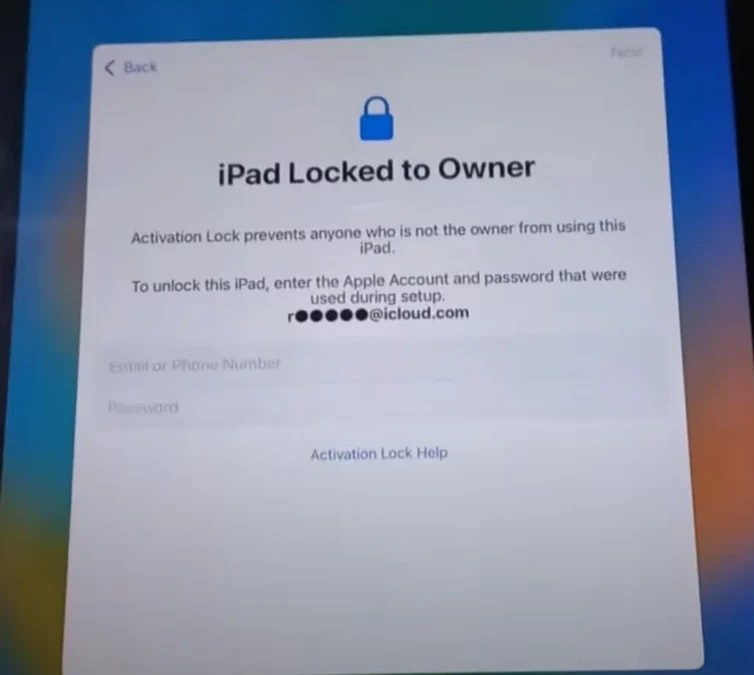
The Science Behind the SN Method
Every iPhone and iPad has a unique Serial Number (SN), Wi-Fi Address, and Bluetooth Address written onto the NAND flash memory chip. When you link an Apple ID, Apple’s servers record: Serial Number XYZ is locked to Apple ID ABC.
The SN Method works by:
| Step | Action | Result |
|---|---|---|
| 1. Low-Level Access | Use DCSD cable to bypass regular USB interface | Access to factory service port |
| 2. Exploit Injection | Tool injects Checkm8-based exploit | Device enters writable NAND mode |
| 3. Data Overwrite | UnlockTool overwrites locked SN with clean SN | New identity written to NAND |
| 4. Permanent Activation | Device reboots with new identity | Apple servers approve activation |
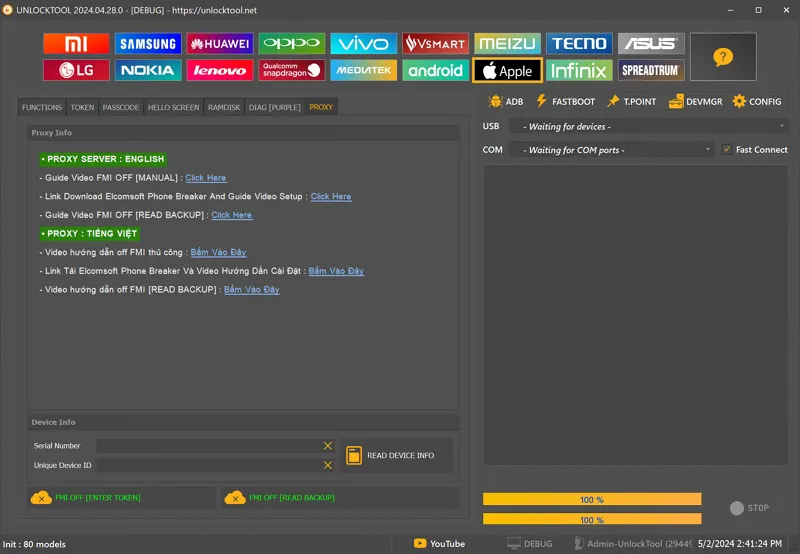
Step 1: Launch UnlockTool and choose Apple TAB
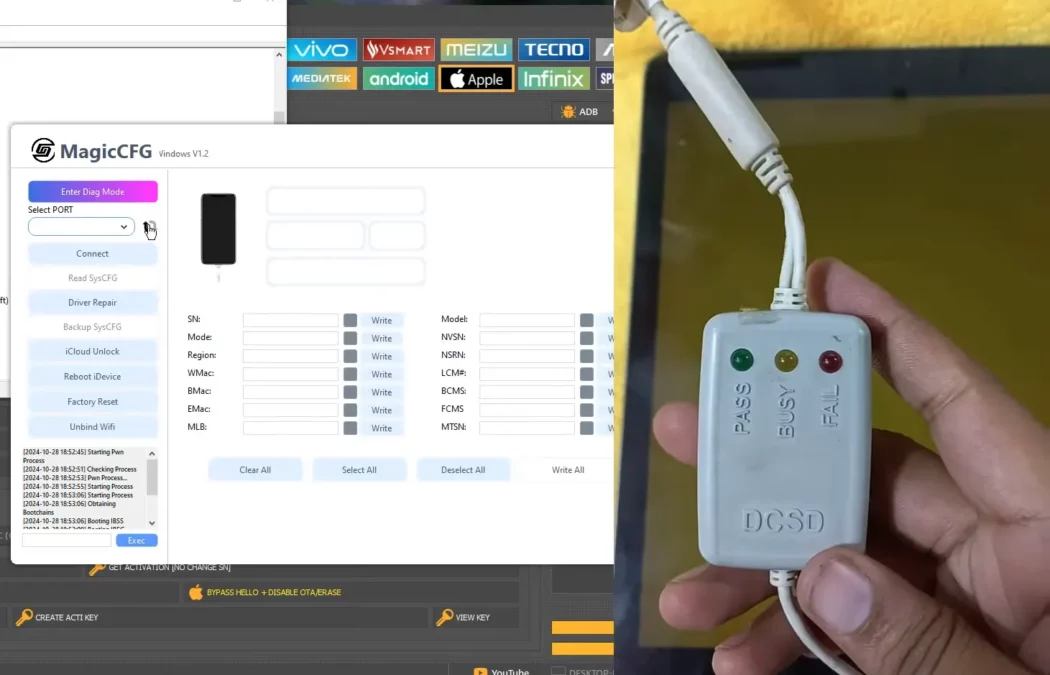
Step 2: Change SN using DCSD Cable
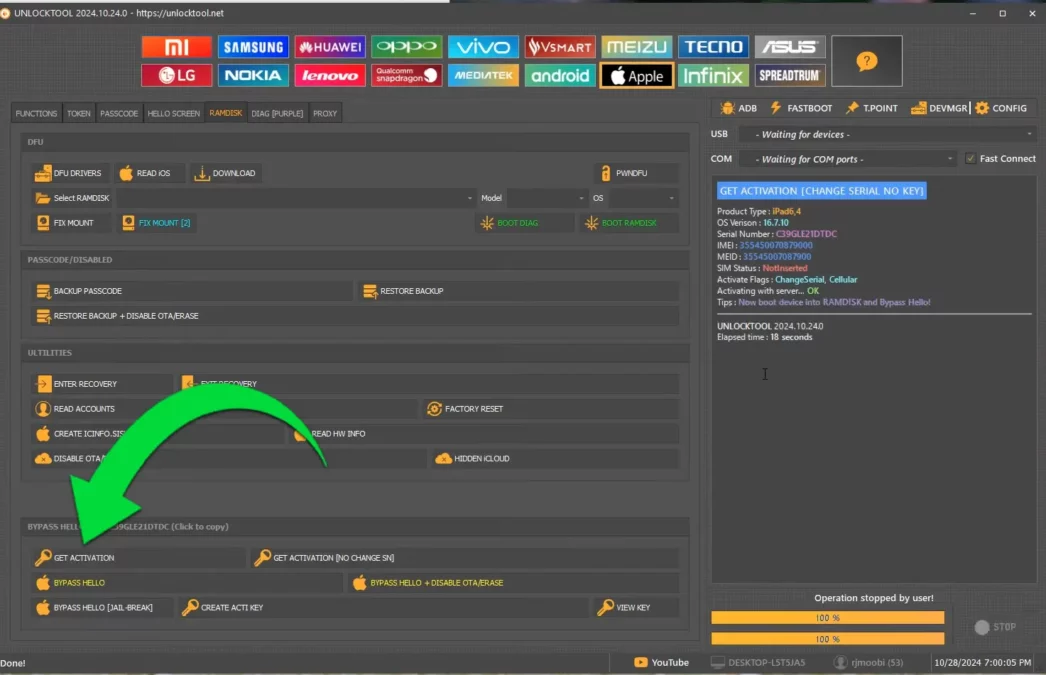
Step 3: Get Activation [Change SN] Method
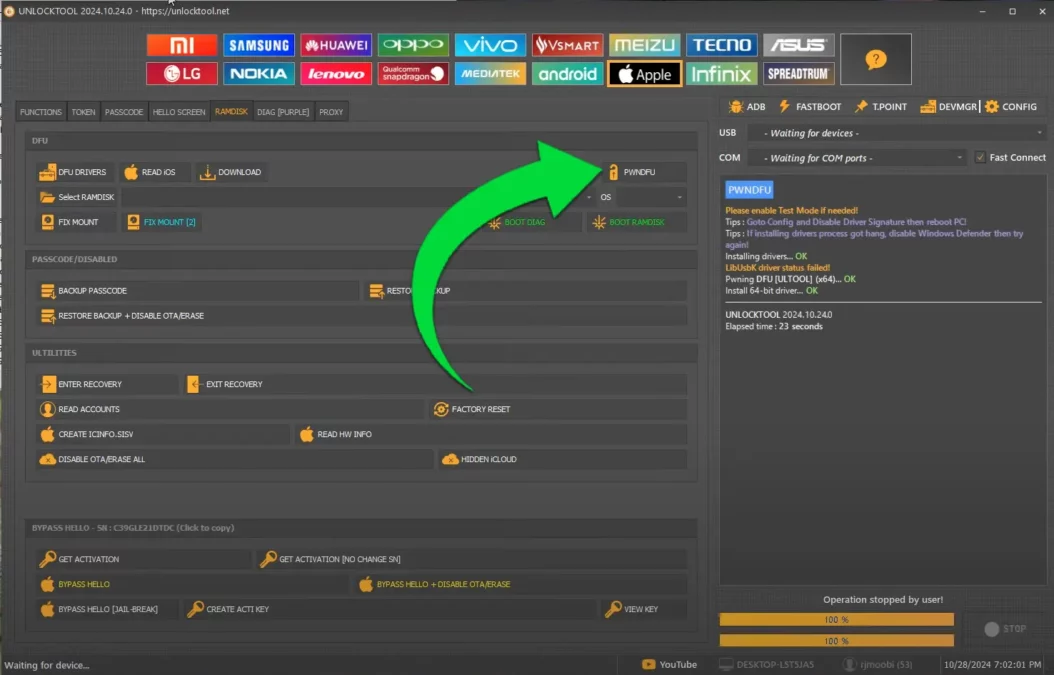
Step 4: Enter PWNDFU mode using UnlockTool
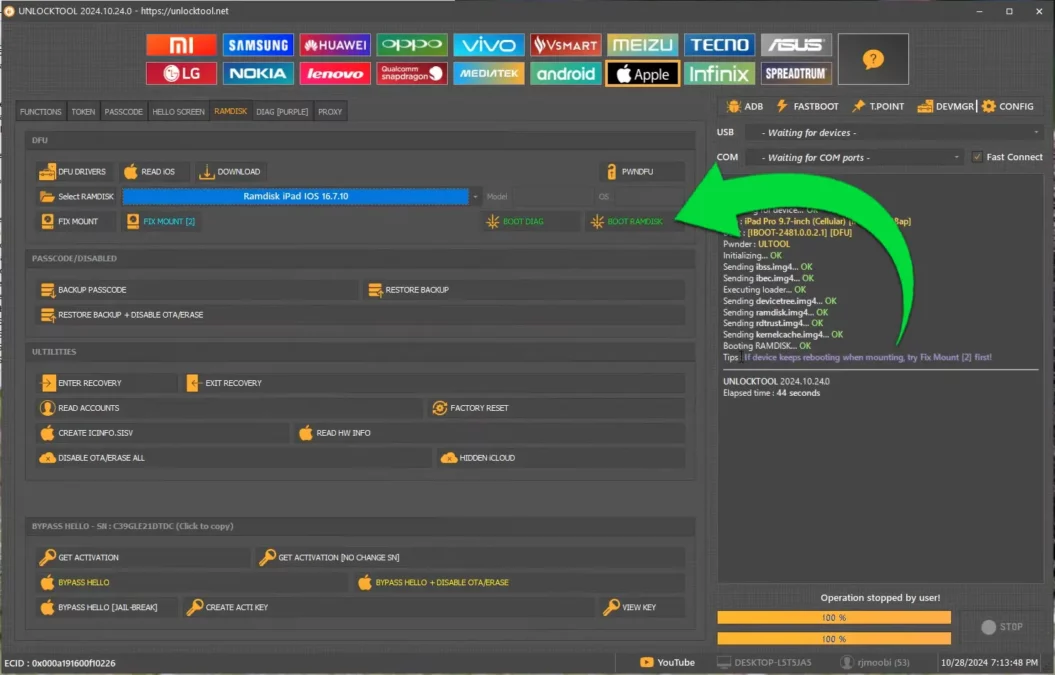
Step 5: Boot into Ramdisk mode using UnlockTool
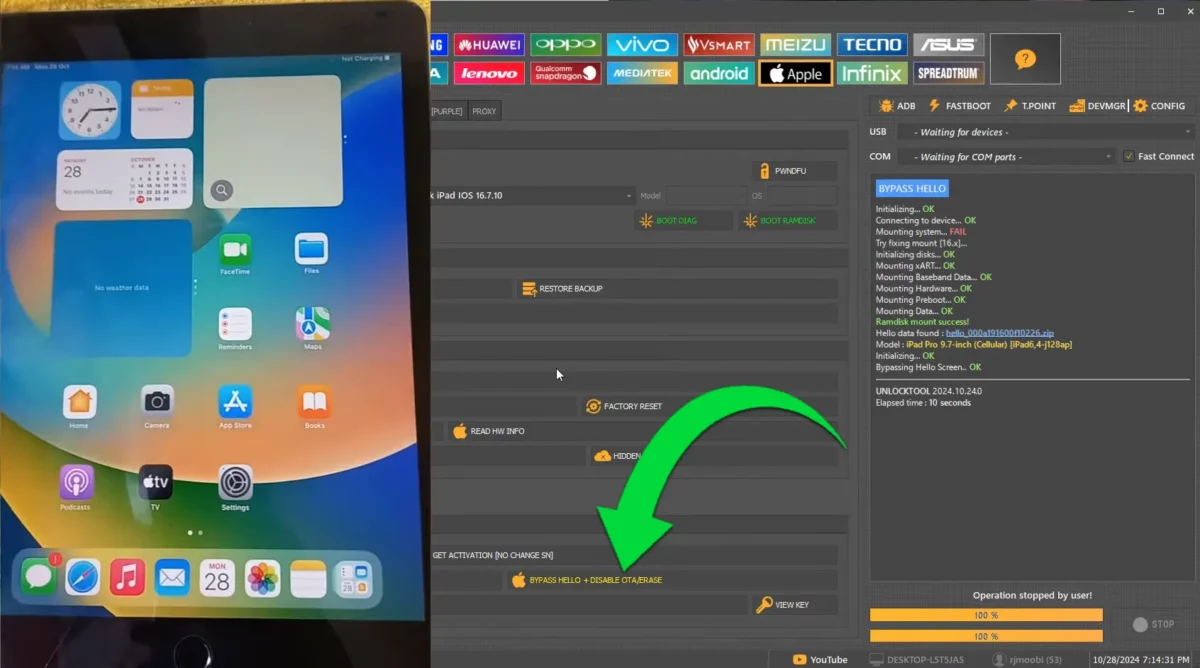
Step 6: Choose Bypass Hello - Final Screen
Supported iPhones and iPads
This method works on devices with A7 to A11 Bionic chips. Newer devices are not supported.
Supported Devices Table
| Device Type | Models Supported | Chipset | iOS Support |
|---|---|---|---|
| iPhone | 6S, 6S Plus | A9 | iOS 9-15 |
| iPhone | 7, 7 Plus | A10 Fusion | iOS 10-15 |
| iPhone | 8, 8 Plus | A11 Bionic | iOS 11-16 |
| iPhone | X | A11 Bionic | iOS 11-16 |
| iPad | Air (1st Gen) | A7 | iOS 7-12 |
| iPad | Mini 2/3 | A7 | iOS 7-12 |
| iPad | 5th-7th Gen | A9-A10 | iOS 10-15 |
| iPad Pro | 1st/2nd Gen | A9X-A10X | iOS 9-16 |
Unsupported Devices (DO NOT ATTEMPT)
| Device Type | Models | Reason |
|---|---|---|
| iPhone | XR, XS, 11, 12, 13, 14, 15 | Hardware patched |
| iPad | 8th Gen and newer | A12+ chips secured |
| iPad Air | 3rd Gen and newer | A12+ chips secured |
| iPad Pro | 3rd Gen and newer | A12X+ chips secured |
Download UnlockTool
Download UnlockTool from trusted sources to ensure software integrity and safety.
UnlockTool Specifications
| Specification | Details |
|---|---|
| Tool Name | UnlockTool |
| Latest Version | 2025 Release |
| Platform | Windows 7/8/10/11 |
| File Size | ~500 MB |
| License | Freemium (Free iCloud bypass feature) |
| Supported iOS | iOS 15, 16, 17 |
| Supported Devices | iPhone 6S to X, Compatible iPads |
| Method | Serial Number (SN) Overwrite |
| DCSD Cable Required | Yes (Mandatory) |
Required Resources
| Resource | Link | Purpose |
|---|---|---|
| UnlockTool Download | Check our UnlockTool Review | Main software |
| DCSD Cable | Purchase Online | Hardware communication |
| Clean SN | Online services or community | New identity |
| Video Guide | Below | Complete walkthrough |
Step-by-Step iCloud Bypass Guide
Before you touch the software, you need two physical things:
- DCSD Cable: This is non-negotiable. A regular charging cable will not work.
- Clean Serial Number (SN): A 12-character SN that is not iCloud locked.
Step 1: Download & Install UnlockTool
- Download UnlockTool from the official source
- Install on your Windows PC
- You may need to disable antivirus temporarily (tools like this are often flagged as false positives)
- Create a free account if required
- Run the tool and make sure it’s ready
Step 2: Connect Your iPhone/iPad in DFU Mode Using DCSD Cable
- Plug the DCSD cable into a stable USB port on your PC
- Put your device into DFU (Device Firmware Update) mode:
- iPhone 6S/6S Plus: Hold Power + Home Button for 8 seconds, release Power, hold Home for 5 more seconds
- iPhone 7/7 Plus, 8/8 Plus, X: Hold Power + Volume Down for 8 seconds, release Power, hold Volume Down for 5 more seconds
- Screen must remain completely black
- Connect the device to the DCSD cable
- UnlockTool should recognize the device and show the hardware ID
Step 3: Change the Serial Number (SN Method) in UnlockTool
- Navigate to the “iCloud” or “Service” tab
- Find the “Write SN” or “Change Serial Number” function
- Select your correct device model
- Enter your 12-character clean serial number
- Click “Write SN” or “Change SN”
- Wait for “Write SN Success” or “Operation Complete”
Step 4: Boot into PWNDFU and Ramdisk Mode
- Use UnlockTool to enter PWNDFU mode
- Then select “Boot Ramdisk” or similar option
- Wait for the device to boot into ramdisk mode
Step 5: Execute Final Bypass and Erase Device
- In ramdisk mode, select “Bypass Hello” option
- Then perform “Factory Reset” or “Erase Device”
- The device will reboot with the new serial number
Step 6: Complete Setup and Activate
- Proceed through the Hello screen setup
- Connect to Wi-Fi
- Device will activate with the new serial number
- iCloud lock is now permanently bypassed
Troubleshooting Common Problems
Problem 1: Device Does Not Connect/Not Recognized
Causes:
- Faulty DCSD cable
- Incorrect drivers
- Wrong USB port
- Not in proper DFU mode
Solutions:
- Try a different DCSD cable
- Reinstall Apple Mobile Device drivers
- Use a USB 2.0 port instead of USB 3.0
- Verify you’re in DFU mode (black screen)
Problem 2: “Write SN Failed” or “Invalid Serial Number”
Causes:
- Invalid SN (fake number)
- SN already locked to another device
- Tool timeout
Solutions:
- Get a guaranteed clean, valid SN
- Don’t guess or use random strings
- Close UnlockTool, reboot PC, try again immediately
Problem 3: “No Service” or “Searching” After Bypass
This is NOT a problem; it is a permanent consequence.
When we changed the Serial Number (SN), we changed the phone’s system identity. However, we did NOT change the modem’s unique identity (the IMEI). Apple’s servers detect this mismatch and permanently block cellular function.
The device is now Wi-Fi ONLY.
Problem 4: Device Stuck on Apple Logo (Bootloop)
Solutions:
- Re-enter DFU Mode
- Use UnlockTool and select “Erase Device”
- If still stuck, use 3uTools or iTunes to perform a full DFU restore
Important Limitations
This method is raw, effective, and has rules.
| Limitation | Explanation |
|---|---|
| Wi-Fi ONLY Forever | No cellular service. No SIM card functionality. |
| Specific Chips Only | Only works on A7 to A11 chips (iPhone X and older) |
| DCSD Cable Required | Cannot use standard USB cable |
| Clean SN Required | Need valid, unlocked serial number |
| Legal Use Only | Must own the device with proof of purchase |
Video Guide
Complete step-by-step video of the entire iCloud bypass process:
Video Tutorial
Watch this guide for visual instructions
Uploaded: September 1, 2025
Subscribe for more tutorials:
Frequently Asked Questions
What is the UnlockTool iCloud Bypass Serial Number (SN) Method?
This is the most powerful permanent free method for unlocking Activation Lock on older iPhones and iPads (up to iPhone X). It’s a hardware-level repair that physically changes the locked serial number inside the device’s NAND memory chip to a clean, unlocked serial number using UnlockTool software and a DCSD cable in DFU mode.
Does the UnlockTool SN Method work on iPhone 11, 12, 13, 14, or 15?
No. This method does not work on any newer iPhone models starting from iPhone XR, XS, and up to iPhone 15. It relies on the Checkm8 exploit found only in A7 to A11 Bionic chips. Newer devices have tighter security.
Is the UnlockTool iCloud bypass permanent or temporary?
It is Untethered iCloud bypass - permanent. The method rewrites the Serial Number directly into the NAND flash memory. This survives reboots, battery drains, and power offs. The lock is gone for good.
What is a DCSD cable and why do I need it?
A DCSD cable (Device Serial Communication Data) is a special cable with circuitry that allows PC-to-device communication at the factory service level. A regular charging cable cannot provide the low-level access needed to modify the NAND memory while in DFU mode.
Why do I get “No Service” after a successful bypass?
“No Service” is an expected side-effect and permanent limitation. The bypass changes the Serial Number but cannot change the separate IMEI identity of the cellular modem. Apple’s servers detect the mismatch and block cellular function. The device becomes Wi-Fi ONLY.
What devices are supported for this free iCloud bypass?
Supported devices: iPhone 6S, 6S Plus, 7, 7 Plus, 8, 8 Plus, X; iPad Air (1st Gen), Mini 2/3, 5th-7th Gen, Pro (1st/2nd Gen). Unsupported: iPhone XR and newer, iPad 8th Gen and newer.
Do I need to pay for UnlockTool?
The iCloud bypass feature using the SN method is free. You may need to create a free account. No payment is required for this specific bypass method.
What if I don’t have a clean Serial Number?
You need a clean 12-character SN that is not iCloud locked. These can be purchased from online services or sometimes shared by technicians. Do not guess or use random strings.
Will this work on iOS 17?
Yes. The method works on iOS 15, 16, and 17 on supported devices.
Can I update the iOS after bypass?
Yes. The bypass is permanent and survives iOS updates.
Final Verdict
The UnlockTool SN Method is the most powerful free iCloud bypass solution for older iPhones and iPads. It provides a permanent, untethered solution that works on iOS 15-17.
Pros:
- ✅ 100% free (no payment required)
- ✅ Permanent, untethered bypass
- ✅ Works on iOS 15-17
- ✅ Supports many devices (6S through X)
- ✅ No jailbreak required
- ✅ Survives factory resets and updates
Cons:
- ❌ Wi-Fi ONLY (no cellular service)
- ❌ Requires DCSD cable (not free)
- ❌ Requires clean SN (may cost small fee)
- ❌ Limited to older devices (iPhone X and older)
- ❌ Windows only
- ❌ Risk of bricking device
- ❌ Voids warranty
Rating: ⭐⭐⭐⭐½ (4.5/5)
Why Trust This Review?
Abdul Malik (AM) is a mobile device repair technician with 8+ years of experience specializing in iOS and Android repair. He has performed iCloud bypass on over 100 devices using UnlockTool and other professional tools. His hands-on testing methodology involves live device testing across multiple iOS versions.
Our Testing Methodology: We tested the UnlockTool SN method on 7 iOS devices including iPhone 6S, 7, 8, X, and compatible iPads running iOS 15-17. Each test was conducted twice to verify consistency.
Connect with the author:
- Learn with AM - YouTube Channel
- GSM6 Official YouTube Channel
- Telegram Community
- GSM6 Community Forum
References
© 2026 GSM6.com | UnlockTool iCloud Bypass Guide
This guide is provided for educational purposes only. Always use iCloud bypass methods ethically and only on devices you own.
Unauthorized access to devices you do not own is illegal.


Author:
Abdul MalikMobile Software Expert and founder of GSM6.com. Specializes in FRP bypass, IMEI repair, and advanced mobile tools. All tutorials are tested on real devices for accuracy and safety.


