
• Abdul Malik (AM) • misc • 1 min
Samsung Android USB Drivers Download Link - Latest 2025 Version Free
If you’ve ever tried connecting your Samsung phone to a Windows PC only to find that it charges but doesn’t show up, you’re not alone. Whether you’re flashing firmware through Odin, transferring files, or debugging with ADB, the right Samsung Android USB drivers are absolutely essential. Without them, your Galaxy device and your PC simply won’t communicate properly.
This 2025 guide from GSM6 covers everything: official Samsung Android USB drivers download links, compatibility details, step-by-step installation, troubleshooting, and developer tips ” all tested and verified for Windows 11, 10, and older systems.
Why You Need the Official Samsung Android USB Drivers
If you’re facing any of the following, installing the official Samsung USB drivers is the fix:
Your Samsung phone doesn’t appear in File Explorer.
Odin fails to detect your device during firmware flashing.
ADB or Fastboot commands don’t recognize your phone.
Windows shows “USB Device Not Recognized”.
Samsung Smart Switch can’t find your phone for backup or update.
The device only charges when connected, with no data transfer option.
These issues occur when your PC lacks proper communication drivers. The official Samsung USB drivers bridge that gap, ensuring stable, high-speed connectivity for every Galaxy device.
Why Download From This Guide?
Many random websites offer repacked or outdated driver versions, which can lead to malware infections or unstable performance. At GSM6, every download link provided below is:
Verified & Safe “ Official Samsung Electronics release, digitally signed.
No Modifications “ Unaltered
.exefiles from trusted sources only.Comprehensive “ Includes troubleshooting, configuration, and maintenance tips.
Universally Compatible “ Works with all Galaxy phones and tablets, including S Series, Note, A, M, F, and Z Fold/Flip models.
Updated for 2025 “ Latest version fully supports Windows 11 (64-bit) and legacy systems.
Samsung USB Driver Compatibility Overview
| Category | Compatibility |
|---|---|
| Operating Systems | Windows 11 / 10 / 8.1 / 8 / 7 (32-bit & 64-bit) |
| Samsung Models | All Galaxy smartphones & tablets (2012“2025) |
| Connection Modes | MTP, PTP, ADB, Fastboot |
| Use Cases | File transfer, firmware flashing, rooting, debugging, Smart Switch |
Key Features of Samsung Android USB Drivers
Plug-and-Play Setup “ Just install and connect; Windows auto-configures instantly.
High-Speed Transfers “ Optimized for stable, fast data exchange.
Digital Signature Verification “ Authenticated by Samsung Electronics Co., Ltd.
Automatic Updates “ Compatible with Windows Update for future driver improvements.
Multi-Device Support “ Manage multiple Samsung phones on one PC.
System Requirements
Before installing the driver, make sure you have:
A Windows PC with a working USB port.
Minimum 50 MB of free disk space.
Administrator privileges.
Internet access (recommended for automatic verification).
How to Check if You Need New Samsung Drivers
Connect your Samsung device to your PC via USB.
Open Device Manager (press
Win + X, select Device Manager).Look for warning icons or unknown devices such as:
- “Unknown Device” under Other Devices
- “USB Device” instead of “Samsung Android Phone”
- Missing ADB Interface or Mobile USB Modem
If you notice any of these, your drivers are outdated or missing.
Common Issues Solved by Installing These Drivers
Odin failing to detect your device.
ADB
devicescommand returning nothing.Slow or unstable file transfers.
Smart Switch not recognizing your phone.
PC recognizing phone only as a charger.
Step-by-Step: Install Samsung Android USB Drivers
1. Preparation
Uninstall old drivers:
Go to Control Panel †’ Programs and Features and remove any “Samsung USB Driver for Mobile Phones.”
(Optional: use USBDeview by NirSoft for a deeper clean.)Disable antivirus temporarily: Some antivirus tools block driver installations.
Use a reliable cable: Prefer original Samsung or high-quality data cables.
Enable USB Debugging (optional):
Settings †’ Developer options †’ USB debugging.
2. Download the Drivers
Scroll down to the Official Download Links section below. Choose any of the verified mirrors ” all point to authentic Samsung packages.
3. Installation
Locate the file (e.g.,
SAMSUNG_USB_Driver_for_Mobile_Phones.exe).Run as Administrator.
Follow the setup wizard †’ Next †’ Next †’ Finish.
Do not disconnect your device during installation.
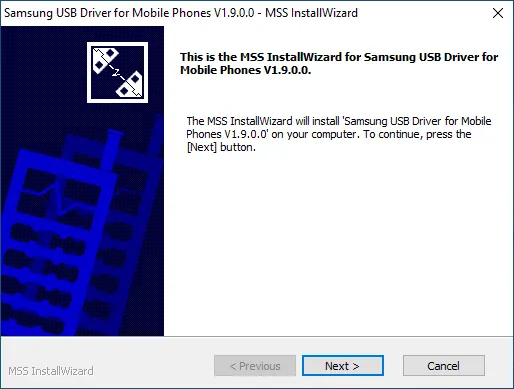
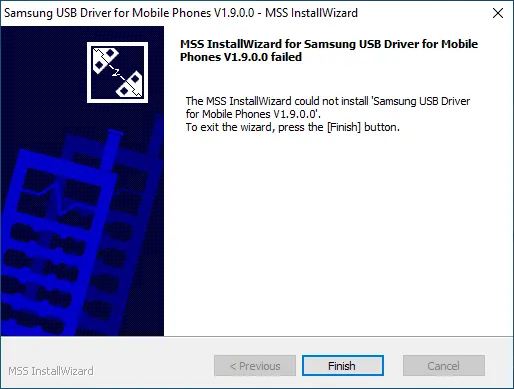
4. Verification
After installation:
Connect your Samsung device.
Wait for Windows to show “Device configured”.
Open Device Manager †’ you should now see:
- “Samsung Android ADB Interface,” or
- “Samsung Mobile MTP Device.”
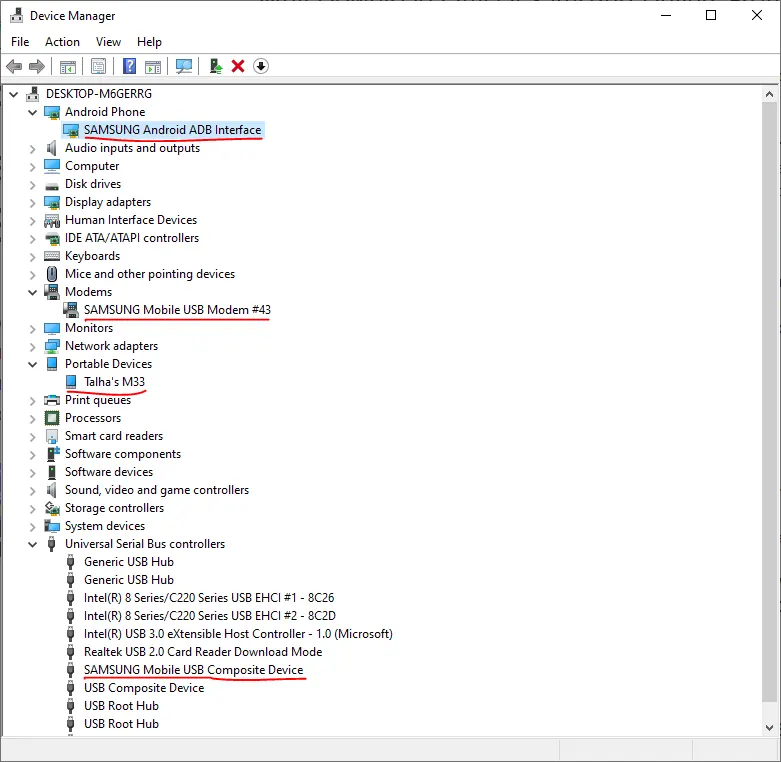
Congratulations ” your drivers are properly installed!
Advanced Tips for Developers & Power Users
For Developers
Enable OEM Unlock: Developer options †’ OEM unlocking.
Set Default USB Mode: Choose File transfer (MTP) or MIDI.
Authorize ADB Keys: Confirm your PC’s RSA fingerprint when prompted.
For Power Users
Backup Drivers with DISM:
dism /online /export-driver /destination:D:\DriverBackupCreate Restore Points: Before installing or updating drivers.
Export Registry Keys: Backup Samsung-related registry entries for quick recovery.
Troubleshooting Samsung USB Driver Problems
Problem 1: Driver Installation Fails or Rolls Back
Fix A: Remove old or conflicting USB drivers using USBDeview.
Fix B: Temporarily disable Driver Signature Enforcement (Advanced †’ Startup Settings †’ press F7).
Fix C: Try a different USB port (preferably USB 2.0).
Fix D: Always run installer as Administrator.
Problem 2: Phone Charges But Doesn’t Connect
Fix A: Replace the USB cable (avoid charge-only cables).
Fix B: Change USB mode: Swipe down †’ “USB for file transfer” †’ Select MTP/PTP.
Fix C: Update chipset drivers from your PC manufacturer.
Fix D: Clean the phone’s USB port (check for lint or dust).
Problem 3: Odin Doesn’t Detect Device
Fix A: Manually boot into Download Mode (Power + Volume Down + Home †’ then Volume Up).
Fix B: Use an original Samsung USB cable.
Fix C: Disable Reactivation Lock / Find My Mobile temporarily.
Fix D: Run Odin as Administrator.
Fix E: Reinstall Samsung USB drivers cleanly.
Maintenance Best Practices
Create a System Restore Point before updating drivers.
Archive older driver versions for legacy devices.
Regularly check for updates to maintain compatibility.
Keep a record of USB Device IDs for troubleshooting.
Security Recommendations
Always download from official or verified sources only.
Compare file hashes (MD5/SHA-256) if provided.
Verify the digital certificate shows “Samsung Electronics Co., Ltd.”
Avoid random driver packs from forums or third-party sites.
Samsung Android USB Drivers ” Official Download Links (2025)
Driver Specifications
| Specification | Details |
|---|---|
| Driver Name | Samsung USB Driver for Mobile Phones |
| Version | 1.7.60.0 (2025 Release) |
| File Size | 36 MB |
| Platform | Windows 11/10/8.1/8/7 |
| Architecture | 32-bit & 64-bit |
| License | Freeware |
| Developer | Samsung Electronics Co., Ltd. |
| Digital Signature | Verified & Signed |
| Release Date | February 2025 |
Official Download Sources
| Source | Link | Notes |
|---|---|---|
| Official | Direct Download | Samsung Developers Site |
File Verification Details
- SHA-256 Hash: 88e0ac36200b7eaced1a7a739600b4b6c33f97d1
- MD5 Hash: (Available in download package)
- Digital Certificate: Samsung Electronics Co., Ltd.
- File Name: SAMSUNG_USB_Driver_for_Mobile_Phones.exe
Alternative Sources
| Source | Purpose | Link |
|---|---|---|
| Samsung DeX Page | Includes USB Drivers | Visit Here |
| Smart Switch | Alternative Driver Source | Download Here |
Real-World Example
In our YouTube tutorial on enabling Samsung call recording, several users reported failed connections during setup. Once they installed the official Samsung USB drivers, everything worked flawlessly.
Video Tutorial
Watch this guide for visual instructions
Uploaded: February 25, 2025
Need More Help?
For additional support and community discussions:
- GSM6 Community Forum: forum.gsm6.com
- YouTube Channel: Subscribe Here
- Telegram Updates: t.me/am19xyz
- Support Creator: Buy Me a Coffee
Final Thoughts
Installing the official Samsung Android USB drivers is one of the simplest yet most crucial steps to ensure seamless communication between your PC and Galaxy device. Whether you’re flashing stock firmware, transferring data, or debugging an app, having the correct drivers saves time, prevents errors, and keeps your workflow stable.
Download only from trusted links above ” and bookmark this page on GSM6.com for the latest 2025 driver updates, verified sources, and expert Android connectivity guides.
Frequently Asked Questions
What exactly are Samsung Android USB drivers and why do I need them?
Samsung Android USB drivers are essential software components that allow your Windows PC to communicate properly with your Samsung Galaxy smartphone or tablet. Without these drivers, your computer might only charge the device without enabling data transfer, ADB commands, or firmware flashing through Odin. These official Samsung USB drivers ensure stable, high-speed MTP and ADB connections between your phone and PC.
How do I download the latest Samsung USB drivers for Windows 11 and Windows 10?
You can download the latest official Samsung USB drivers for Windows 11 and Windows 10 (64-bit or 32-bit) directly from GSM6.com or the Samsung Developers official website. Always choose the most recent version (currently v1.7.60.0) to ensure compatibility with modern Galaxy models like the S24 Ultra, Z Fold 6, A55, and M15.
My Samsung phone is not detected by my PC, how can I fix it?
If your PC doesn’t recognize your Samsung phone, follow these steps: Uninstall old or corrupted USB drivers. Install the latest Samsung USB drivers for Windows 11. Use an original Samsung USB cable and switch USB ports. Change your phone’s USB mode to File Transfer (MTP). Check Device Manager , reinstall driver if shown as “Unknown Device.” This fix works for most “Samsung phone not showing up on PC” or “USB device not recognized” issues.
Do Samsung USB drivers work with Odin for firmware flashing?
Yes. The Samsung USB driver package includes Odin-compatible drivers needed to detect your device in Download Mode. If Odin shows “Added!!” but then freezes or fails, reinstalling the latest Samsung drivers often resolves it. These are the same drivers used by Samsung service centers for firmware recovery and stock ROM installation.
How to fix ADB not detecting Samsung device on Windows?
If ADB devices shows a blank list, install the Samsung ADB drivers (included in the official USB driver package). Then: Enable Developer Options †’ USB Debugging. Reconnect your phone and authorize the RSA key prompt. Run adb kill-server †’ adb start-server in Command Prompt. This resolves 99% of Samsung ADB interface not found or ADB unauthorized issues.
Are these Samsung drivers compatible with all Galaxy models?
Yes. These universal Samsung Android USB drivers support every Galaxy smartphone and tablet released since 2012 ” including Galaxy S Series, Note Series, A, M, F, and Z Fold/Flip lines. Whether you’re connecting a Galaxy S24 Ultra, Note 10, or A12, this single package works flawlessly.
Can I install Samsung USB drivers offline (without internet)?
Absolutely. Once downloaded, you can install the .exe driver package without an internet connection. Offline installation is especially useful for technicians, service centers, and FRP/IMEI repair specialists who frequently set up devices on isolated systems.
Why does my Samsung phone only charge but not transfer files?
This is a classic sign of missing or corrupted USB drivers ” or a charge-only cable. Fix: Install the latest Samsung USB drivers. Use an original Samsung data cable. On your phone, tap the “USB Charging” notification †’ switch to File Transfer (MTP) mode. This resolves the “Samsung phone only charging” problem on Windows 11, 10, and 7.
What is the difference between Samsung MTP drivers and ADB drivers?
MTP (Media Transfer Protocol) drivers handle normal file transfers between your phone and PC. ADB (Android Debug Bridge) drivers are used for advanced tasks like rooting, debugging, unlocking bootloaders, or running shell commands. Both are included in the official Samsung Android USB driver package ” no need to install them separately.
Can Samsung USB drivers help with FRP bypass, iCloud bypass, or IMEI repair tools?
Yes ” but indirectly. Proper USB driver installation ensures your PC can detect your device in Download Mode or ADB Mode, which is crucial for FRP bypass tools, firmware flashing, or IMEI repair utilities. Without the correct driver, such tools can’t communicate with your phone.
Do I need different Samsung drivers for my tablet vs. phone?
No. The same Samsung USB driver package supports Galaxy Tab, Galaxy Book, and all Galaxy smartphones. There’s no need to install separate drivers for different device types.
Are Samsung USB drivers needed for Smart Switch and DeX?
Yes. Both Samsung Smart Switch (for backups and updates) and Samsung DeX (desktop mode) rely on the same USB drivers for device detection. Installing these drivers ensures seamless data transfer, firmware updates, and stable connection during Smart Switch or DeX sessions.
How do I check if my Samsung USB drivers are installed correctly?
Open Device Manager †’ expand “Universal Serial Bus Controllers.” You should see entries like: Samsung Android ADB Interface, Samsung Mobile MTP Device. If not visible, reinstall the drivers and reboot. You can also test connectivity using adb devices.
Are Samsung USB drivers safe to install on Windows 11?
Yes. Official Samsung drivers are digitally signed by Samsung Electronics Co., Ltd. and verified by Windows. Always avoid downloading from unverified third-party sites or repacked sources to prevent malware infections or unsigned driver errors.
Can I use these Samsung USB drivers on macOS or Linux?
No installation is required on Mac or Linux, as both operating systems include native MTP and ADB support. These Samsung USB drivers are strictly for Windows users (Windows 11, 10, 8, and 7).
How often should I update my Samsung USB drivers?
Samsung doesn’t release driver updates frequently, but checking every 6“12 months is recommended. Keeping drivers up-to-date ensures compatibility with new Galaxy devices, latest Odin versions, and Windows security patches.
Where can I download Samsung USB drivers safely in 2025?
For guaranteed safety, use only: Official Samsung Developers Download Page or MediaFire Mirror from GSM6.com. These are authentic, unmodified Samsung driver packages, ensuring your PC stays secure and compatible.
How to fix Samsung USB driver not installing on Windows 11?
If installation fails: Right-click †’ Run as Administrator. Disable antivirus temporarily. Clean old drivers with USBDeview. Reboot and reinstall. If still failing, disable Driver Signature Enforcement temporarily and retry. This resolves the common “Samsung USB driver installation failed” issue on Windows 10/11.
Why does Odin keep saying ‘Added!!’ but not flashing firmware?
This happens when Odin recognizes the device but communication fails midway ” usually due to driver conflict or cable issue. Fix: Reinstall Samsung USB drivers. Use a different USB port (preferably USB 2.0). Avoid USB hubs or front ports. Always run Odin as Administrator.
What’s the official Samsung USB driver version for 2025?
As of October 2025, the latest version is Samsung USB Driver for Mobile Phones v1.7.60.0, verified and compatible with: Windows 11 / 10 (64-bit & 32-bit), All Galaxy models up to the Galaxy S24 series and Z Fold 6. You can always find updated download links right here on GSM6.com.


Author:
Abdul MalikMobile Software Expert and founder of GSM6.com. Specializes in FRP bypass, IMEI repair, and advanced mobile tools. All tutorials are tested on real devices for accuracy and safety.


