
• Abdul Malik (AM) • GSM6-Development • 1 min
GSM6 Pixel 6 Series Toolkit v1.0 - IMEI 0000 Fix with One Click [FREE]
The Ultimate Guide: GSM6 Pixel 6 Series Toolkit v1.0 - Unlock, Repair IMEI, & Fix Your Pixel 6, 6a, 6 Pro
Have you ever found yourself staring at a bricked Pixel 6? Maybe it’s stuck in a boot loop after a failed flash, or perhaps you’re dealing with the dreaded “IMEI 0000” bug that leaves your phone unable to make calls. You’re not alone. These are some of the most frustrating problems a Pixel owner can face.
The usual solution involves a deep dive into complex, confusing command-line tools like ADB and Fastboot. It requires you to remember cryptic commands and precise file paths, and one tiny mistake can turn your phone into a very expensive paperweight.
But what if there was an easier way? A tool that simplifies everything into a few clicks?
Welcome to the GSM6 Pixel 6 Series Toolkit v1.0. Created by GSM6.com and Learn Mobile Software with AM, this toolkit is a complete, user-friendly solution designed to help you fix your Pixel 6, 6a, and 6 Pro devices with a simple, automated menu. No more memorizing commands. No more endless searching for the right file. Just a powerful, single-click solution.
In this comprehensive guide, we will cover everything you need to know about the GSM6 Pixel 6 Series Toolkit. We’ll walk you through its features, explain the underlying concepts, provide a detailed step-by-step tutorial, and get you back in control of your device.
The Big Problems: Why Do I Need This Tool?
Before we dive into the tool itself, let’s talk about the problems it’s designed to solve. Understanding the “why” is just as important as knowing the “how.”
1. Bootloader Operations: Locking and Unlocking
The bootloader is the very first program that runs when you turn on your phone. Think of it as the gatekeeper. On most Android devices, the bootloader is locked to prevent unauthorized software from being loaded. Unlocking it is a necessary first step if you want to:
Install a Custom Recovery: Tools like TWRP allow you to flash custom ROMs, make full backups, and perform system-level operations.
Flash a Custom ROM: This is how you change your phone’s entire operating system to something like LineageOS, which can offer more features or better performance.
Root Your Device: Rooting gives you superuser access, allowing you to modify system files, remove bloatware, and customize your device in ways you can’t normally.
However, unlocking the bootloader comes with a huge, undeniable risk: it performs a factory reset and wipes all data on your device. This is a critical security feature, and it’s why our toolkit includes a mandatory warning before you proceed.
On the flip side, you might want to relock your bootloader. This is often done before installing a stock update or for security reasons. Locking the bootloader means your phone will only boot verified software, which is a crucial step if you ever need to send it in for a warranty claim or want to return to a fully stock state.
2. The Dreaded “IMEI 0000” Bug
This is perhaps the most serious issue the GSM6 Toolkit addresses. The IMEI (International Mobile Equipment Identity) is a 15-digit number that uniquely identifies your phone on a cellular network. It’s like your phone’s social security number.
When the IMEI shows up as “0000” or is completely missing, your phone can’t connect to a mobile network. This means no calls, no SMS, and no mobile data. It turns your phone into a Wi-Fi-only device. This bug is surprisingly common after a bad flash or a software glitch.
The fix involves flashing the correct radio image for your specific phone model. The “radio” is a piece of firmware that controls all wireless communications, including cellular, Wi-Fi, and Bluetooth.
Flashing the wrong radio can cause even more problems. That’s why the GSM6 Toolkit is so essential: it automates the process and provides the correct files for each Pixel model, minimizing the risk of human error.
Introducing the GSM6 Pixel 6 Series Toolkit v1.0
The GSM6 Pixel 6 Series Toolkit is a simple command-line interface (CMD) tool for Windows. It’s designed for both beginners and experienced users who want a faster, safer way to perform common operations. Instead of typing out long commands, you just press a number on your keyboard.
Key Features and Functions:
The toolkit’s main menu is your command center. Let’s break down each option and what it does.
Option 1: Reboot to Bootloader
This is the first step for nearly every other operation in the toolkit. It safely reboots your phone from the Android operating system into Fastboot mode.
Commands Executed:
adb kill-server,adb devices,adb reboot-bootloader.Safety Precaution: The tool first checks if your device is recognized by ADB and then sends the reboot command. It also includes the crucial warnings about enabling OEM unlocking and USB debugging.
Option 2: Unlock Bootloader
This is the big one. This option executes the command to unlock your device’s bootloader, which is a prerequisite for rooting and flashing custom software.
Command Executed:
fastboot devices,fastboot flashing unlock.Critical Warning: The tool provides a final, unmissable warning that this will erase all data on your device. You can’t proceed without acknowledging this.
Options 3, 4, 5: The IMEI Fixes
These options are specifically for fixing the IMEI 0000 bug on the Pixel 6 series. Each option is tied to a specific device model, ensuring you flash the correct radio image.
Option 3: Pixel 6 (oriole) IMEI 0000 Fix: This flashes the radio image for the standard Pixel 6. The command is
fastboot flash radio pixel6.img.Option 4: Pixel 6a (blujay) IMEI 0000 Fix: This flashes the radio image for the Pixel 6a. The command is
fastboot flash radio pixela.img.Option 5: Pixel 6 Pro (raven) IMEI 0000 Fix: This flashes the radio image for the Pixel 6 Pro. The command is
fastboot flash radio pixel6pro.img.
Each of these options includes a final check to ensure you have selected the right model. Flashing the wrong radio could brick your device, and our toolkit is designed to make you double-check before it’s too late.
Option 6: Lock or Relock Bootloader
This option does the reverse of unlocking. It secures your device by relocking the bootloader.
Command Executed:
fastboot flashing lock.Purpose: Use this to prevent unauthorized modifications or to return your device to a stock state for official firmware updates.
Warning: The tool reminds you to make sure your device is in Fastboot mode before proceeding.
Requirements to run GSM6 Pixel 6 series Toolkit v1.0
- Windows/Linux
- Compatible android usb drivers (Download From Here)
- type c data cable
Step-by-Step Guide: How to Use the GSM6 Pixel 6 Series Toolkit v1.0
This toolkit is designed for simplicity, but a few setup steps are required to ensure everything works smoothly. Follow these instructions carefully.
Step 1: Download and Prepare the Toolkit
First, you need to download the entire toolkit package. This package includes the Pixel_Tool.cmd file, the platform-tools folder (which contains ADB and Fastboot), and the radio_files folder.
Download the ZIP File: Click the download link below to get the latest version of the GSM6 Pixel 6 Series Toolkit.
Extract the Files: Extract the contents of the ZIP file to a dedicated folder on your desktop. We recommend naming it “GSM6_Pixel_Tool” for easy access.
Folder Structure Check: Double-check that your folder looks exactly like this:
GSM6_Pixel_ToolPixel_Tool.cmdplatform-tools(folder)radio_files(folder)
Step 2: Prepare Your Pixel Device
Before you connect your phone to your PC, you need to enable a few key options in Android’s Developer Settings.
Enable Developer Options: Go to Settings > About phone and tap on the Build number seven times. You’ll see a toast notification that says “You are now a developer!”.
Enable USB Debugging: In the main Settings menu, go to System > Developer options. Find and toggle on USB debugging. This allows your computer to send ADB commands to your phone.
Enable OEM Unlocking: In the same Developer options menu, toggle on OEM unlocking. This is a crucial step that allows the bootloader to be unlocked. Without it, the toolkit’s unlock option will not work.
Step 3: Connect Your Phone and Run the Tool
Now you’re ready to use the toolkit.
Connect Your Phone: Use a high-quality USB cable to connect your Pixel 6 device to your PC.
Open the Tool: Navigate to your
GSM6_Pixel_Toolfolder and double-click thePixel_Tool.cmdfile. The command prompt window will open.Select Your Option: The main menu will appear. Use the numbers on your keyboard (1 through 6) to select the operation you want to perform.
Follow the Prompts: The tool will guide you through the process, providing warnings and asking for confirmation before executing any irreversible commands. For example, when you select “Reboot to Bootloader,” it will display a warning and wait for you to press Enter.
Proof Screenshot:
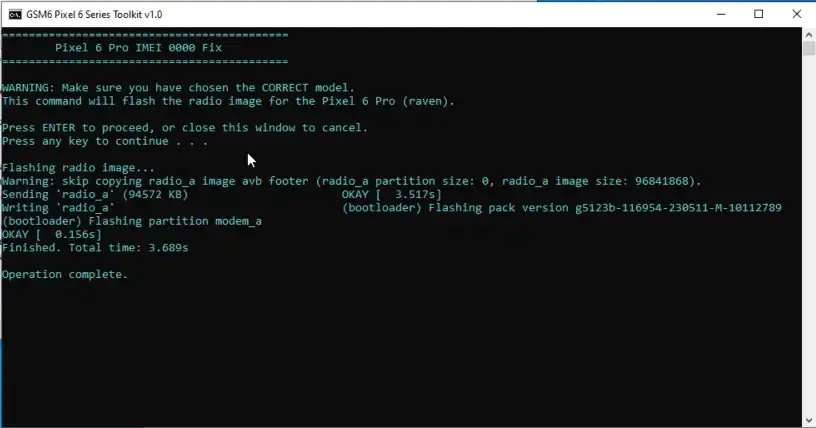
flashing imei 0 fix file by toolkit - screenshot
final result:
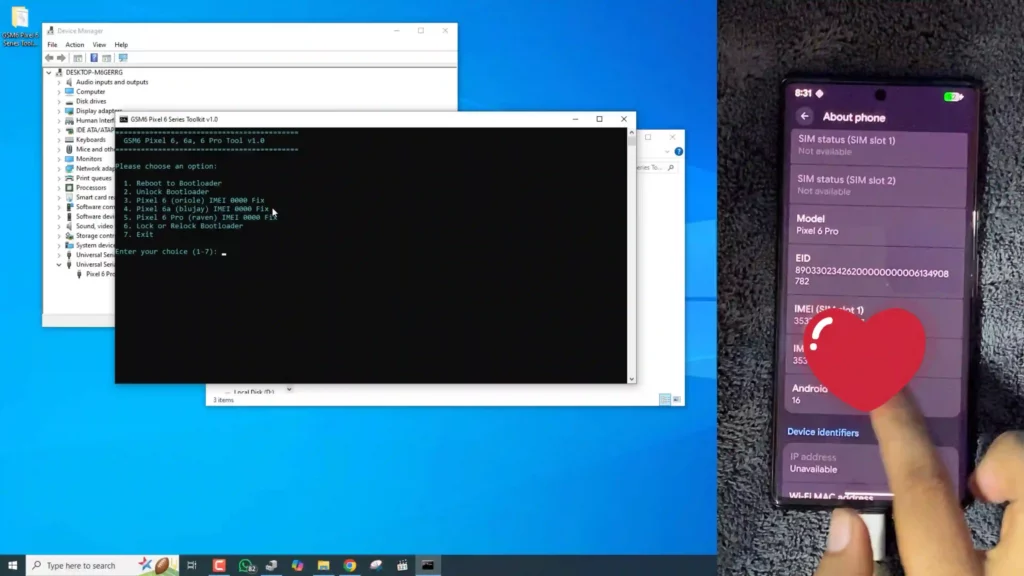
imei recovered successfully - screenshot
Troubleshooting Common Issues
While the toolkit simplifies the process, you might encounter a few common issues.
Device Not Found: If the tool says your device isn’t found, it’s most likely a driver issue. Go to your PC’s Device Manager and check if your phone is listed correctly. If not, you may need to manually install the Google USB Driver for your device.
“Waiting for any device” (Fastboot): This means your phone is not in Fastboot mode. Make sure you have used Option 1 to successfully reboot to the bootloader before attempting any Fastboot commands (like Unlocking or IMEI fixing).
The IMEI Fix Didn’t Work: If your IMEI is still showing as “0000” after flashing, double-check that you selected the correct model number (Pixel 6 vs. 6a vs. 6 Pro). Also, ensure that the image file (
pixel6.img,pixel6a.img, etc.) is correctly placed in theradio_filesfolder.
Step-by-Step Video Guide: How to fix imei 0000 by using “GSM6 Pixel 6 Series Toolkit”
Proof:
In this video, I used a Google Pixel 6 running Android 16 September build & as you can see the comment section on my youtube video, hundreds of the people has used this tool to fix their pixel 6, 6a & 6 pro modesls on android 16 & older versions as well. you can run this tool in any windows 7 to 11 all editions, no special requirments.
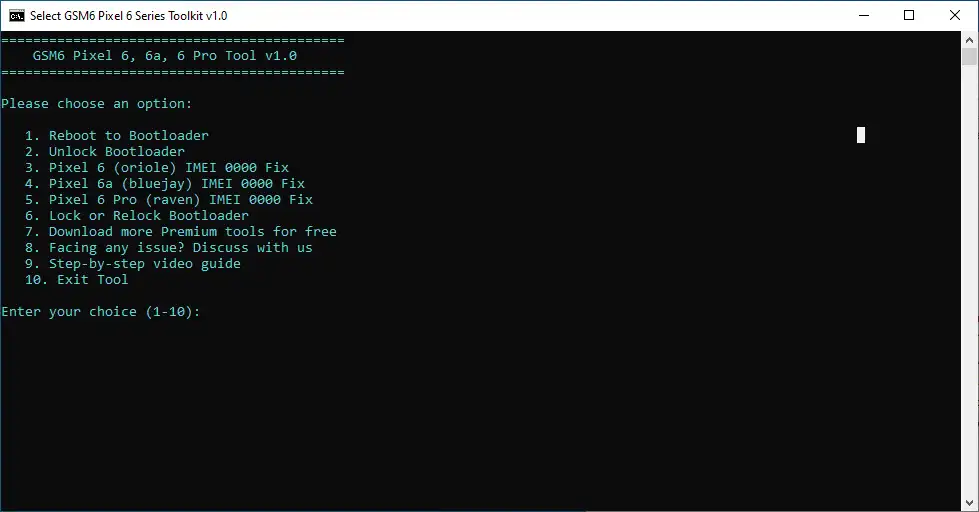
GSM6 Pixel 6 series Toolkit Main Screen
Video Tutorial
Watch this guide for visual instructions
Uploaded: September 3, 2025
FREE Download GSM6 Pixel 6 Series Toolkit v1.0
GSM6 Pixel 6 Toolkit Specifications
| Specification | Details |
|---|---|
| Tool Name | GSM6 Pixel 6 Series Toolkit v1.0 |
| Version | 1.0 |
| Platform | Windows 7/8/10/11, Linux |
| File Size | ~300 MB |
| License | Freeware |
| Price | Completely Free |
| Password | gsm6.com |
| SHA-256 Hash | 19574D580289D83F1FABC0110181F6A272F137EF9995E1BBAA8C1ABAE8BDB8BB |
| Supported Models | Pixel 6, Pixel 6a, Pixel 6 Pro |
| Functions | IMEI Fix, Bootloader Unlock/Lock |
Download Links & Details
| Source | Link | Size | Hash Verification |
|---|---|---|---|
| MediaFire | Direct Download | ~300MB | SHA-256: 19574D5…B8B8BB |
| MegaSync | Direct Download | ~300MB | SHA-256: 19574D5…B8B8BB |
Note: Extract password is gsm6.com
The Virus Alert:
You may notice that some antivirus software flags this tool as a potential threat. This is a common false positive. The tool is not a virus and is completely safe to use.
The reason for the alert is that this tool is designed to generate and execute powerful ADB and Fastboot commands. Antivirus programs see this kind of deep-level device access and, as a safety measure, mistakenly identify it as malicious behavior.
Please be assured that the tool is functioning as intended and will not harm your device. You can safely ignore the warning.
Conclusion: Take Back Control of Your Pixel Today
The GSM6 Pixel 6 Series Toolkit v1.0 is more than just a piece of software; it’s a lifeline for your device. It takes the stress and complexity out of advanced operations, putting the power back in your hands. Whether you want to customize your phone with a new ROM or fix a crippling software bug, this toolkit has you covered.
Don’t let a software glitch turn your expensive phone into a useless brick. Download the GSM6 Pixel 6 Series Toolkit v1.0 today and get your device running exactly as it should be.
Download the Toolkit Now!
For more expert mobile software solutions, be sure to visit our main site at gsm6.com and join the conversation on our forums at forum.gsm6.com. Stay tuned for our next tool, the GSM6 Pixel 7 Series Toolkit!
Frequently Asked Questions
Why does my antivirus software say this tool is a virus?
You may notice that some antivirus software flags this tool as a potential threat. This is a common false positive. The tool is not a virus and is completely safe to use. The reason for the alert is that this tool is designed to generate and execute powerful ADB and Fastboot commands. Antivirus programs see this kind of deep-level device access and, as a safety measure, mistakenly identify it as malicious behavior. Please be assured that the tool is functioning as intended and will not harm your device. You can safely ignore the warning.
What are ADB and Fastboot commands?
ADB (Android Debug Bridge) is a command-line tool that lets you communicate with an Android device. It allows you to perform various actions like installing apps, transferring files, and accessing system logs while the device is running. Fastboot is a diagnostic protocol that allows you to modify the Android filesystem from a computer. It is used for tasks like flashing custom recoveries, installing new firmware, or unlocking the bootloader. Both are essential tools for Android developers and advanced users.
Is it safe to use this tool?
Yes, this tool is safe to use. It is designed to simplify complex processes by generating the correct commands for you. However, as with any powerful tool, it’s important to understand what the commands do before you execute them on your device. Always follow the instructions provided with your device’s specific model.
What should I do if my antivirus blocks the tool?
If your antivirus software automatically blocks or quarantines the tool, you will need to add an exception or whitelist the file in your antivirus settings. The process varies depending on the antivirus program you use, so please refer to your antivirus provider’s documentation for specific instructions.


Author:
Abdul MalikMobile Software Expert and founder of GSM6.com. Specializes in FRP bypass, IMEI repair, and advanced mobile tools. All tutorials are tested on real devices for accuracy and safety.


