
• Abdul Malik (AM) • misc • 1 min
UnlockTool Review 2025: Technical Overview for Android Device Professionals
UnlockTool Review: Introduction
The world of Android is a giant, complicated mix of different brands and chips, and every single one of them has its own problems. If you are a developer, or a repair technician who needs the right papers, or even just an owner stuck with a device you cannot get into, you need a special kind of tool. You need software that can help you get access back, fix the firmware deep down, and check the health of the phone.
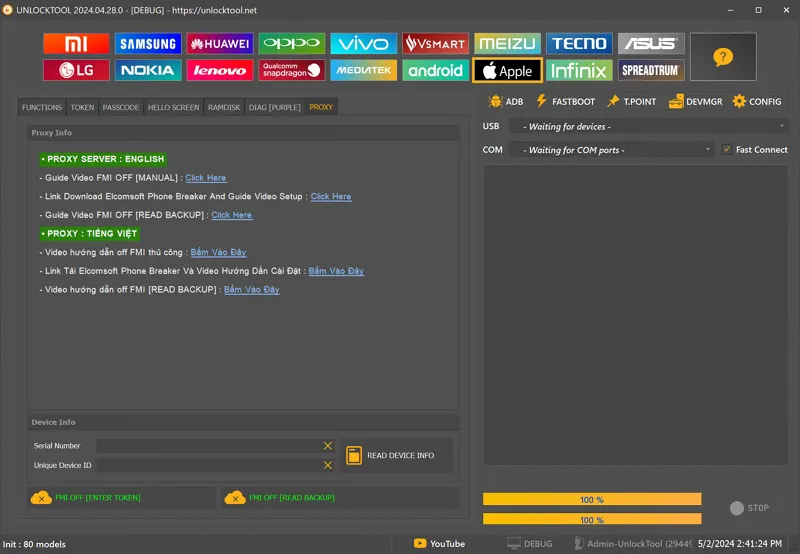
In the repair shops, one of these special programs, UnlockTool, has become quite popular because it works with so many different kinds of Android phones. This article is going to give you a simple, honest look at UnlockTool what the company says it does, how the professionals use it legally, and the very serious things you must know before you even think about starting it up.
Disclaimer: This article is just for reading and learning. We will not help you break any laws or rules. You must always follow the laws where you live and the rules of the company that made your phone before you do anything.
Modern Android phones are built with huge, solid walls of security to protect everything inside. Important features like the Factory Reset Protection (FRP), the simple screen lock (PIN, pattern, fingerprint), and the secure boot systems are all there to make sure no bad guy can get in. But even with all these high walls, sometimes an honest person runs into a wall, like when:
A phone owner totally forgets their screen lock code.
The real owner loses the password to their Google account after a hard factory reset.
A phone gets stuck in a never-ending loop (a boot loop) or is completely bricked because a software update failed halfway through.
A repair expert with the right paperwork is trying to fix or restore a phone that was legally sold to someone else with full proof of transfer.
UnlockTool: What It Offers (According to Official Sources)
UnlockTool is a special piece of software that runs on a Windows computer. It is designed for deep, heavy work with many different kinds of Android phones by talking to the main chips inside. It focuses on the big names in chipsets, like:
Qualcomm (using the EDL mode)
MediaTek (using the Preloader or BROM modes)
Samsung (using the Download mode)
UniSOC and other chips you find in the mid-range phones.
When used in a way that is right and legal, the tool is reported to have some powerful features:
UnlockTool Feature Summary
| Feature | Description | Legal Use Case |
|---|---|---|
| Account Recovery | FRP bypass for Google account lock | Owner locked out of own device |
| Screen Lock Removal | Resets PIN/pattern/password locks | Owner forgot lock credentials |
| Firmware Restoration | Flashes stock firmware | Repairing soft-bricked devices |
| Bootloader Management | Unlocks/locks bootloader | Developer testing on own device |
| Network Tools | SIM unlock for specific regions | Legal carrier unlocking |
Account Recovery Support The tool is said to be able to help you get your Google account back in those tough moments when a real user is locked out of their own phone after doing a factory reset. The tool helps bring back access by using the official, correct methods. š ï¸ This is a recovery process, not some kind of sneaky “bypass” tool. If you try to get around the security on a phone that is not yours, you are breaking the law.
Screen Lock Access Reset (For Personal Devices Only) If the person who truly owns the phone forgets their lock screen password, this tool gives them a way to reset the whole phone back to the factory state by using that low-level access. It is kind of like what the phone makers’ own flashing tools do. This will erase all the data completely and should only be done if you have a perfect reason and a proper backup.
Firmware Restoration and Flashing One of the most serious, professional things UnlockTool can do is flash the original, stock software back onto the phone or repair phones that are only soft-bricked (stuck in a loop). You can force a compatible ROM back onto the phone when it will not boot right, as long as you have the right software file and you know you are using the right method.
Bootloader Status Management (Developer Mode) For the deep thinkers and coders who like to mess with Android, the tool is said to help you change the state of the bootloader. You need to do this if you want to install custom ROMs or do very deep testing at the development level. Again, this only applies to phones you own and should never be used to mess with security without permission.
Network Configuration Tools (Caution Required) Some of the different versions of UnlockTool talk about extra tools for changing network settings or unlocking the SIM card for specific regions. This can be helpful when a phone has been officially sold or transferred to a new owner, but you must make sure any such use is completely legal in your country and with your phone company. š ï¸ You must avoid any tool that says it can change your IMEI or other ID numbers. This is against the law in many places, breaks all rules, and makes your warranty worthless.
How UnlockTool Works (Technical Mode Overview)
UnlockTool works by using low-level, special communication, skipping past the main Android operating system completely to talk to the firmware directly. To use it, you need:
The correct USB drivers installed on your PC (these change depending on the type of chip in the phone).
The use of special boot modes (like the EDL mode for Qualcomm or the Preloader/BROM modes for MediaTek).
The computer to correctly see and name the phone model.
The software to run the recovery or flashing commands through its simple window.
Device Boot Modes Supported
| Mode Type | Chipset | Use Case |
|---|---|---|
| EDL Mode | Qualcomm | Emergency Download for bricked devices |
| Preloader/BROM | MediaTek | Boot ROM mode for low-level access |
| Fastboot Mode | All Android | Developer and recovery operations |
| Download Mode | Samsung | Official firmware flashing |
** You must make sure you have a perfect, solid USB connection and a full battery before you use any recovery tools.**
Critical Legal & Ethical Considerations
Using UnlockTool correctly is not just about knowing the technical steps; it is also about being ethical and having the clear right to do it.
Risk Assessment Table
| Risk Level | Concern | Prevention |
|---|---|---|
| High | Legal violations | Only use on own devices |
| High | Data loss | Complete backup before use |
| Medium | Warranty void | Contact manufacturer first |
Always Confirm Legal Ownership:** Never, ever use this tool on a phone that:
- You did not buy for yourself.
- You found, borrowed, or bought from someone without proper, verifiable proof of ownership change. Doing this can break laws about digital access, property rights, and protecting someone else’s data.
Antivirus Alerts & Tool Authenticity:** Because UnlockTool digs deep into the system, your antivirus program might pop up a scary warning. You must always follow these rules:
- Download the software only from the official, real website: https://www.unlocktool.net/
- Never trust cracked versions or unofficial copies (they are almost always full of bad software).
** Backup Before Proceeding:** Most of the things you do with this tool will lead to all your data being completely erased. Try to back up your phone if it can still turn on enough to get into recovery or ADB mode.
** Warranty Void Risk:** Flashing firmware, doing hard resets, or changing the bootloader status will almost always make your phone’s warranty completely useless. Always talk to the company that made your phone before you go ahead with this.
** Not for Beginners! Professional Use Advised:** UnlockTool is not meant for people who just started. You need to have:
- Solid knowledge of boot modes, how USB debugging works, and how to install drivers.
- A good understanding of the local laws about phones (like if SIM unlocking is allowed where you are).
- A plan for backing up and a way to stop things from getting worse if it fails. If you use this tool incorrectly, you can:
- Ruin the phone forever (permanently brick it).
- Make the phone unbootable.
- Damage the security parts of the phone.
** If you are not completely sure what you are doing, you must go find a certified mobile repair technician or contact the company that made your device.**
How to Use Unlocktool? Watch Step-by-Step video
If you learn best by watching, you can see a full, step-by-step example of this tool in action. The video below is named iCloud Bypass iPad Pro 9.7” iOS 16.7.10, Fix Diag Port | UnlockTool - 2025 and it shows a complicated recovery job.
Video Tutorial
Watch this guide for visual instructions
Uploaded: May 30, 2025
This video will walk you through things like getting the device into a special DFU mode, using a second tool called MagicCFG to get the phone into a deep purple/diag mode, and how the UnlockTool is then used to change the serial number and finish the security bypass. You even see how a special DCSD Cable is needed for some devices to be seen by the computer. You can use this video to get a very good, raw idea of how this powerful software works in the real world.
Tips for Responsible Use the Unlocktool
Always look twice at your phone’s exact model number and the software file you are using.
Only use the tool in ways that are totally legal and ethical.
Only download the software from the original developer.
Do not try to make changes that the tool does not officially support.
Keep your computer clean from viruses and fully updated while the tool is running.
Download Link (Safe Access Only)
To use UnlockTool in a legal and safe way, you must only download it from the site run by the original developer.
Official Download Information
| Source | Link | Status |
|---|---|---|
| Official Website | https://www.unlocktool.net/ | Recommended |
Visit Official UnlockTool Website: Click Here
We are not the ones who give out this software. You must read all of their rules and agreements before you download or install it.
Conclusion: A Technical Resource with Serious Responsibility
UnlockTool is a very powerful, professional piece of software that is used in real, legal phone repair and developer work. When it is used correctly and inside the law, it can bring a phone back to life after it was bricked or you were locked out.
But this power comes with huge risks:
You will lose all your data.
You could permanently damage the device.
You could break the rules and face legal trouble if you use it wrong.
If you are just a casual user, we strongly recommend you just call the official service center or the phone company’s support team instead. But if you are a certified technician, a developer, or a verified owner with the right skills and the best intentions, tools like UnlockTool can be a valuable last-ditch option in your tool chest for Android recovery.
Disclaimer: We do not allow or encourage getting into or changing devices without the right permission. This article is only for learning. Only use tools like UnlockTool if you have the full legal right to do so. You must always follow all local laws, platform rules, and ethical guidelines.
Frequently Asked Questions
Is UnlockTool a legal piece of software for me to use on my own device?
Yes, UnlockTool is totally legal to own and use, but only when you use it for the right, legal reasons. This is the simple rule you must follow: you can use it on a phone you bought and own yourself to fix a problem, like when you forget your screen lock password, or you lose access to your own Google account after a factory reset, which is called FRP. However, if you use UnlockTool or any similar software to try and break into a phone that is not yours, or if you try to take off the Google lock on a phone you found or bought without full proof of proper ownership transfer, that action is absolutely illegal and wrong. The line is very clear here: it is a professional repair tool for professionals and true owners, not a tool for breaking the law, and you must always have the legal right to work on the device you are connecting to your computer.
Can UnlockTool permanently remove the FRP Lock or the Google Account lock from my phone?
Yes, it can, but you have to understand exactly what that means. When UnlockTool is used correctly in the Account Recovery (FRP) section, it uses low-level technical moves to remove the Factory Reset Protection lock, which is that annoying Google lock. Once that lock is successfully removed, you can set up the phone with your own new Google account, and the old lock is completely gone. However, if you then do a factory reset again later on and you have not gone into the settings to remove your new Google account first, the FRP lock will just come back on with your new details. So, the tool removes the current lock that is stopping you from using the phone, but it does not remove the security feature from the phone forever”it just gives you the power to set the phone up fresh, and it is always up to you to manage the security going forward.
Why does my computer’s antivirus program flag the UnlockTool download as a risk or a virus when I try to run it?
This happens a lot with any heavy-duty software that is designed to go deep into the operating system of another device. Your antivirus program is always watching out for any tool that tries to bypass normal security walls or do things that only a system-level tool should do, and since UnlockTool is created to bypass things like the bootloader and screen locks, the antivirus often raises a huge, scary red flag. It is being overly cautious because the software is powerful. When you download the tool from the one and only official website, it is usually clean and safe, but because it does such serious, low-level things to the phone’s chip, the computer thinks it is a threat. This is why we tell you to only download it from the official website https://www.unlocktool.net/, and you may need to tell your antivirus program to make an exception and allow the file to run only if you are completely sure it came from the real source.
I see many free downloads and “cracked” versions online. Is it okay to use those to save money?
No, you must never, ever, ever touch those free or cracked versions”it is a huge risk, and it is simply not worth the small amount of money you save. We cannot stress this enough: the person who cracked the tool and put it up on a shady website is unknown, and they almost always hide very bad things like malware, viruses, keyloggers that steal your passwords, or spyware inside that free download. You might think you are just trying to unlock a phone, but you are actually infecting your computer, opening up your entire network, and giving all your personal information to a criminal. Always pay the small, necessary fee to get the software directly from the official source, https://unocktool.com, because that is the one and only way to make sure the tool is clean, stable, and comes with all the latest safety and security updates.
What is the difference between a soft brick and a hard brick, and can UnlockTool fix both?
This is an important question for people who need recovery. A soft brick is when the phone powers on, lights up, and shows a logo, but then it gets stuck in a never-ending loop and cannot load the main Android system”it is stuck in a loop and not completely dead. A hard brick is much worse; this is when the phone will not turn on at all, has a totally black screen, and only shows up as a tiny, hidden diagnostic port on your computer, like Qualcomm EDL or MediaTek BROM. UnlockTool is mainly built for this heavy, serious work. It talks to the chips at the lowest possible level in those special modes (EDL or BROM) to force the correct, working firmware back onto the phone’s storage chip, even when the phone looks and acts stone-cold dead. So the answer is yes, UnlockTool is designed to handle both, but it is the ultimate solution for those hard-bricked, black-screen devices.


Author:
Abdul MalikMobile Software Expert and founder of GSM6.com. Specializes in FRP bypass, IMEI repair, and advanced mobile tools. All tutorials are tested on real devices for accuracy and safety.


