
• Abdul Malik (AM) • GSM6-Development • 1 min
Samsung CSC Changer Tool V2.12.112025 - Change CSC without Root
Samsung CSC Changer Tool V2.12.112025: Have you ever been frustrated that your Samsung phone, bought from another country, lacks features like the native call recording button or doesn’t support Samsung Pay/Wallet in your region? Or perhaps you’re waiting for a software update that seems to be available everywhere else in the world except for your specific device variant?
The culprit is a small but powerful piece of software called the CSC code.
For years, changing this code was a daunting task, often requiring root access, voiding your warranty, risking data loss, and permanently tripping the Knox security platform. But what if I told you there’s a new, safe, and incredibly efficient way to take full control of your device’s regional configuration? it will help you change csc without root.
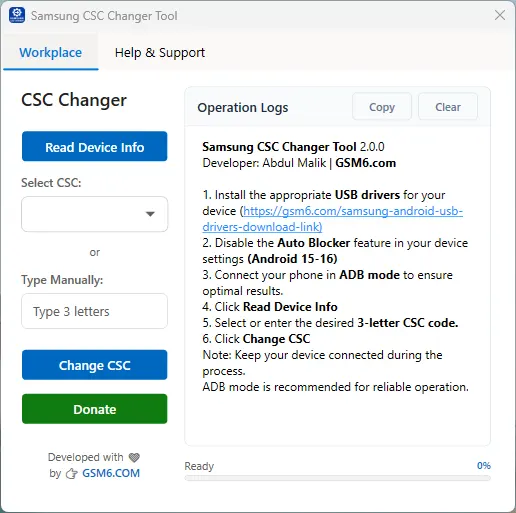
Enter Samsung CSC Changer V2.12.112025, a groundbreaking free tool from GSM6.com that revolutionizes how we modify our Samsung devices.
In this ultimate guide, we will dive deep into what a CSC code is, why the CSC Changer V2.12.112025 is a game-changer, and provide you with a meticulous, step-by-step tutorial to safely unlock your phone’s hidden features. We’ll explore how it allows you to change your CSC without root, without losing a single byte of data, and without tripping your Knox warranty bit.
What is a CSC Code? The Secret Language of Your Samsung Phone
Before we wield the powerful CSC Changer tool, it’s crucial to understand what we’re modifying. CSC stands for Country-Specific Code or Consumer Software Customization.
Think of your Samsung phone’s firmware as a multi-layered cake. The base layer (BL) is the bootloader, the core system (AP) is the Android OS, and the modem (CP) handles your cellular connection. The CSC is the icing and sprinkles on top—”it’s the layer that customizes the phone for a specific market or carrier.
Your CSC code determines:
Pre-installed Apps: Which carrier or regional bloatware comes with your phone.
System Language & Keyboard Layouts: The default languages and input methods.
Samsung Pay/Wallet Availability: Whether the app is present and which banks it supports.
Native Call Recording: The presence of the built-in call record button in the dialer.
Wi-Fi Channels & 5G Bands: Specific radio frequency allowances for different countries.
Software Update Schedule: Which server your phone checks for Over-The-Air (OTA) updates.
By changing your CSC, you are essentially telling your phone, “Forget where you were sold; act like a phone from this region instead.” This is the key to unlocking a world of features previously inaccessible to you.
Why Samsung CSC Changer V2.12.112025 is a Revolutionary Tool
The internet is filled with methods to change CSC, from complex ADB commands to flashing entire firmware packages with Odin. So, what makes the GSM6.com tool stand out?
Let’s break down its revolutionary advantages:
1. No Root Required (The Holy Grail)
Rooting your Samsung phone has always been a double-edged sword. While it grants deep system access, it comes at a heavy cost: voiding your warranty, breaking security features like Samsung Pass and Secure Folder, and making your device more vulnerable to malware. CSC Changer V2.12.112025 operates without root, preserving the integrity and security of your device.
2. Zero Data Loss
Traditional methods, especially those involving Odin, often require a factory reset to apply the new CSC successfully. This means backing up and restoring all your data—”a time-consuming and frustrating process. This tool performs a “hot-swap” of the CSC, meaning your data, apps, settings, and photos remain perfectly intact. It’s a seamless transition.
3. Does Not Trip Knox
The Knox warranty void is a permanent fuse that, once tripped, can never be reset. It’s the point of no return for your warranty and certain Samsung services. The developers of CSC Changer V2.12.112025 have engineered a method that manipulates the CSC through authorized channels, guaranteeing that your Knox counter remains 0x0. Your warranty is safe.
4. Intelligent Feature Detection
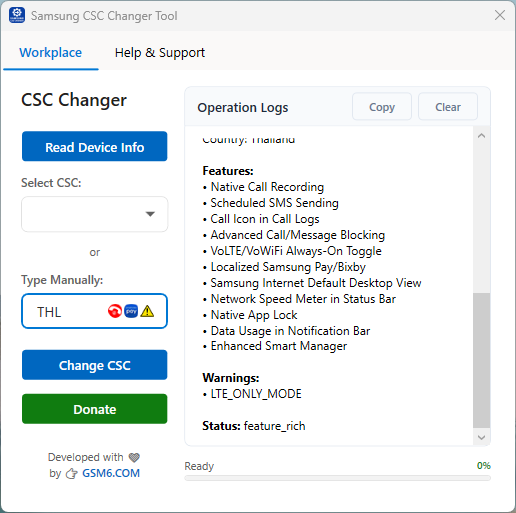
This is the tool’s killer feature. It doesn’t just blindly change codes. It intelligently identifies which CSCs support highly sought-after features like native call recording and Samsung Pay. It visually represents this with easy-to-understand emojis (📞 for call recording, 💳for Samsung Pay), taking the guesswork out of choosing the right code.
it will also guide you if there’s any risk of losing data.. but for the most of the phones it can change csc without losing data. always check Operation logs.
5. User-Friendly GUI
Forget about typing cryptic commands in a terminal. CSC Changer V2.12.112025 provides a clean, graphical user interface (GUI) that guides you through the entire process. With dropdown menus, clear buttons, and descriptive operation logs, it makes a technically complex task accessible to everyone.
Prerequisites: Gearing Up for a Successful CSC Change
Before we begin the step-by-step process, let’s ensure you have everything you need.
A Samsung Phone: The tool primarily supports a wide range of newer Samsung Galaxy S, Note, and A series phones. Check the GSM6.com website for a detailed compatibility list.
A Windows PC/Laptop: The tool is built for the Windows operating system.
USB Data Cable: Use the original cable that came with your phone. Cheap, charge-only cables can cause connection issues.
Samsung USB Drivers: This is the most common point of failure. You must install the correct drivers so your PC can communicate with your phone in diagnostic mode.
- Solution: Download and install the latest Samsung Smart Switch application on your PC. Installing Smart Switch automatically installs the necessary USB drivers.
Samsung CSC Changer V2.12.112025: Download the latest version from the official source, GSM6.com Softpedia. Always download from the official site to avoid malware or outdated software.
Adequate Battery: Ensure your phone has at least a 50% charge to prevent any issues during the reboot process.
Samsung CSC Changer Tool Specifications
| Specification | Details |
|---|---|
| Tool Name | Samsung CSC Changer Tool |
| Version | 2.12.112025 (Latest) |
| Platform | Windows 10/11 |
| File Size | ~15MB |
| License | Freeware |
| SHA-256 Hash | 09521f0b1a0760925c555c27d70711b39ba8ddc308175ae394516d28ca52e79b |
| Developer | GSM6 Official |
| Release Date | November 2025 |
Feature Comparison: CSC Changer vs Traditional Methods
| Feature | CSC Changer V2.12.112025 | Odin Flashing | Root Methods |
|---|---|---|---|
| Root Required | ❌ No | ❌ No | ✅ Yes |
| Data Loss | ❌ No | ✅ Yes | ⚠️ Sometimes |
| Knox Trip | ❌ No | ❌ No | ✅ Yes |
| Warranty Safe | ✅ Yes | ✅ Yes | ❌ No |
| Ease of Use | ✅ Very Easy | ⚠️ Moderate | ❌ Difficult |
| Feature Detection | ✅ Intelligent | ❌ Manual | ⚠️ Manual |
| Speed | ✅ 10-20 seconds | ⚠️ 5-10 minutes | ⚠️ Varies |
The Definitive Step-by-Step Guide to Using CSC Changer V2.12.112025
Follow these instructions meticulously for a flawless CSC change experience.
Step 1: Install Compatible USB Drivers
As mentioned, this is critical. If you haven’t already, download and install Samsung Smart Switch on your PC. Run the installer and follow the on-screen prompts. Once done, restart your PC to ensure the drivers are loaded correctly.
Step 2: Prepare Your Android Phone
On your Samsung phone, you need to enable a few settings to allow the connection.
Enable Developer Options: Go to
Settings > About Phone > Software Information. Tap on “Build Number” 7 times repeatedly. You will see a message saying “You are now a developer!”Enable USB Debugging: Go back to the main
Settingsmenu, and you will find “Developer Options” at the bottom. Enter it and scroll down to find “USB Debugging.” Toggle it on. Confirm the warning prompt by clicking “OK.”Set USB Configuration: While still in Developer Options, find “Select USB Configuration” and tap on it. Change it from “Charging” to “MTP (Media Transfer Protocol)” or “File Transfer.”
Step 3: Launch the Tool and Connect Your Phone
Extract the downloaded CSC Changer V2.12.112025 ZIP file and run the executable file (e.g.,
CSC_Changer_V2.12.112025.exe). You may need to run it as an administrator (right-click > Run as administrator).Now, connect your phone to your PC using the USB cable. A prompt on your phone will ask, “Allow USB debugging?” Check the box that says “Always allow from this computer” and tap “Allow.”
Step 4: Read Your Device Information
With your phone connected and in File Transfer mode, the CSC Changer tool interface should now be active. Click the button that says “Read Device Information.”
The tool will now communicate with your phone and populate the fields with your current details, such as Model Number, Current CSC, Active CSC, and Bootloader Version. This confirms that the connection is stable and the tool is ready to proceed.
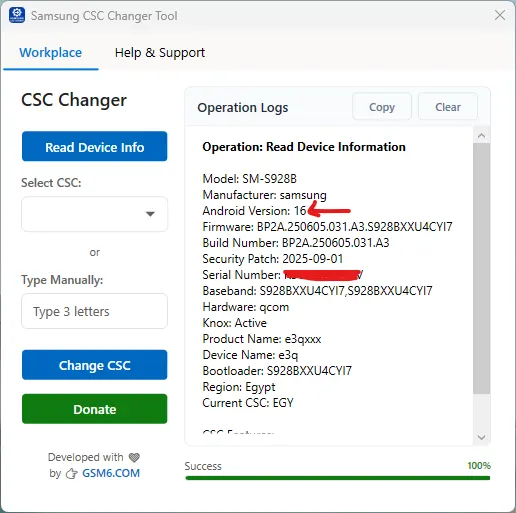
android 16 change csc without root or without losing data
Step 5: Choose Your Desired CSC (The Magic Happens Here)
This is the most important step. You will see a dropdown menu listing all the CSCs that are compatible with your device’s firmware.
- The Intelligent Dropdown: As you scroll through the list, pay close attention. Next to some CSC codes, you will see emojis.
📞 (dialer Emoji): This indicates that if you select this CSC, your phone will gain the native call recording feature.
💳 (Debit Card Emoji): This indicates that this CSC will enable and support Samsung Pay/Wallet.
📞💳 (Both Emojis): The jackpot! This CSC supports both call recording and Samsung Pay.
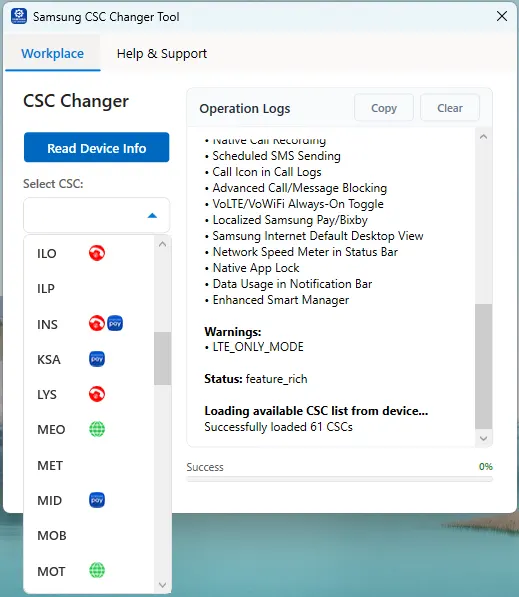
Manual Entry (Advanced Users): If you know a specific CSC code you want to use (e.g.,
DBTfor Germany unbranded,XSGfor UAE unbranded), you can also type it directly into the field.Operation Logs Insight: When you select or type a CSC, keep an eye on the “Operation Logs” window at the bottom of the tool. It will not only confirm your selection but also explicitly state the features associated with that CSC, such as “THL (Call Recording + Wallet)” This double-confirmation ensures you know exactly what you’re getting.
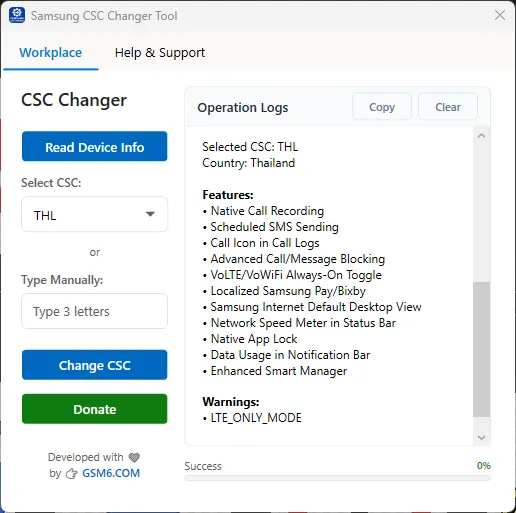
enable hidden features in samsung
Step 6: Initiate the CSC Change and Reboot
You’ve selected your target CSC, confirmed its features, and you’re ready to go. Take a deep breath and click the button that says “Change CSC.”
The tool will now begin the process. The operation logs will provide a live feed of what’s happening.
The process itself is very quick, often taking only 10-20 seconds.
Once completed, the tool will command your phone to reboot automatically.
Do not disconnect your phone during this process! Wait for the reboot to begin. (sometimes it may not reboot you can do that manually after success message)
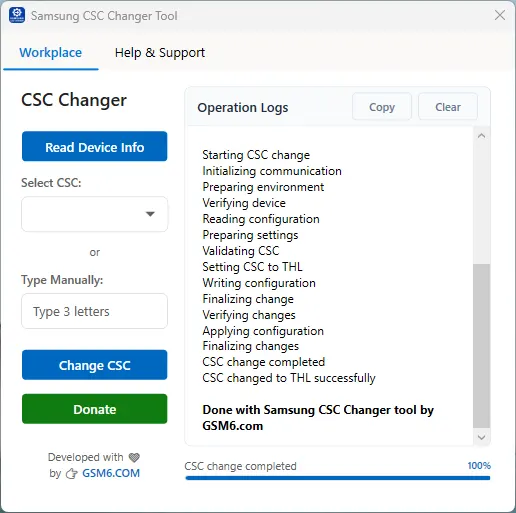
CSC Change without losing data successfully
Step 7: Post-Change Verification and Setup
After your phone reboots, which might take slightly longer than a normal reboot, you will be greeted with your familiar lock screen.
Verify the New CSC: Go to
Settings > About Phone > Software Information > Service provider software version. You should see your new CSC code listed here (e.g.,XSG/XSG,XSG/OXM).Check for New Features: Open your Phone dialer app. You should now see a “Record” button during an active call. Open your app drawer and look for the Samsung Pay/Wallet app.
Update Samsung Pay (if applicable): If you enabled Samsung Pay, you may need to update the app and its plugins via the Galaxy Store. You will then be able to add your credit/debit cards as per your region’s availability.
Check for Updates: It’s a good idea to go to
Settings > Software update > Download and installto see if your new CSC has made any new firmware updates available.
Recommended CSC Codes for Popular Features
| CSC Code | Country | Features | Recommendation |
|---|---|---|---|
| INS | India | 📞💳 Call Recording + Samsung Pay | ⭐⭐⭐⭐⭐ Best Overall |
| XXV | Vietnam | 📞💳 Call Recording + Samsung Pay | ⭐⭐⭐⭐⭐ Highly Recommended |
| THL | Thailand | 📞💳 Call Recording + Samsung Pay | ⭐⭐⭐⭐ Excellent |
| XSG | UAE | 💳 Samsung Pay (No Call Recording) | ⭐⭐⭐ For Wallet Only |
| DBT | Germany | 💳 Samsung Pay (No Call Recording) | ⭐⭐⭐ EU Region |
| XID | Indonesia | 📞 Call Recording Only | ⭐⭐⭐⭐ Good Alternative |
Step-by-Step Video Guide
here is a live demo of changing csc on samsung galaxy s24 ultra (android 16 one ui8) & samsung a15 (SM-A155F) with both adb & mtp mode. Using windows 11.
Video Tutorial
Watch this guide for visual instructions
Uploaded: December 8, 2025
Download Samsung CSC Changer Tool v2.12.112025
Download Information
| Source | Link | Notes |
|---|---|---|
| GSM6 – Direct (Official) | v2.12.112025 | ✅ Recommended • Fast • Latest |
| Softpedia (Mirror) | v2.12.112025 | ✔ Verified listing |
| XDA Developers (Thread) | Read Discussion | Community feedback & updates |
🔐 Trust & Verification:
This tool is officially listed on Softpedia and actively discussed on XDA Developers, two of the most trusted platforms in the Android modding and software community.
File Details
- Version: 2.12.112025
- File Name: Samsung_CSC_Changer_V2.12.112025.zip
- Size: ~4.8MB
- SHA-256: 09521f0b1a0760925c555c27d70711b39ba8ddc308175ae394516d28ca52e79b
Troubleshooting Common Issues
| Issue | Solution | Prevention |
|---|---|---|
| ”Device Not Found” | Reinstall Samsung USB Drivers, use different USB port/cable | Install Smart Switch first |
| USB Debugging Not Working | Enable Developer Options, toggle USB Debugging on/off | Check phone prompt & allow |
| CSC Change Fails | Restart tool & phone, ensure 50%+ battery | Follow steps precisely |
| No Emoji Indicators | Tool may not have feature data for your firmware | Check operation logs instead |
| Phone Stuck in Boot | Force restart (Vol Down + Power), reattempt CSC change | Don’t disconnect during process |
| Samsung Pay Not Working | May require factory reset for financial apps | Known limitation, CSC works otherwise |
Conclusion: Embrace a Truly Global Phone
The Samsung CSC Changer V2.12.112025 from GSM6.com is more than just a utility; it’s a key that unlocks the restrictive chains of regional branding. It empowers you, the user, to define your phone’s experience based on your needs, not your geographic location.
The ability to gain flagship features like call recording and Samsung Pay, all while keeping your warranty intact and your data secure, was once a distant dream for Samsung users. Today, it’s a reality that is just a few clicks away.
So, download the tool, follow this guide, and step into a world where your Samsung phone is truly, completely yours.
Disclaimer: While CSC Changer V2.12.112025 is proven to be safe and is used by thousands, modifying your device’s software always carries a minimal inherent risk. Always Backup your Important data. The author and blog are not responsible for any unforeseen issues. Always ensure you download the tool from the official GSM6.com GitHub.
Frequently Asked Questions
Is CSC Changer Tool safe to use on my Samsung phone?
Yes, Samsung CSC Changer Tool V2.12.112025 is completely safe when used as instructed. It does not require root access, does not trip Knox warranty, and is designed to change CSC without data loss. Always download from official sources.
Will changing CSC void my Samsung warranty?
No, changing CSC with this tool does not void your warranty. The tool works without tripping Knox counter (0x0), which is what manufacturers check for warranty claims. Your warranty remains intact.
Do I need to backup my data before using CSC Changer?
While the tool is designed to change CSC without data loss, it’s always recommended to backup important data as a precaution. The process is generally safe, but backups are good practice.
Which CSC should I choose for call recording?
For call recording, choose CSCs with 📞 emoji. INS (India), XXV (Vietnam), and THL (Thailand) are highly recommended as they support both call recording and Samsung Pay.
Can I revert back to my original CSC?
Yes, you can revert to your original CSC at any time using the same tool. Simply select your original CSC code from the dropdown and apply the change.
Does CSC Changer work on all Samsung models?
The tool supports most modern Samsung Galaxy S, Note, A, and M series. Check the compatibility list on GSM6.com or GitHub for specific model support.
Why is Samsung Pay not working after CSC change?
Samsung Pay has additional security checks. Sometimes a factory reset is required for financial apps to initialize properly after CSC change. This is a Samsung security measure, not a tool limitation.
What if the tool doesn’t detect my phone?
Ensure Samsung USB Drivers are installed, USB Debugging is enabled, and you’re using the original USB cable. Try different USB ports and restart both phone and PC.


Author:
Abdul MalikMobile Software Expert and founder of GSM6.com. Specializes in FRP bypass, IMEI repair, and advanced mobile tools. All tutorials are tested on real devices for accuracy and safety.


