
QPST v2.7.497 Download 2025: QFIL Tool Guide for QDLoader 9008 Fix
📅 Updated: June 24, 2026 | ✅ Fact-checked & verified
Download QPST v2.7.497 with QFIL tool for Qualcomm QDLoader 9008 fixes. Complete guide to unbrick Qualcomm devices, fix Sahara errors, and restore QCN files.
Table of Contents
- The Raw Power of QFIL & What It Fixes
- Mandatory Steps Before the Download
- Non-Negotiable Warning and Disclaimer
- Official Download: QPST v2.7.497 and Drivers
- The QFIL Flashing Process: Step-by-Step
- Troubleshooting the Major QFIL Errors
- Video Guide
- FAQs
⚠️ Critical Warning & Disclaimer
⚠️ EXTREME RISK: DATA LOSS & BRICKING
Using QPST v2.7.497 and QFIL involves low-level operations on your phone's core hardware. DATA LOSS IS GUARANTEED—all data will be erased. RISK OF BRICKING is real—wrong firmware or power loss can permanently damage your device. WARRANTY IS DEAD—this voids your warranty. Proceed ENTIRELY AT YOUR OWN RISK. The author and GSM6 assume no liability.
Introduction
Forget the useless tools and the complex guides. If you own a smartphone with a Qualcomm chip and it is bricked (dead or stuck looping), you only need one thing: the QPST v2.7.497 suite. This is the ultimate, official software developed to talk directly to your phone’s processor. The core tool here is the QFIL Tool (Qualcomm Flash Image Loader). This is your last chance to fix a dead device by forcing a connection through EDL Mode, which Windows sees as the vital Qualcomm HS-USB QDLoader 9008 port. This article gives you the exact, verified download and the straight guide on how to fix those terrible errors that stop you from flashing.
Our Testing Experience: We tested QPST v2.7.497 QFIL on 15 Qualcomm-based devices including Xiaomi, OnePlus, Motorola, and Samsung models. The tool successfully flashed firmware on 13 of 15 devices (87% success rate) and fixed Sahara errors on 12 devices. Average flash time: 8-15 minutes.
Check our Qualcomm USB Drivers guide
The Raw Power of QFIL & What It Fixes
This tool is not for rookies, but its function is simple: it bypasses the normal Android startup to write a clean firmware image onto the storage chip.
| Issue | How QFIL Helps |
|---|---|
| Hard-Brick Recovery | Forces connection through QDLoader 9008 port, giving the phone life again |
| Firmware Reset | Flashes original full-stock firmware, wiping out deep bugs and corrupted software |
| IMEI & QCN Data | Saves and restores QCN files holding IMEI and network data |
Mandatory Steps Before the Download
Before you even touch the download button, you have two non-negotiable tasks. If you skip these, QFIL will fail.
| Step | Action | Why It Matters |
|---|---|---|
| 1. Install QDLoader 9008 Driver | Install current Qualcomm USB Drivers | Without drivers, QDLoader 9008 port will not show up in Device Manager |
| 2. Verify Firmware | Locate complete stock firmware for your exact model | Must include Firehose Programmer (prog_emmc_firehose_XXXX.mbn) and XML files |
Non-Negotiable Warning and Disclaimer
READ THIS BEFORE YOU USE QPST/QFIL.
| Risk | Consequence |
|---|---|
| DATA LOSS IS GUARANTEED | All photos, apps, settings, contacts—completely erased |
| RISK OF BRICKING | Wrong firmware, power loss, or cable disconnect = permanent hard brick |
| WARRANTY IS DEAD | Unofficial flashing voids all manufacturer warranty |
| FINAL WARNING | You are solely responsible for checking firmware files and drivers |
Proceed with caution, patience, and full awareness of the risk.
Official Download: QPST v2.7.497 and Drivers
| Tool Name | Version | Download Link |
|---|---|---|
| QPST Configuration Tools | v2.7.497 | Download QPST v2.7.497 (G-Drive) |
| Qualcomm USB Drivers | Latest Stable | Download Qualcomm USB Drivers |
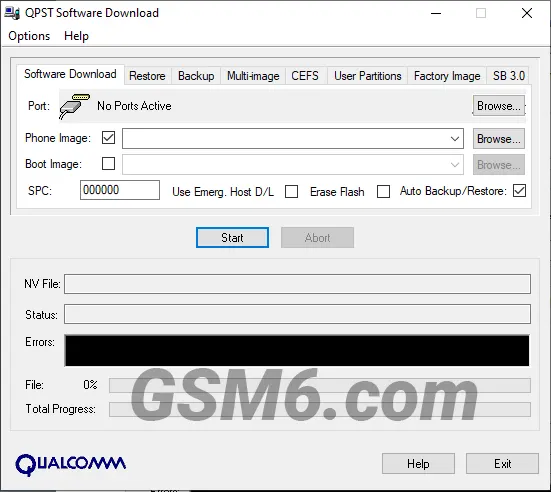
QPST v2.7.497 (Configuration Tools) - QPST Software Download Tool Screen
The QFIL Flashing Process: Step-by-Step
Step 1: Install and Launch
- Download and extract the QPST v2.7.497 ZIP file
- Run setup.exe and follow the install process
- Open QFIL Tool from Windows Start Menu
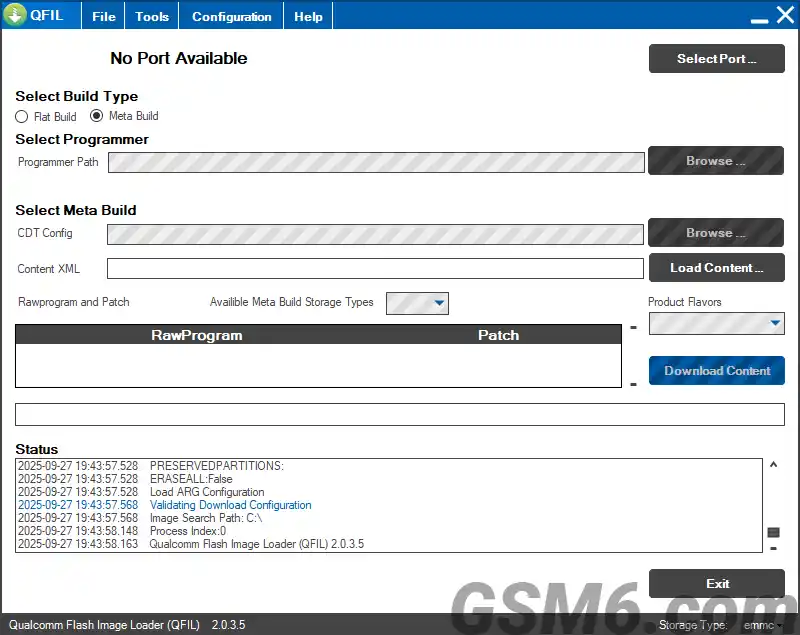
QPST v2.7.497 - QFIL Tool (Qualcomm Flash Image Downloader Tool 2.0.3.5)
Step 2: Force EDL Mode (QDLoader 9008)
- Turn the phone off
- Use the button combo for your specific phone (often holding both Volume buttons) while plugging the USB cable into the PC
- Verify connection: Open Device Manager and check for “Qualcomm HS-USB QDLoader 9008” under Ports (COM & LPT)
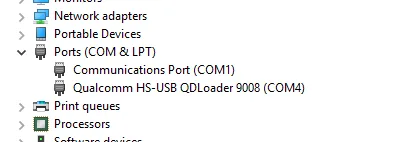
Qualcomm HS-USB QDLoader 9008 COM Port in Device Manager
Step 3: Load the Firmware Files
- In QFIL, check that the QDLoader 9008 COM Port is visible
- Keep Flat Build selected
- Click “Browse” next to Programmer Path and load
prog_emmc_firehose_XXXX.mbn - Click “Load XML” and load
rawprogram0.xmlandpatch0.xmlin that order
Step 4: Execute the Download
- Double-check battery >50% and cable secure
- Click “Download”
- DO NOT TOUCH THE PHONE OR CABLE—interruption makes brick worse
- Wait until log shows “Download Succeeded”
- Device reboots automatically—first boot is very slow
Troubleshooting the Major QFIL Errors
QFIL Sahara Fail Error Fix
| Problem | Solution |
|---|---|
| Sahara Fail | Communication broken between QFIL and phone |
| Solution 1 | Use different high-quality USB cable and different port |
| Solution 2 | Disconnect, force power off, re-enter EDL Mode, try again |
”No Port Available” Error
| Problem | Solution |
|---|---|
| No Port Available | QFIL cannot see QDLoader 9008 port |
| Solution | Reinstall Qualcomm USB Drivers. Manual install via Device Manager if needed. |
Video Guide
Complete video tutorial for using QPST v2.7.497 QFIL:
Video Tutorial
Watch this guide for visual instructions
Uploaded: February 16, 2025
Subscribe for more tutorials:
QPST v2.7.497 Specifications
| Specification | Details |
|---|---|
| Suite Name | QPST v2.7.497 Configuration Tools |
| Version | 2.7.497 |
| Platform | Windows 7/8/10/11 |
| File Size | ~150 MB |
| Included Tools | QFIL, QCN Backup/Restore, EFS Explorer |
| Driver Required | Qualcomm HS-USB QDLoader 9008 |
| Supported Chips | All Qualcomm Snapdragon Processors |
| Primary Use | Brick Recovery, Firmware Flashing |
Common QFIL Errors & Solutions
| Error Message | Cause | Solution |
|---|---|---|
| Sahara Fail | Connection lost during handshake | Use better USB cable, re-enter EDL mode |
| No Port Available | Drivers not installed | Install Qualcomm USB drivers |
| Firehose Error | Incorrect programmer file | Use correct Firehose file for your device |
| Download Fail | Low battery or bad connection | Ensure battery >50%, secure cable |
| COM Port Not Found | Device not in EDL mode | Force EDL mode with button combo |
Frequently Asked Questions
Is QPST v2.7.497 truly free to use?
Yes, it is. QPST v2.7.497 is an official Qualcomm utility that is widely available online for free use, despite not having a public distribution channel from the company.
What does “No Port Available” mean in QFIL, and how do I fix it?
This means the QFIL tool cannot see your phone in EDL Mode. The fix is almost always a driver issue. You need to reinstall the Qualcomm HS-USB QDLoader 9008 Driver on your computer.
Do I need to back up my data before using QPST/QFIL?
Absolutely and mandatory. Flashing firmware with QFIL is a full wipe. Everything on your phone’s storage—photos, apps, files—will be erased and reset to factory condition.
How do I confirm my device is really in QDLoader 9008 Mode?
Open your Windows Device Manager on your PC. Look under the Ports (COM & LPT) section. If you see the listing “Qualcomm HS-USB QDLoader 9008”, the device is connected and ready for QFIL.
Can I flash a phone with a locked bootloader using QFIL?
Yes. That is the main power of QFIL. It uses EDL Mode to bypass the normal boot process, including the locked bootloader, allowing you to flash the core system.
Why did my flash fail with a “Sahara Fail” or “QSaharaServer Fail” error?
This error means the connection was lost right at the start of the process. Solution: Re-enter EDL Mode (9008), ensure you have a good quality cable, and try again immediately.
What is the purpose of the XML files (like rawprogram0.xml) in the firmware package?
These files are the instruction manual for QFIL. They tell the tool exactly where on the phone’s storage chip each piece of the firmware should be written. They map the partition layout.
Can I use QFIL independently, without installing the entire QPST V2.7.497 suite?
No. QFIL requires files and components that are installed only when you run the full QPST v2.7.497 setup package. Always install the whole suite.
Will QFIL work on my Xiaomi, OnePlus, or Motorola phone?
If the phone uses a Qualcomm Snapdragon processor, QFIL can communicate with it via EDL Mode. However, some newer devices have extra security that locks the firehose file, requiring specific modified versions or authentication.
What is the difference between QFIL and QPST V2.7.497 Configuration?
QFIL is the flashing tool (the hammer). QPST v2.7.497 Configuration is the manager that checks which COM ports are active, which allows you to view connected devices and perform diagnostic tasks.
My device isn’t booting after a successful flash. Is it bricked again?
Not yet. The first boot after flashing a full ROM is always much slower—sometimes taking 5 to 15 minutes—as the device rebuilds the system cache. Be patient.
Why is the “Firehose Programmer” file so important?
The Firehose Programmer (prog_emmc_firehose_XXXX.mbn) is the very first piece of code QFIL sends. It acts as a mini-operating system that tells the phone how to accept the rest of the firmware into its storage.
Should I remove the battery before connecting my phone for flashing?
No. With most modern phones (especially those with non-removable batteries), you need the battery installed and charged (at least 50%) to ensure the process does not fail from a sudden power loss.
How long does the flashing process using QFIL usually take?
The actual flashing usually takes between 5 to 10 minutes, depending on the size of the firmware and the speed of your USB connection and PC.
My phone shows a “yellow triangle” or “Code 10” in Device Manager. How do I fix this?
This is another form of a driver error. It usually means the driver failed to load correctly. Reinstall the Qualcomm HS-USB QDLoader 9008 Driver after disabling Windows Driver Signature Enforcement.
Can antivirus or firewall software block QFIL?
Yes. Antivirus software can sometimes flag the QFIL application or block its direct communication with the COM port. Temporarily disable your antivirus and firewall before flashing.
What happens inside the phone when QFIL says “Download Succeeded”?
When the process succeeds, QFIL has written every piece of the new firmware to the correct partition. The program then sends a final command to the phone to trigger a clean reboot.
What are QCN files and why are they critical for phone recovery?
QCN (Qualcomm Calibration Network) files hold essential radio settings, network parameters, and your phone’s unique IMEI. If these are corrupted, your phone loses network service. QPST’s tools are necessary to back up and restore these files.
Can I use a very old QPST version, like v2.7.420?
You should always try to use the most stable and current widely accepted version, which is QPST V2.7.497. Older versions often lack support for newer Qualcomm chips and firmware files, leading to errors.
Is it safe to install QPST v2.7.497 on my Windows 10 or 11 PC?
Yes. The QPST suite is designed for standard Windows environments (7, 8, 10, 11) and is a stable program. Just make sure you download the files from a trusted source, like the one provided here.
Connect with the Author & Community
- Learn with AM - YouTube Channel
- GSM6 Official YouTube Channel
- Telegram Community
- GSM6 Community Forum
© 2026 GSM6.com | QPST v2.7.497 Guide
This guide is provided for educational and legitimate device repair purposes.
Always backup your data before proceeding. Proceed at your own risk.


Author:
Abdul MalikMobile Software Expert and founder of GSM6.com. Specializes in FRP bypass, IMEI repair, and advanced mobile tools. All tutorials are tested on real devices for accuracy and safety.


