
• Abdul Malik (AM) • misc • 1 min
QPST v2.7.497 Download 2025: QFIL Tool Guide for QDLoader 9008 Fix | Free
Forget the useless tools and the complex guides. If you own a smartphone with a Qualcomm chip and it is bricked (dead or stuck looping), you only need one thing: the QPST v2.7.497 suite. This is the ultimate, official software developed to talk directly to your phone’s processor. The core tool here is the QFIL Tool (Qualcomm Flash Image Loader). This is your last chance to fix a dead device by forcing a connection through EDL Mode, which Windows sees as the vital Qualcomm HS-USB QDLoader 9008 port. This article gives you the exact, verified download and the straight guide on how to fix those terrible errors that stop you from flashing.
The Raw Power of QFIL & What It Fixes
This tool is not for rookies, but its function is simple: it bypasses the normal Android startup to write a clean firmware image onto the storage chip.
Hard-Brick Recovery: When your phone is completely dead and nothing works, the QFIL Tool is what forces the connection through the low-level QDLoader 9008 port, giving the phone life again.
Firmware Reset: QFIL lets you flash the original, full-stock firmware. This is the nuclear option that wipes out deep bugs, persistent errors, and poor performance caused by corrupted software.
IMEI & QCN Data: The full QPST toolkit allows access to advanced sections. It can save and restore the crucial QCN file which holds your device’s network data and IMEI. If your IMEI gets corrupted, QPST is the way to bring it back.
Mandatory Steps Before the Download
Before you even touch the download button, you have two non-negotiable tasks. If you skip these, QFIL will fail, and you will get the common “No Port Available” error.
Qualcomm HS-USB QDLoader 9008 Driver: You absolutely must install the correct, current Qualcomm USB Drivers. Without them, your computer will not recognize your phone when it is in the necessary EDL Mode, and the QDLoader 9008 port will not show up. Install the drivers first.
Verified Firmware: Locate the complete stock firmware package for your exact phone model. Make sure it includes the crucial Firehose Programmer file (usually named
prog_emmc_firehose_XXXX.mbn) and the XML partition files (rawprogram0.xmlandpatch0.xml).
Non-Negotiable Warning and Disclaimer
READ THIS BEFORE YOU USE QPST/QFIL.
This guide and the use of the QPST v2.7.497 suite, including the QFIL Tool, involve low-level operations on your phone’s core hardware. This is not a simple software update. Using this tool is done entirely at your own risk. We provide this information as a guide, but we are not responsible for what happens to your device. By choosing to proceed, you accept all risk and responsibility.
DATA LOSS IS GUARANTEED: Flashing firmware with QFIL will completely erase everything on your device”photos, apps, settings, contacts. Back up your data now, or lose it forever.
RISK OF BRICKING: If you use the wrong firmware, lose power, or disconnect the USB cable during the flashing process, you can permanently damage (hard brick) your phone. This damage may be irreversible.
WARRANTY IS DEAD: Using this unofficial method and forcing your device into EDL Mode (QDLoader 9008) will most certainly void any existing manufacturer warranty on your device.
FINAL WARNING: You are solely responsible for checking that your firmware files and drivers are 100% correct for your exact phone model. Proceed with caution, patience, and full awareness of the risk.
Official Download: QPST v2.7.497 and Drivers
This is the verified download for the complete, stable QPST package. We link directly to the clean files you need.
| Tool Name | Version | Download Link |
|---|---|---|
| QPST Configuration Tools | v2.7.497 | Download QPST v2.7.497 (G-Drive) |
| Qualcomm USB Drivers | Latest Stable | Download Qualcomm USB Drivers |
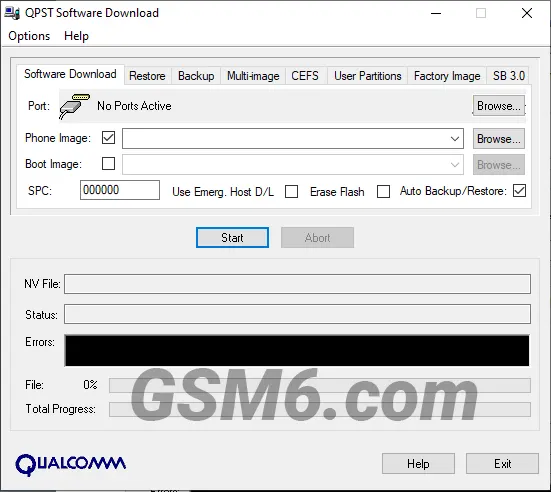
QPST v2.7.497 (Configurations Tools) - QPST Software Dowload Tool Screen
The QFIL Flashing Process: Step-by-Step
Step 1: Install and Launch
- Download and extract the QPST v2.7.497 ZIP file.
- Run setup.exe and follow the install process.
- Find and open the QFIL Tool from your Windows Start Menu.
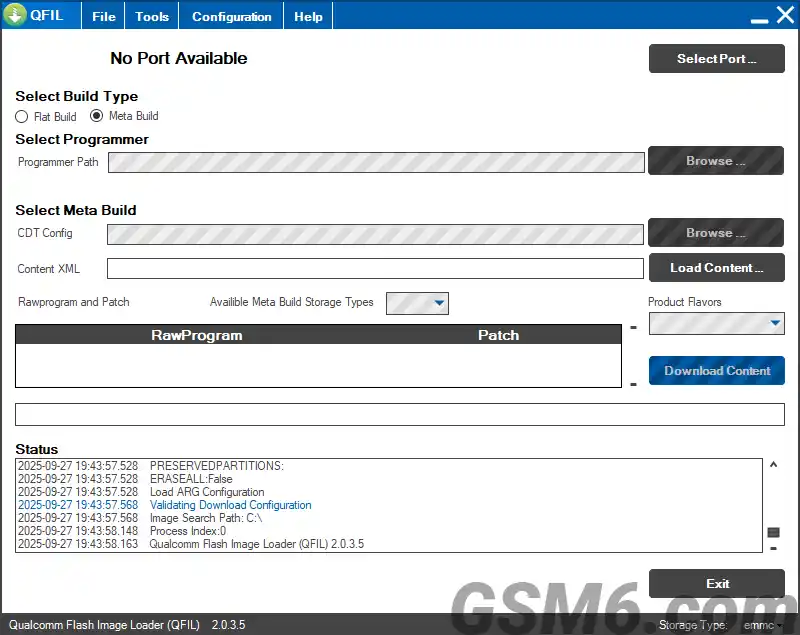
QPST v2.7.497 - QFil Tool (Qualcomm Flash Image Downloader Tool 2.0.3.5)
Step 2: Force EDL Mode (QDLoader 9008)
- Your phone must enter EDL Mode. Turn the phone off.
- Use the button combo for your specific phone (often holding both Volume buttons) while plugging the USB cable into the PC.
- Verify the connection: Open Device Manager and check that you see “Qualcomm HS-USB QDLoader 9008” under Ports (COM & LPT). If you do not see this, go back to fixing your drivers and your EDL method.
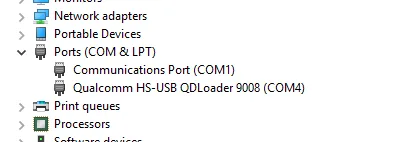
Qualcomm HS-USB QDLoader 9008 com port drivers screen
Step 3: Load the Firmware Files
- In the QFIL window, check that the QDLoader 9008 COM Port is visible at the top.
- Keep Flat Build selected.
- Click “Browse” next to Programmer Path and load the
prog_emmc_firehose_XXXX.mbnfile. This is the Firehose Programmer file. - Click “Load XML” and load the
rawprogram0.xmlandpatch0.xmlfiles in that order.
Step 4: Execute the Download
- Double-check that the battery is over 50% and the cable is secure.
- Click the “Download” button.
- DO NOT TOUCH THE PHONE OR CABLE. Interrupting this process will make the brick worse.
- Wait until the log shows “Download Succeeded.” Your phone will reboot automatically, and the first start will be very slow.
Troubleshooting the Major QFIL Errors
QFIL Sahara Fail Error Fix
The Sahara Fail error means the QFIL tool started talking to the phone, but the communication was suddenly broken, or the phone dropped out of EDL Mode.
Solution 1 (Connection): This is often a bad USB cable or a loose connection. Try a different, high-quality cable and a different USB port on your computer.
Solution 2 (Re-enter EDL): The failure might mean the phone needs a fresh start. Disconnect the device, force it to power off completely (hold Power for a long time), and then force it back into EDL Mode (QDLoader 9008) before clicking “Download” again.
”No Port Available” Error
This error is simple: QFIL cannot see the QDLoader 9008 port.
- Solution: Your Qualcomm USB Drivers are missing or are the wrong version. Re-download and re-install the drivers. If that fails, go into Device Manager, find the device (it might show up as an unknown device), right-click, and manually install the drivers.
Video Tutorial
Video Tutorial
Watch this guide for visual instructions
Uploaded: February 16, 2025
QPST v2.7.497 Specifications
| Specification | Details |
|---|---|
| Suite Name | QPST v2.7.497 Configuration Tools |
| Version | 2.7.497 |
| Platform | Windows 7/8/10/11 |
| File Size | ~150 MB |
| Included Tools | QFIL, QCN Backup/Restore, EFS Explorer |
| Driver Required | Qualcomm HS-USB QDLoader 9008 |
| Supported Chips | All Qualcomm Snapdragon Processors |
| Primary Use | Brick Recovery, Firmware Flashing |
Common QFIL Errors & Solutions
| Error Message | Cause | Solution |
|---|---|---|
| Sahara Fail | Connection lost during handshake | Use better USB cable, re-enter EDL mode |
| No Port Available | Drivers not installed | Install Qualcomm USB drivers |
| Firehose Error | Incorrect programmer file | Use correct Firehose file for your device |
| Download Fail | Low battery or bad connection | Ensure battery >50%, secure cable |
| COM Port Not Found | Device not in EDL mode | Force EDL mode with button combo |
This Article Solves Following High-Value Search Queries
If you are looking for a solution to any of the following problems, you are in the right place. We cover the direct fix for every one of these high-stakes issues:
- QPST v2.7.497 Download (2025)
- QFIL Sahara Fail Error Fix
- QFIL Flash Hard-Bricked Qualcomm Phone
- Unbrick Qualcomm device using QFIL Tool
- Qualcomm HS-USB QDLoader 9008 Driver Download
- QFIL No Port Available Error
- Fix IMEI Invalid QCN Restore using QPST
- Firehose Programmer File Missing Fix
- How to flash stock ROM using QFIL
- QPST Software Download Guide
- Force EDL Mode on Qualcomm Snapdragon
Frequently Asked Questions
Is QPST v2.7.497 truly free to use?
Yes, it is. QPST v2.7.497 is an official Qualcomm utility that is widely available online for free use, despite not having a public distribution channel from the company.
What does “No Port Available” mean in QFIL, and how do I fix it?
This means the QFIL tool cannot see your phone in EDL Mode. The fix is almost always a driver issue. You need to reinstall the Qualcomm HS-USB QDLoader 9008 Driver on your computer.
Do I need to back up my data before using QPST/QFIL?
Absolutely and mandatory. Flashing firmware with QFIL is a full wipe. Everything on your phone’s storage”photos, apps, files”will be erased and reset to factory condition.
How do I confirm my device is really in QDLoader 9008 Mode?
Open your Windows Device Manager on your PC. Look under the Ports (COM & LPT) section. If you see the listing “Qualcomm HS-USB QDLoader 9008”, the device is connected and ready for QFIL.
Can I flash a phone with a locked bootloader using QFIL?
Yes. That is the main power of QFIL. It uses EDL Mode to bypass the normal boot process, including the locked bootloader, allowing you to flash the core system.
Why did my flash fail with a “Sahara Fail” or “QSaharaServer Fail” error?
This error means the connection was lost right at the start of the process. Solution: Re-enter EDL Mode (9008), ensure you have a good quality cable, and try again immediately.
What is the purpose of the XML files (like rawprogram0.xml) in the firmware package?
These files are the instruction manual for QFIL. They tell the tool exactly where on the phone’s storage chip each piece of the firmware should be written. They map the partition layout.
Can I use QFIL independently, without installing the entire QPST V2.7.497 suite?
No. QFIL requires files and components that are installed only when you run the full QPST v2.7.497 setup package. Always install the whole suite.
Will QFIL work on my Xiaomi, OnePlus, or Motorola phone?
If the phone uses a Qualcomm Snapdragon processor, QFIL can communicate with it via EDL Mode. However, some newer devices have extra security that locks the firehose file, requiring specific modified versions or authentication.
What is the difference between QFIL and QPST V2.7.497 Configuration?
QFIL is the flashing tool (the hammer). QPST v2.7.497 Configuration is the manager that checks which COM ports are active, which allows you to view connected devices and perform diagnostic tasks.
My device isn’t booting after a successful flash. Is it bricked again?
Not yet. The first boot after flashing a full ROM is always much slower”sometimes taking 5 to 15 minutes”as the device rebuilds the system cache. Be patient.
Why is the “Firehose Programmer” file so important?
The Firehose Programmer (prog_emmc_firehose_XXXX.mbn) is the very first piece of code QFIL sends. It acts as a mini-operating system that tells the phone how to accept the rest of the firmware into its storage.
Should I remove the battery before connecting my phone for flashing?
No. With most modern phones (especially those with non-removable batteries), you need the battery installed and charged (at least 50%) to ensure the process does not fail from a sudden power loss.
How long does the flashing process using QFIL usually take?
The actual flashing usually takes between 5 to 10 minutes, depending on the size of the firmware and the speed of your USB connection and PC.
My phone shows a “yellow triangle” or “Code 10” in Device Manager. How do I fix this?
This is another form of a driver error. It usually means the driver failed to load correctly. Reinstall the Qualcomm HS-USB QDLoader 9008 Driver after disabling Windows Driver Signature Enforcement (search for a quick guide on this).
Can antivirus or firewall software block QFIL?
Yes. Antivirus software can sometimes flag the QFIL application or block its direct communication with the COM port. If you have issues, temporarily disable your antivirus and firewall before flashing.
What happens inside the phone when QFIL says “Download Succeeded”?
When the process succeeds, QFIL has written every piece of the new firmware to the correct partition. The program then sends a final command to the phone to trigger a clean reboot.
What are QCN files and why are they critical for phone recovery?
QCN (Qualcomm Calibration Network) files hold essential radio settings, network parameters, and your phone’s unique IMEI. If these are corrupted, your phone loses network service. QPST’s tools are necessary to back up and restore these files.
Can I use a very old QPST version, like v2.7.420?
You should always try to use the most stable and current widely accepted version, which is QPST V2.7.497. Older versions often lack support for newer Qualcomm chips and firmware files, leading to errors.
Is it safe to install QPST v2.7.497 on my Windows 10 or 11 PC?
Yes. The QPST suite is designed for standard Windows environments (7, 8, 10, 11) and is a stable program. Just make sure you download the files from a trusted source, like the one provided here.


Author:
Abdul MalikMobile Software Expert and founder of GSM6.com. Specializes in FRP bypass, IMEI repair, and advanced mobile tools. All tutorials are tested on real devices for accuracy and safety.


