
• Abdul Malik (AM) • android • 1 min
Where to Download Older Pixel 6a Firmware (bluejay) | Android 14 / 15 Factory or OTA Images
Introduction: Why You Need Pixel 6a Older Firmware Right Now
If you’re searching for a Pixel 6a firmware download, you’ve probably noticed that Google Pixel 6a factory images for Android 14 and Android 15 are disappearing from official sources. Since July 2025, Google has started pulling older builds from its developer portal ” leaving many users without a way to roll back or recover from buggy updates.
That means if you didn’t already save a download Android 14 factory image or a Pixel 6a Android 15 download, you might soon lose access for good. In this guide, we’ll cover:
Where to find Pixel 6a older ROM downloads even after removal
Community mirrors and archives that still host Android 14/15/16 earlier builds
Step-by-step instructions to flash them safely
Critical risks to avoid (like anti-rollback bricking)
Act quickly: once Google’s servers are cleared and caches expire, these older builds may be gone forever.
Why Older Firmware Still Matters for Pixel 6a Owners
Google’s latest updates for the Pixel 6a introduced forced battery management changes to fix overheating issues. Alongside these updates came anti-rollback bootloader protections, which block downgrades from Android 16 or higher.
Without access to Pixel 6a older ROM downloads, you risk being stuck on a buggy build ” with no fallback option if something goes wrong.
Older factory images matter because they:
Restore your phone to a working state if an update bricks it
Provide a clean base for installing custom ROMs like LineageOS
Help developers test app compatibility across Android versions
Act as a safeguard against unwanted feature changes
Important: Once anti-rollback is triggered, flashing older firmware may permanently brick your device.
Official Google Sources (While They Last)
Google has two primary portals for Pixel firmware:
Factory Images for Nexus & Pixel Devices
Provides full Google Pixel 6a factory images (complete firmware packages).
Requires an unlocked bootloader.
As of mid-2025, Pixel 6a Android 14 and 15 entries are missing.
Full OTA Images for Nexus & Pixel Devices
OTA files can restore stock firmware without wiping data.
Works without unlocking the bootloader.
Pixel 6a entries are also disappearing here.
Tip: Try accessing these links via cached versions in your browser or Archive.org. Sometimes, Google’s removal doesn’t wipe older builds immediately.
Community & Mirror Solutions
When official links vanish, the community steps in. Here’s where to look:
Reddit Threads (r/LineageOS, r/Pixel6a)
Users have reported seeing older builds cached on Google’s servers even after removal:
“I see plenty of 15.0 downloads for bluejay on the factory image page just above the only 16.0 download.” “ Reddit User
This suggests refreshing or tweaking query strings may still expose hidden links.
XDA Forums & Archive.org
XDA developers often mirror Pixel 6a older ROM downloads in their repositories. Searching for terms like “Pixel 6a mini-repository archive.org” can help locate Android 14/15 builds.
Look for threads dedicated to “Bluejay firmware” or “Pixel 6a ROM archive.”
Always verify checksums to avoid tampered files.
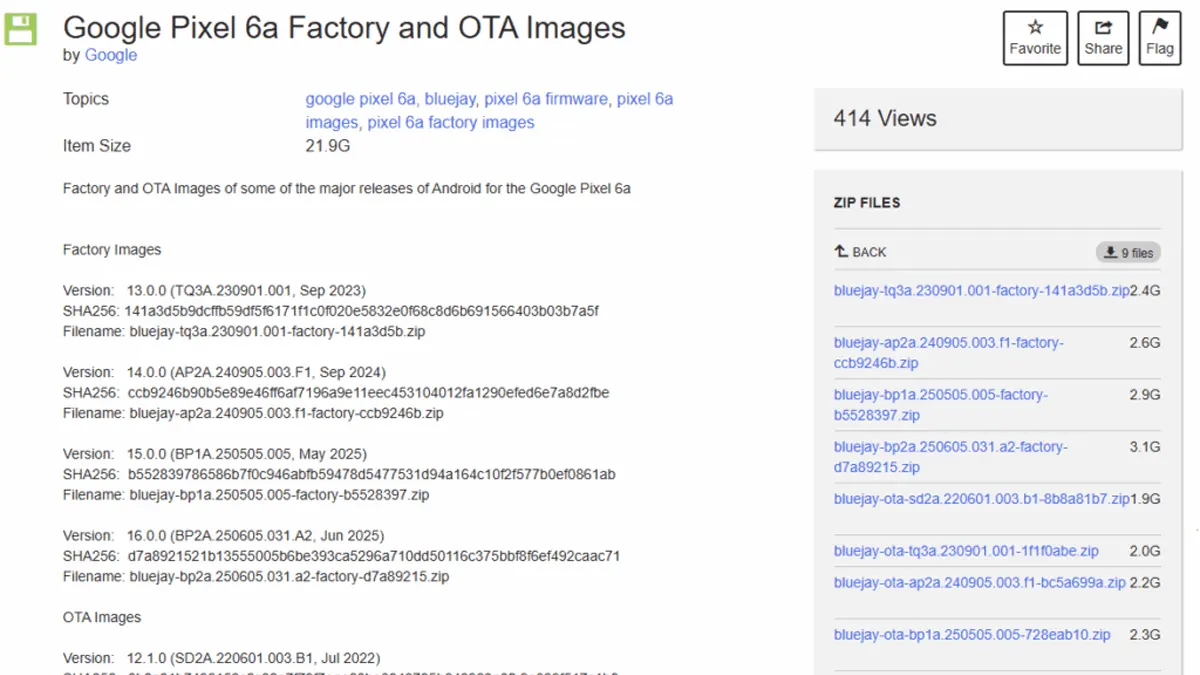
Download Links for Pixel 6a bluejay Old Flash Files:
Pixel 6a Firmware Specifications
| Android Version | Build Number | Release Date | File Type | Size |
|---|---|---|---|---|
| Android 13 | TQ3A.230901.001 | September 2023 | Factory Image | ~2.5GB |
| Android 14 | AP2A.240905.003.F1 | September 2024 | Factory Image | ~2.8GB |
| Android 15 | BP1A.250505.005 | May 2025 | Factory Image | ~3.0GB |
| Android 16 | BP2A.250605.031.A2 | June 2025 | Factory Image | ~3.2GB |
Fastboot Factory Images
Version: 13.0.0 (TQ3A.230901.001, Sep 2023)
(Pixel 6a Android 13 Firmware)
SHA256: 141a3d5b9dcffb59df5f6171f1c0f020e5832e0f68c8d6b691566403b03b7a5f
Filename: bluejay-tq3a.230901.001-factory-141a3d5b.zip
Version: 14.0.0 (AP2A.240905.003.F1, Sep 2024)
(Pixel 6a Android 14 Firmware)
SHA256: ccb9246b90b5e89e46ff6af7196a9e11eec453104012fa1290efed6e7a8d2fbe
Filename: bluejay-ap2a.240905.003.f1-factory-ccb9246b.zip
Version: 15.0.0 (BP1A.250505.005, May 2025)
(Pixel 6a Android 15 Firmware)
SHA256: b552839786586b7f0c946abfb59478d5477531d94a164c10f2f577b0ef0861ab
Filename: bluejay-bp1a.250505.005-factory-b5528397.zip
Version: 16.0.0 (BP2A.250605.031.A2, Jun 2025)
(Pixel 6a Android 16 Firmware)
SHA256: d7a8921521b13555005b6be393ca5296a710dd50116c375bbf8f6ef492caac71
Filename: bluejay-bp2a.250605.031.a2-factory-d7a89215.zip
OTA Images
Version: 12.1.0 (SD2A.220601.003.B1, Jul 2022)
SHA256: 8b8a81b7496152c6c02e7f79f7eae60be0843785b042963a3fb9e329f517c1b8
Filename: bluejay-ota-sd2a.220601.003.b1-8b8a81b7.zip
Version: 13.0.0 (TQ3A.230901.001, Sep 2023)
SHA256: 1f1f0abe67a6f6f47287be6dafec2c12628de6a715b82ca7beddaf67ad22aca5
Filename: bluejay-ota-tq3a.230901.001-1f1f0abe.zip
Version: 14.0.0 (AP2A.240905.003.F1, Sep 2024)
SHA256: bc5a699a4d37ae146c56b499ce9a7742c1d72bc9e1977859c71378321c3407d3
Filename: bluejay-ota-ap2a.240905.003.f1-bc5a699a.zip
Version: 15.0.0 (BP1A.250505.005, May 2025)
(Pixel 6a Android 15 Stock Rom)
SHA256: 728eab10ee8393a04503e2f79cfe441f7f287a6dda4ba207d0550632009f6904
Filename: bluejay-ota-bp1a.250505.005-728eab10.zip
Version: 16.0.0 (BP2A.250605.031.A2, Jun 2025)
SHA256: 71681dcb1b6a9492aab6b463986297a08cda2e68a3de026c53c954e75092d045
Filename: bluejay-ota-bp2a.250605.031.a2-71681dcb.zip
Thanks to the Original Source => https://archive.org
How to Flash Pixel 6a Firmware Safely
Once you have the correct firmware, flashing can be done with two main methods:
Requirements to Flash Google Pixel
Compatible Android USB Drivers (Download From Here)
Android SDK Platform tools (ADB fastboot) minimal binaries => Download From Here
Option 1: Android Flash Tool (Beginner-Friendly)
Enable USB Debugging and OEM Unlocking in Developer Options.
Visit Android Flash Tool in Chrome.
Connect your Pixel 6a via USB.
Select the downloaded factory or OTA image.
Follow on-screen steps to complete the flash.
Option 2: Fastboot Method (Advanced)
Install Android SDK Platform Tools.
Unlock the bootloader with:
fastboot flashing unlockExtract your Google Pixel 6a factory images folder.
Run the included
flash-all.bat(Windows) orflash-all.sh(Linux/macOS).Wait until reboot completes.
Step 1. Unlock the Bootloader
Here is the Step-by-Step tutorial & video Guide “How to Unlock Bootloader on Google Pixel (All models)
or you can use “GSM6 Pixel 6 series Toolkit” to unlock bootloader
Step 2. Flash Stock rom
here is step-by-step guide about flashing google pixel online (without downloading any file)
Here is the step by step Guide about how to Flash Google Pixel via Fastboot mode
Risks & Warnings:
Flashing wipes your data completely.
Anti-rollback checks may hard brick your device.
Verify firmware matches your device model (Bluejay).
Conclusion: Download Older Pixel 6a Firmware Before It’s Gone
The window to grab Pixel 6a older ROM downloads for Android 14 and 15 is closing fast. With Google removing files and enforcing anti-rollback, your best bet is to act now ” check official portals, scour community mirrors, and back up everything locally.
Whether you’re a developer, tinkerer, or just a cautious user, having a Google Pixel 6a factory image on hand is the only real safety net against bricked devices or forced updates.
Don’t wait until it’s too late ” download and store your firmware today.
Frequently Asked Questions
Where can I find a Pixel 6a firmware download if Google removed it?
If Google has removed Android 14 or 15 builds for the Pixel 6a, your best options are: Cached Google developer pages (via browser or Archive.org), XDA forums, which often maintain Pixel 6a older ROM downloads, and community mirrors shared on Reddit or GitHub.
What’s the difference between Pixel 6a factory images and OTA images?
Google Pixel 6a factory images are full system packages. They require a bootloader unlock and completely wipe your phone. OTA images update your phone without wiping data and don’t require unlocking. However, they are not always available once removed.
Can I downgrade from Android 16 to Android 15 or 14 on Pixel 6a?
Not safely. Due to anti-rollback protections introduced in mid-2025, attempting to flash older firmware on a Pixel 6a running Android 16 may hard brick your device. Only downgrade if you are sure rollback protection isn’t active.
Is it safe to use community mirrors for Pixel 6a firmware?
Generally, yes ” if you trust the source. Always: Verify file integrity with SHA256/MD5 checksums, cross-check file sizes with official releases, and download from reputable forums (like XDA) rather than random file-sharing sites.
Do I need an unlocked bootloader to flash Pixel 6a firmware?
Factory Images: Yes, you need an unlocked bootloader. OTA Images: No, you can apply them without unlocking, but they’re less commonly archived.
Why is my Pixel 6a bricking when flashing older firmware?
This usually happens because of: Anti-rollback protection (newer bootloaders reject older builds), using firmware for the wrong device variant (must be “Bluejay”), or incomplete or corrupted downloads.


Author:
Abdul MalikMobile Software Expert and founder of GSM6.com. Specializes in FRP bypass, IMEI repair, and advanced mobile tools. All tutorials are tested on real devices for accuracy and safety.


