
• Abdul Malik (AM) • misc • 1 min
Pandora Tool Download Latest Version 2025 + Complete Review
Pandora Tool Download, Review & Features! Unlocking the Potential: A Comprehensive Guide to Pandora Tool (2025)
In the ever-evolving landscape of smartphone technology, device issues like FRP locks, flashing errors, and software malfunctions are common challenges for users and technicians alike. Enter Pandora Tool, a robust and versatile service software designed to address these complex problems across a wide array of Android devices. Renowned for its efficiency and broad compatibility, Pandora Tool has emerged as a go-to solution for professionals and mobile enthusiasts aiming to unlock, repair, and revitalize smartphones from leading brands such as Samsung, Xiaomi, Vivo, Oppo, and Realme.
This detailed review will delve into the capabilities of Pandora Tool, providing a comprehensive overview of its features, supported devices, usage guidelines, and licensing information.
What is Pandora Tool?
Pandora Tool is a specialized software solution primarily used for FRP (Factory Reset Protection) bypass, firmware flashing, device unlocking, and various repair operations on Android smartphones. Its core strength lies in its extensive support for devices powered by the most prevalent chipsets: Qualcomm, MediaTek, and Exynos. This broad compatibility makes it an indispensable asset for anyone involved in mobile phone servicing.
Key Highlights of This Review:
Pandora tool Direct Links for the latest official version (2025).
An exhaustive Feature List showcasing its powerful functionalities.
Detailed information on Supported Models and Chipsets.
A user-friendly, Step-by-Step Usage Guide.
Clarity on Pricing and Activation options.
Download Latest Version (2025) “ Direct
To ensure optimal performance, access to the newest features, and the highest security standards, it’s crucial to always use the latest official version of Pandora Tool.
Pandora Tool Specifications
| Specification | Details |
|---|---|
| Software Name | Pandora Tool |
| Latest Version | 8.7 (2025) |
| Platform | Windows 10/11 64-bit |
| File Size | ~500 MB |
| License Type | Paid Professional Software |
| Free Trial | Demo Version Available |
| Official Website | z3x-team.com |
| Required | Admin Rights, USB Drivers |
| Language Support | English, Spanish, Arabic |
Pricing Options
| License Type | Price | Features |
|---|---|---|
| 1-Year Online Activation | $65 USD | Full software access, online license |
| Lifetime License (Box) | $300 USD | Hardware dongle, permanent license |
| Demo Version | Free | Limited functionality testing |
Official Download Link: https://z3x-team.com/products/pandora/
Important Note: Always download Pandora Tool exclusively from its official website (z3x-team.com) to mitigate the risk of malware, corrupted files, or unofficial versions that may compromise your device’s security.
Pandora Tool’s Comprehensive Feature Set (2025)
Pandora Tool is packed with functionalities designed to streamline and simplify intricate mobile repair tasks.
1. Samsung FRP Bypass (One-Click Solution)
Instant Google Account Lock (FRP) Removal: Bypass FRP on a vast range of Samsung devices, regardless of whether they are powered by Qualcomm or Exynos chipsets.
Broad Device Coverage: Supports popular models including the latest Galaxy S23/S22/S21 series, A14/A54, M33, and many more.
Up-to-Date Compatibility: Fully functional with the latest Android 13 and 14 security patches, ensuring reliability on newer devices.
2. Samsung Unlock & Repair Capabilities
IMEI Repair: Effectively restores lost or corrupted IMEI numbers, often a critical issue after flashing or deep system modifications.
Bootloop Fix (Dead Boot Recovery): Revives devices stuck in a bootloop or suffering from dead boot issues, preventing costly hardware replacements.
Factory Reset Bypass: Offers solutions to bypass factory reset protections beyond FRP, providing deeper control over device access.
3. Extensive Multi-Brand Support (Xiaomi, Oppo, Vivo, Realme)
Xiaomi Auth Flash: Facilitates flashing Xiaomi devices without requiring an authorized account, a significant advantage for technicians.
Vivo FRP Removal: Efficiently removes FRP on a wide range of Vivo models, particularly those featuring Qualcomm chipsets.
Oppo Pattern/Password Unlock: Provides direct solutions for unlocking forgotten patterns or passwords on Oppo devices, preserving user data where possible.
4. Advanced Qualcomm & MediaTek Tools
EDL Mode Flashing: Enables flashing of bricked or unresponsive devices by utilizing Emergency Download (EDL) mode for Qualcomm chipsets.
Firmware Read/Write: Allows for complete firmware read and write operations, including full dump support for backup and restoration purposes.
Bootloader Unlock: Offers bootloader unlocking capabilities for popular brands like Xiaomi and Realme, crucial for custom ROMs and advanced modifications.
5. User-Friendly Interface & Continuous Development
Intuitive One-Click Operations: Designed for ease of use, many functions are accessible with a single click, eliminating the need for complex command-line operations.
Multi-Language Support: Caters to a global user base with support for multiple languages, including English, Spanish, and Arabic.
Regular Updates: The software receives consistent updates, with new models and functionalities added monthly, ensuring ongoing relevance and support for the latest devices.
Supported Devices (2025)
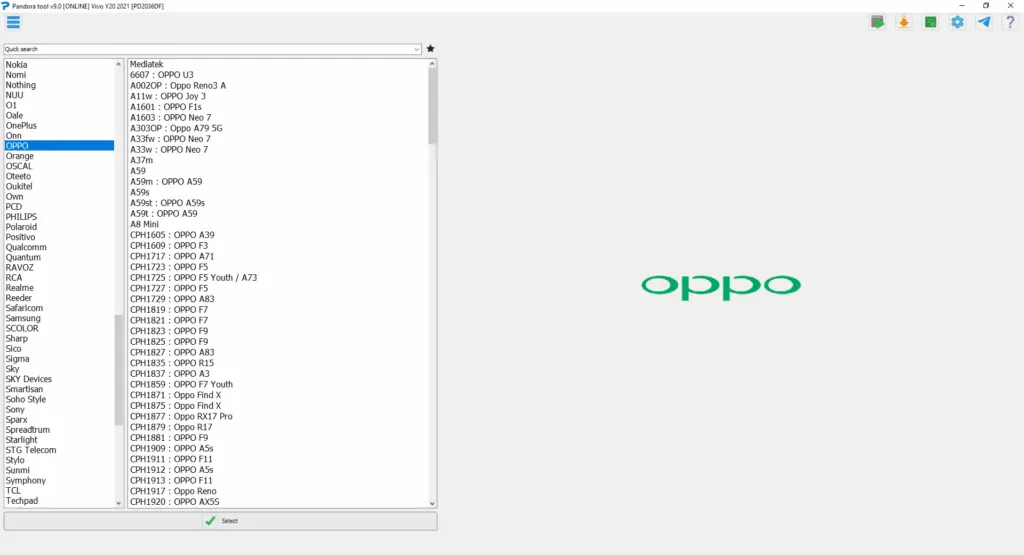
Pandora Tool boasts an impressive list of supported devices, constantly updated to include the newest releases. Below is a snapshot of some popular brands and their compatible chipsets:
| Brand | Models (Examples) | Supported Chipsets |
|---|---|---|
| Samsung | Galaxy S23/S22/S21, A54/A34, M54 | Qualcomm, Exynos |
| Xiaomi | Redmi Note 12, Poco X5, Mi 11T | Snapdragon, MediaTek |
| Oppo | A78, F21, Reno 8 | MediaTek, Qualcomm |
| Vivo | Y21, V25, X80 | Snapdragon, Dimensity |
| Realme | Narzo 50, GT Neo 3 | MediaTek, Snapdragon |
| And many more models across various brands! |
How to Use Pandora Tool Latest? (Step-by-Step Guide)
Using Pandora Tool is a straightforward process, though precise execution of each step is crucial for success.
System Requirements
| Component | Minimum Requirement |
|---|---|
| Operating System | Windows 10/11 64-bit |
| Processor | Intel/AMD 64-bit |
| RAM | 4GB minimum (8GB recommended) |
| Storage | 2GB free space |
| USB Ports | USB 2.0/3.0 working port |
| Permissions | Administrator rights |
Installation and Usage Steps
Install Latest Version:
- Download the latest version of the software from the official website.
- Install the application on your Windows PC.
- Always Run as Administrator to ensure proper permissions and functionality.
Connect Phone in Correct Mode:
- Samsung Devices: Place your device into Download Mode (typically by holding Volume Down + Power + Home/Bixby button simultaneously, or Volume Down + Power for newer models).
- Xiaomi/Realme (and other Qualcomm/MediaTek devices): Connect your device in EDL Mode (Emergency Download Mode, often achieved via test point or specific button combinations from Fastboot mode). Refer to device-specific guides for entering EDL.
Select Function & Start Process:
- Launch Pandora Tool.
- From the intuitive interface, select the desired function (e.g., “FRP Remove,” “Unlock,” “Flash Firmware”).
- Follow any on-screen prompts and then click the “Start” or “Execute” button to initiate the process.
- Wait patiently for the operation to complete. Do not disconnect the device during this stage.
Done! Phone Unlocked/Repaired:
- Once Pandora Tool indicates successful completion, safely disconnect your device.
- Reboot your phone. It should now be unlocked, have its FRP removed, or be repaired as per the operation performed.
Pandora Tool Price & Activation
Pandora Tool is a professional-grade solution and, as such, requires a paid license for full functionality.
1-Year License: Approximately $65 USD
Lifetime License (Box): Approximately $300 USD (This typically includes a hardware dongle, also referred to as a “Box,” which serves as the license key).
Where to Buy: It is highly recommended to purchase your official license directly from the Pandora Tool Store on the Z3X Team official website or through their authorized resellers to ensure authenticity and receive proper support.
Frequently Asked Questions
Is this free to use?
No, Pandora Tool requires a paid license for its full suite of features. However, a demo version might be available for testing basic functionalities or compatibility with your system.
Does Pandora Tool Activation work without a hardware box/dongle?
Yes! Pandora Tool offers both a hardware “Box” (lifetime license) and a software-based “Online Activation” (yearly license). The online activation allows you to use the tool via a USB cable connection without needing a physical hardware dongle. Current Pandora box owners can also use the software without the box after a specific software version (e.g., v4.0 and above).
Is Pandora Tool safe to use?
When downloaded solely from the official website and used according to instructions, Pandora Tool is safe. However, exercising caution is paramount. Avoid cracked or pirated versions, as these are often bundled with malware, viruses, or may cause irreparable damage to your device.
Conclusion “ Should You Invest in Pandora Tool?
Pandora Tool stands out as an exceptionally powerful and reliable solution for a wide range of smartphone servicing needs. Its broad support for various chipsets and major smartphone brands, combined with its user-friendly interface, makes it an attractive option for professionals.
Pros and Cons Analysis
| Pros | Cons |
|---|---|
| Effortless One-Click FRP Bypass | Paid Software (Requires Investment) |
| Extensive Model Support (1000+ models) | Requires Proper USB Drivers Setup |
| Consistent Monthly Updates | Windows 10/11 64-bit Required |
| Multi-functional (Flashing, Unlocking, Repair) | Learning Curve for Beginners |
| Professional-Grade Reliability | Hardware Box Additional Cost |
Best Suited For: Mobile phone technicians, repair shops, advanced users, and individuals who frequently work with smartphone software issues.
Final Verdict: If you’re a professional or an enthusiast seeking a robust, regularly updated, and efficient tool for Samsung, Xiaomi, Vivo, Oppo, Realme, and other Android smartphone unlocking and repair tasks, Pandora Tool is undoubtedly a worthwhile investment. Its comprehensive features and user-centric design position it as a leader in the mobile servicing industry.
Useful Links:
Official Website (Z3X Team): https://z3x-team.com/
Pandora Tool Product Page: https://z3x-team.com/products/pandora/


Author:
Abdul MalikMobile Software Expert and founder of GSM6.com. Specializes in FRP bypass, IMEI repair, and advanced mobile tools. All tutorials are tested on real devices for accuracy and safety.


