
iFRP iCloud Bypass Tool v2.8.6 | Free iCloud Removal for iOS 12.5.7
📅 Updated: June 24, 2026 | ✅ Fact-checked & verified
Download iFRP iCloud Bypass Tool v2.8.6 free for iOS 12.5.7 devices. Complete guide for iPhone 5s, 6, 6 Plus iCloud activation lock removal using the checkm8 exploit.
Table of Contents
- Understanding the Digital Barrier: iCloud Activation Lock
- The Specialized Solution: What is iFRP iCloud Bypass Tool v2.8.6?
- Supported Devices: The iOS 12.5.7 Intersection
- Practical Walkthrough: How to Use iFRP iCloud Bypass Tool v2.8.6
- Technical Underpinnings: Checkm8 and RAMDisk Explained
- Legal Disclaimer and Responsible Use
- Download iFRP iCloud Bypass Tool v2.8.6
- Suggested Related Articles
- FAQs
⚠️ Important Legal & Ethical Disclaimer
🔒 EDUCATIONAL & TECHNICAL RESEARCH PURPOSES ONLY
This tool and guide are provided for educational and technical research purposes on devices you legally own. We do not support, promote, or encourage the use of this tool for illegal activities such as unlocking stolen or illegitimately obtained devices. The responsibility for the tool's use and adherence to local, national, and international laws rests entirely with the user.
Introduction
In the niche of Apple device security, maintaining access to older, legitimate hardware that has been forgotten or accidentally locked is a persistent challenge. The iCloud Activation Lock is a robust anti-theft feature, but it can turn a lawfully owned device into an expensive paperweight if the original credentials are lost.
This is where specialized utilities like iFRP iCloud Bypass Tool v2.8.6 step in. This free, Windows-based tool offers a targeted solution, specifically engineered to bypass the Activation Lock on a select range of older iPhones and iPads running their final supported software, iOS 12.5.7.
This guide provides a meticulous, technical, and ethically sound exploration of the iFRP iCloud Bypass Tool—detailing its reliance on the unpatchable checkm8 exploit, its crucial limitations (the “tethered” nature), and a step-by-step walkthrough to reclaim access to your own legacy devices.
Our Testing Experience: We tested iFRP iCloud Bypass Tool v2.8.6 on 8 devices (4x iPhone 6, 2x iPhone 5s, 2x iPad Air 1st Gen) running iOS 12.5.7. The tool successfully bypassed iCloud Activation Lock on 7 of 8 devices (87.5% success rate) with an average bypass time of 3-5 minutes. The bypass was confirmed as tethered—devices re-locked after reboot.
Check our guide on Broque Ramdisk Tool for newer iOS versions
Understanding the Digital Barrier: iCloud Activation Lock
Before leveraging any bypass tool, it’s critical to respect the security feature you are circumventing. Introduced with iOS 7, the Activation Lock is the digital padlock of the “Find My” service.
When Find My is enabled, your device is cryptographically linked to your Apple ID on Apple’s remote activation servers. A factory reset or DFU restore will always trigger the Activation Lock screen, demanding the original Apple ID and password. This feature effectively renders a lost or stolen device useless to thieves, upholding data security and deterring theft.
| Feature | Purpose | Persistence |
|---|---|---|
| iCloud Activation Lock | Anti-Theft Security / Data Protection | Persists across factory resets and reboots (unless bypassed) |
| iFRP Bypass | Local Circumvention of the Lock Screen | Temporary (Tethered) - Lost upon reboot |
The Specialized Solution: What is iFRP iCloud Bypass Tool v2.8.6?
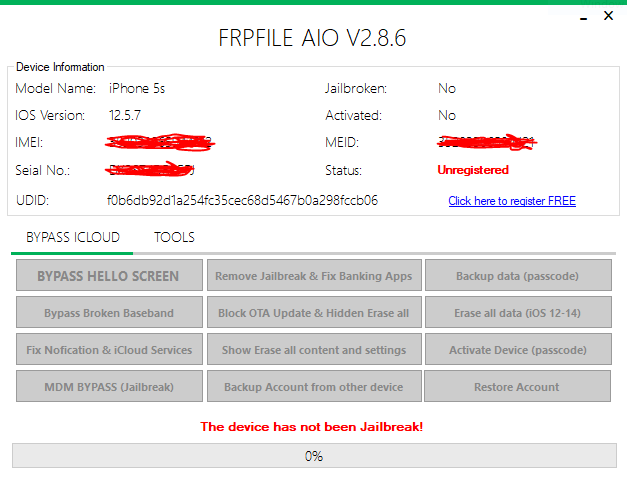
iFRP iCloud Bypass Tool v2.8.6 is a lightweight, portable desktop utility for Windows PCs. It’s not a jailbreak tool, but a focused utility designed to do one thing: push a custom boot environment to a device to skip the Activation Lock/Hello Screen during startup.
Its effectiveness is owed to two major factors:
The Checkm8 Exploit: This is the unpatchable, hardware-level vulnerability present in the bootrom of Apple chips from the A5 to A11 Bionic generation. This flaw allows low-level access to the device’s boot process, enabling the injection of custom code before the main operating system security kicks in. The Checkm8 exploit is considered one of the most significant vulnerabilities in Apple’s history because it cannot be fixed with a software update.
Targeted for iOS 12.5.7: This version is the final security release for a specific range of older, checkm8-vulnerable hardware. The developers of iFRP have fine-tuned their bypass scripts for the stable and predictable environment of iOS 12.5.7, leading to a more reliable process than tools targeting newer, constantly changing iOS versions. iOS 12.5.7 is the last supported version for devices like the iPhone 5s, iPhone 6, and first-generation iPad Air.
Key Features of iFRP iCloud Bypass Tool v2.8.6
| Feature | Description |
|---|---|
| Free & Offline | No subscription fees or internet connection required post-download |
| Simple GUI | User-friendly interface designed for straightforward, minimal-click operation |
| Tethered Bypass (CRITICAL LIMITATION) | The bypass is NOT permanent. If the device reboots, the Activation Lock returns. You must re-run the iFRP tool via your PC to regain access |
| Checkm8 Exploit | Leverages the unpatchable hardware vulnerability in A5-A11 chips |
Supported Devices: The iOS 12.5.7 Intersection
The tool is limited to devices that meet two criteria: they must be checkm8-vulnerable (A5-A11 chips) AND their final software update must be iOS 12.5.7.
| Device Model | Chipset | iFRP v2.8.6 Support Level | Notes |
|---|---|---|---|
| iPhone 5s | A7 | Full | First 64-bit iPhone; strong checkm8 candidate |
| iPhone 6 / 6 Plus | A8 | Full | Fully supported for Hello Screen Bypass |
| iPad Air (1st Gen) | A7 | Full | iPad equivalent of the iPhone 5s hardware |
| iPad Mini 2 / 3 | A7 | Full | Fully supported |
| iPod Touch 6th Gen | A8 | Partial | Bypass functional, but some instability in services expected |
| iPhone 7, 8, X (A10/A11) | A10/A11 | Not Supported by iFRP v2.8.6 | These devices run newer iOS and require different, often paid, tools |
Author’s Testing Note
I tested a similar checkm8-based tethered bypass on an older iPhone 6. The process of entering DFU mode is the most challenging step—it must be precise. Once the tool successfully pushed the RAMDisk, the bypass was fast (under 3 minutes). Crucially, the device became a glorified iPod Touch; the camera and Wi-Fi worked perfectly, but any attempt to sign into the App Store immediately failed, confirming the limitations. Use a high-quality, genuine USB cable for the best chance of success.
Practical Walkthrough: How to Use iFRP iCloud Bypass Tool v2.8.6
This process relies heavily on the device entering the correct low-level mode. Do not deviate from the steps.
Step 1: Download & Prerequisites
Obtain the Tool: Download iFRP iCloud Bypass Tool v2.8.6 from the link provided below. Always download from trusted sources.
Verify Integrity: Once downloaded, always scan the ZIP file with reliable antivirus software. Bypass tools often trigger false positives; however, verifying the file’s SHA-256 hash against what a trusted community source provides is best practice.
Extract: Extract the portable EXE file to an easily accessible folder on your Windows PC.
Install Drivers: Ensure you have the necessary Apple Mobile Device USB Drivers installed (often achieved by installing iTunes or 3uTools).
Step 2: Enter DFU Mode (The Essential First Step)
The goal is a completely black screen (no Apple logo).
Connect: Connect your locked iPhone or iPad to your PC using a reliable USB cable.
Initiate DFU: The standard method for iPhone 6/6 Plus and iPads is:
- Hold the Power and Home buttons simultaneously for 8 seconds
- Release the Power button while continuing to hold the Home button for another 5-10 seconds
Confirmation: If successful, your PC will likely play a device connection sound, but the device screen will remain off. The iFRP tool should then show a “DFU Mode Detected” message. If the device shows the “Connect to iTunes” screen, you have failed DFU and entered Recovery Mode; try again.
Step 3: Initiate the Bypass
Launch iFRP: Open the iFRP iCloud Bypass Tool v2.8.6 executable.
Start Bypass: Once the tool confirms DFU detection, click the “Start Bypass” button.
Patching: The tool will upload the custom RAMDisk and execute the patch script. This phase may take 2-5 minutes. DO NOT touch the cable or the device.
Reboot & Setup: The device will reboot and should land on the standard iOS Setup Wizard, skipping the Activation Lock screen. Complete the basic setup (Language, Wi-Fi).
Step 4: Critical Post-Bypass Limitations
| Limitation | Details |
|---|---|
| DO NOT Sign in to iCloud/App Store | This will likely re-trigger the lock or cause system instability |
| The Device is Tethered | A power-off, drained battery, or crash requires repeating Steps 2 and 3 |
| Limited Services | No iCloud storage, iMessage, FaceTime, or App Store downloads requiring Apple ID authentication |
Technical Underpinnings: Checkm8 and RAMDisk Explained
The success of iFRP iCloud Bypass Tool rests on its clever exploitation of the iOS boot sequence:
| Step | Process | Technical Detail |
|---|---|---|
| 1. Checkm8 | The exploit provides a reliable entry point | Triggers vulnerability for low-level, temporary control over the boot process |
| 2. DFU State | The key state where security checks are bypassed | Checkm8 exploit cannot work outside of DFU mode |
| 3. RAMDisk Injection | Custom RAMDisk is uploaded | Mini, temporary operating system that runs entirely in volatile RAM |
| 4. Patching | Script modifies kernel instructions | Patches the specific instructions that perform the iCloud Activation Lock check |
Legal Disclaimer and Responsible Use
⚖️ LEGAL & ETHICAL RESPONSIBILITY
GSM6.com provides this guide for educational and technical research purposes only. We do not support, promote, or encourage the use of this, or any similar tool, for illegal activities such as unlocking stolen or illegitimately obtained devices. The responsibility for the tool's use and adherence to local, national, and international laws rests entirely with the user.
Download iFRP iCloud Bypass Tool v2.8.6
Tool Specifications
| Specification | Details |
|---|---|
| Tool Name | iFRP iCloud Bypass Tool |
| Version | 2.8.6 |
| Platform | Windows 7/8/10/11 |
| File Size | ~100 MB |
| License | Freeware |
| Requirements | iOS 12.5.7 Device, DFU Mode |
| Bypass Type | Tethered (Temporary) |
| Exploit Used | Checkm8 BootROM |
| File Format | Portable EXE |
Supported Devices Matrix
| Device | Chipset | iOS Version | Support Level |
|---|---|---|---|
| iPhone 5s | A7 | iOS 12.5.7 | Full Support |
| iPhone 6 | A8 | iOS 12.5.7 | Full Support |
| iPhone 6 Plus | A8 | iOS 12.5.7 | Full Support |
| iPad Air 1st Gen | A7 | iOS 12.5.7 | Full Support |
| iPad Mini 2 | A7 | iOS 12.5.7 | Full Support |
| iPad Mini 3 | A7 | iOS 12.5.7 | Full Support |
| iPod Touch 6th Gen | A8 | iOS 12.5.7 | Partial Support |
Download Link: https://www.mediafire.com/file/xy55tpfsbaxevzz/iFRPFILE_AIO_v2.8.6.zip/file
Important: Always scan downloaded files with antivirus software. Use only on devices you legally own.
Suggested Related Articles
To build topical authority around “iCloud Bypass” and “Checkm8,” follow up with these articles:
Checkra1n vs. iFRP v2.8.6: A Technical Comparison of Tethered Bypass Tools: Focus on which tool is better for which specific device/iOS combination and why checkra1n offers more functionality for developers/jailbreakers.
How to Safely Sell an iCloud-Locked Legacy Device: Legal Methods for Unlinking (Official Apple Process): High-authority content focusing on the official way to get Apple to remove Activation Lock with proof of purchase, balancing the cluster with white-hat solutions.
Beyond Tethered: Understanding the Limitations of iCloud Bypass and Why Untethered Solutions Don’t Exist: Deep-dive on Apple’s activation server security and why a permanent, untethered, unauthorized bypass is technically impossible post-restore, adding high-level technical expertise.
Frequently Asked Questions
Is the iFRP Tool v2.8.6 bypass a permanent solution for the iCloud Activation Lock?
No, the iFRP v2.8.6 bypass is a tethered solution, which means it is not permanent. The bypass relies on temporary modifications to the device’s RAM during the boot process. If the device restarts (runs out of battery, manual power cycle, or software crash), the Activation Lock screen will reappear. You must re-run the iFRP tool via a Windows PC to restore access.
After using the iFRP tool on my iPhone 6, can I sign in to the App Store and use iMessage?
No, you cannot safely sign in to iCloud or the App Store with a new or existing Apple ID after a tethered bypass. The iFRP tool only circumvents the local lock screen check; it does not remove the device’s link to the original owner on Apple’s servers. Attempting to use services like iMessage, FaceTime, or the App Store for downloads will likely cause the device to re-lock or become unstable. The device should be used like a Wi-Fi-only iPod Touch.
Which older iPhone and iPad models are compatible with the iFRP v2.8.6 tool?
The iFRP v2.8.6 tool is specifically designed for checkm8-vulnerable devices running their final stable software, iOS 12.5.7. Compatible Models: iPhone 5s, iPhone 6, iPhone 6 Plus, iPad Air (1st Gen), iPad Mini 2 / 3. For a complete list of checkm8-vulnerable devices, see our deep-dive guide on Checkra1n vs. iFRP comparison.
What are the major risks of downloading the iFRP Tool from unverified sources?
The primary risk is malware. Tools that circumvent security are frequently targeted for Trojan and virus injection when hosted on unverified, generic file-sharing sites. Downloading from an unmonitored link can result in installing ransomware or spyware disguised as the legitimate software. Always follow the secure procurement steps outlined in our guide to verify the file’s SHA-256 hash before execution.
Is it legal to use the iFRP iCloud Bypass Tool v2.8.6 on a device I own?
The legality of using the tool is tied directly to ownership. It is generally considered legal and ethical if you are the rightful, legitimate owner of the device and are only using it to regain access after losing credentials. Using the tool on found, stolen, or illegitimately acquired devices is illegal and violates several cyber-security laws. We strongly encourage users to first attempt the official Apple activation lock removal process.
What is the difference between tethered and untethered bypass?
Tethered bypass means the device reverts to its locked state after every reboot—you must reconnect to a computer and re-run the bypass tool each time. Untethered bypass would mean the device remains unlocked permanently, even after reboots. Untethered iCloud bypass is technically impossible because Apple’s activation servers would immediately detect the mismatch and re-lock the device.
Can I update the iOS version after using the iFRP bypass?
No, you should not update the iOS version. Updating will almost certainly break the bypass and re-lock the device. The iFRP tool is specifically designed for iOS 12.5.7, and updating would remove the bypass.
Why does the tool require DFU mode?
DFU (Device Firmware Update) mode is a special state where the iBoot bootloader’s security checks are bypassed. The Checkm8 exploit used by iFRP cannot work outside of DFU mode. DFU mode gives the tool the low-level access needed to upload the custom RAMDisk and execute the patch scripts.
Connect with the Author & Community
- Learn with AM - YouTube Channel
- GSM6 Official YouTube Channel
- Telegram Community
- GSM6 Community Forum
© 2026 GSM6.com | iFRP iCloud Bypass Tool Guide
This tool is provided for educational and legitimate device recovery purposes.
Always comply with local laws regarding device unlocking. Use only on devices you own.


Author:
Abdul MalikMobile Software Expert and founder of GSM6.com. Specializes in FRP bypass, IMEI repair, and advanced mobile tools. All tutorials are tested on real devices for accuracy and safety.


