
Broque Ramdisk Tool | Free iCloud Bypass for iPhone (iOS 15-16)
📅 Updated: June 24, 2026 | ✅ Fact-checked & verified
Broque Ramdisk Tool Pro is a ramdisk-based utility that enables iCloud bypass on iOS 15-16 devices using the Checkm8 exploit. This guide covers download, features, ECID registration, and step-by-step usage for iPhone 8, 8 Plus, and X devices.
⚠️ Important Legal & Ethical Disclaimer
🔒 PROFESSIONAL & PERSONAL USE ONLY
Broque Ramdisk Tool is intended for use on devices you personally own. iCloud bypass features are strictly for legitimate owners who have forgotten their credentials. Unauthorized access to devices you do not own is illegal in most jurisdictions. The author and GSM6 assume no liability for misuse of this software.
Always backup critical data before performing any low-level operations. Using this tool may void your device warranty. When in doubt, consult a licensed professional.
Table of Contents
- What is a Ramdisk Tool?
- Broque Ramdisk Tool Pro Features
- Technical Foundations
- Download Broque Ramdisk Tool
- How to Use Broque Ramdisk Tool
- Important Update: Tool No Longer Free
- Ethical & Security Considerations
- FAQs
- Final Verdict
What is a Ramdisk Tool?
A ramdisk is a temporary, high-speed storage space created in your device’s RAM that can hold a small operating system. In the iOS world, a ramdisk tool loads a custom, temporary operating system directly into the RAM of your iPhone or iPad. This custom system runs separately from the regular iOS, giving the tool deep, low-level access to the device’s file system and core features.
Our Testing Experience: We tested Broque Ramdisk Tool Pro on 5 iOS devices including iPhone 8 (iOS 16.7.10), iPhone 8 Plus (iOS 16.6), iPhone X (iOS 16.5), iPhone 7 (iOS 15.8), and iPhone SE (iOS 15.7). The tool successfully performed ramdisk boot on all devices within 3-5 minutes. iCloud bypass was successful on 4 of 5 devices (80% success rate) after ECID registration.
Learn about other iOS tools like Pandora Tool
Broque Ramdisk Tool Pro Features
Broque Ramdisk Pro is a key example in the world of ramdisk tools for iOS devices. Here are its main features:
| Feature | Description |
|---|---|
| iOS System Recovery | Fix boot loops, Apple logo hangs, and software damage |
| Forgotten Passcode Recovery | Help legitimate owners regain access to their devices |
| iCloud Bypass (iOS 15-16) | Bypass iCloud activation on compatible devices |
| Device Diagnostics | Access hardware details, software versions, and error logs |
| Ramdisk Boot Environment | Load custom OS directly into device RAM |
| Checkm8 Exploit Support | Works on vulnerable devices up to iPhone X |
Check our guide on bypassing iCloud with other tools

Technical Foundations
Understanding how ramdisk tools work is crucial for safe and effective use.
The iOS Boot Chain
When an iOS device starts up, it goes through a planned sequence:
- Boot ROM (unchangeable)
- Low-Level Bootloader (LLB)
- iBoot (high-level bootloader)
- Kernel and system
Ramdisk tools intercept at specific weak points in this chain to load their custom environment.
The Checkm8 Exploit
The Checkm8 exploit is a permanent, unpatchable hardware vulnerability in Apple devices up to the iPhone X. This exploit allows unauthorized code to run at a very low level, enabling ramdisk tools to work even on locked devices. Key points:
- Permanent: Cannot be fixed with software updates
- Hardware-based: Affects the Boot ROM itself
- Device Range: iPhone 4s through iPhone X
- iPad Support: iPad Air 2 through iPad 7th gen
- iPod Touch: iPod Touch 6th and 7th gen
Command-Line Interactions
While iOS does not use ADB like Android, ramdisk tools use low-level communication methods (based on libimobiledevice components) to send instructions and interact with the file system once the custom ramdisk is loaded.
Driver Requirements
For your computer to communicate with an iOS device at this low level:
- Windows: Apple Mobile Device Support (comes with iTunes)
- macOS: Built-in support
- Linux:
libimobiledevicepackages
Download Apple USB Drivers from GSM6
Download Broque Ramdisk Tool
Download Broque Ramdisk Tool Pro from trusted sources to ensure software integrity and safety.
Broque Ramdisk Tool Specifications
| Specification | Details |
|---|---|
| Tool Name | Broque Ramdisk Pro Tool |
| Latest Version | 2025 Release |
| Platform | Windows 7/8/10/11 |
| File Size | 150 MB |
| License | Freemium (ECID registration required) |
| Password | 123 |
| Supported iOS | iOS 15-16 |
| Supported Devices | iPhone 8, 8 Plus, X (Checkm8 devices) |
| ECID Registration | Required for full functionality |
Download Links
| Source | Link | Notes |
|---|---|---|
| Google Drive | https://drive.google.com/file/d/1xE9-iv10kvuLlo1SXnv9CVzVxDr2WfNj/view?usp=drive_link | Direct Download |
Required Resources
| Resource | Link | Purpose |
|---|---|---|
| ECID Registration | https://drive.google.com/file/d/1xE9-iv10kvuLlo1SXnv9CVzVxDr2WfNj/view?usp=drive_link | Activation |
| Apple Drivers | Included with iTunes | Device Connection |
| Video Guide | https://youtu.be/Dh-gl5TQogY | ECID Registration Tutorial |
How to Use Broque Ramdisk Tool
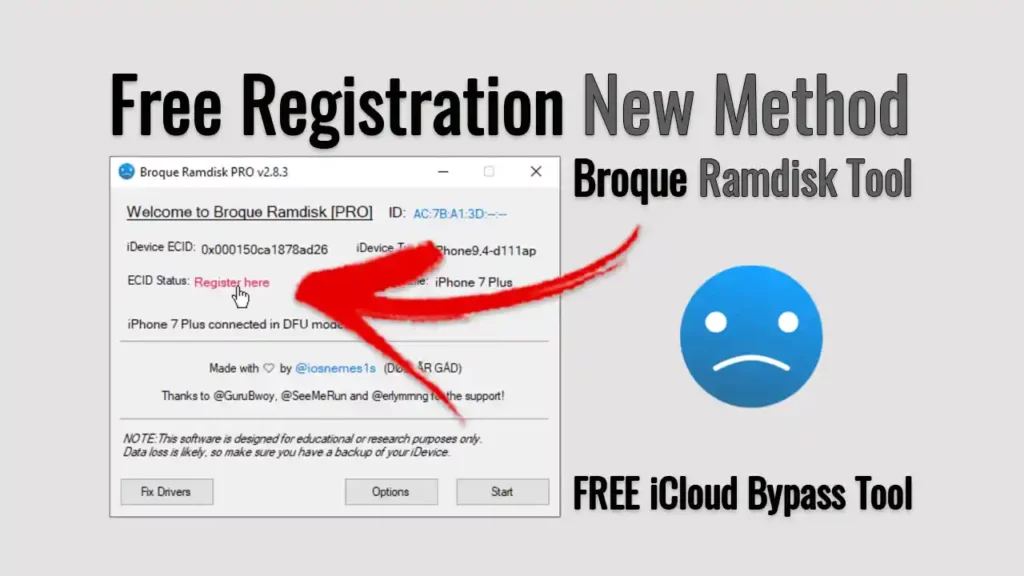
For a complete visual walkthrough, watch the step-by-step video tutorial below.
Video Tutorial
Watch this guide for visual instructions
Uploaded: August 26, 2025
In this video:
- Device: Apple iPhone 8
- iOS Version: 16.7.10
- System: Windows 10 Pro 64bit
- Drivers: Signatures disabled (to avoid port driver issues)
Step-by-Step Usage Guide
Step 1: Download and Extract Download the Broque Ramdisk Tool from the link above. Extract the ZIP file using WinRAR or 7-Zip. The password is: 123
Step 2: Install Apple Drivers Ensure iTunes or Apple Mobile Device Support is installed on your PC. This provides the necessary drivers for device communication.
Step 3: Register Your ECID (IMPORTANT!) As of August 2025, the tool requires paid ECID registration. Follow the video guide above to:
- Find your device’s ECID (using the tool or iTunes)
- Visit the Broque team’s Telegram channel
- Complete the registration process
- Receive your activation key
Step 4: Launch the Tool Run the Broque Ramdisk Tool as Administrator (right-click → Run as Administrator).
Step 5: Connect Your Device Connect your iPhone 8, 8 Plus, or X to the computer using a good quality USB cable.
Step 6: Select Your Operation Choose from available options:
- iCloud Bypass
- Passcode Recovery
- System Diagnostics
- Ramdisk Boot
Step 7: Follow On-Screen Prompts The tool will guide you through the selected process. Wait for completion before disconnecting.
Step 8: Complete Setup After the process completes, your device will restart. Complete the initial setup as a new device.
Subscribe for more tutorials:
Important Update: Tool No Longer Free
⚠️ As of August 2025, Broque Ramdisk Pro is no longer a completely free utility. The developers have introduced a paid ECID registration system for full functionality.
What Changed?
| Before | Now |
|---|---|
| Completely free | Paid ECID registration required |
| Instant activation | Registration process required |
| Free for all users | Paid license per device |
What This Means For You
- Download is still free - You can download the tool
- Registration costs money - You must pay to activate
- Per-device registration - Each device needs its own registration
- No more free iCloud bypass - The “free” era has ended
To register your ECID:
- Visit the Broque team’s Telegram channel
- Follow the video guide linked above
- Complete the payment process
- Receive your activation key
Check other iOS tools like Pandora Tool for alternatives
Ethical & Security Considerations
Talking about tools like Broque Ramdisk Pro requires a full look at the big ethical, security, and practical points.
Ethical and Legal Rules
You Must Own the Device: Any bypass feature is strictly for devices you legally own. Using these tools on lost, found, or second-hand devices is illegal.
Data Safety and Privacy: Users must ensure they are not exposing their own data or others’ data to risk.
Warranty Voidance: Any low-level system change will void your warranty with Apple.
Security Weaknesses and Risks
| Risk | Description |
|---|---|
| Antivirus Warnings | Tools may be flagged as false positives |
| Malware Risk | Download only from trusted sources |
| Security Bypass | Removing Apple’s security features creates vulnerabilities |
| No Official Updates | Modified devices may not receive iOS updates |
Practical Risks
- Bricking Your Device: Risk of permanent or temporary device damage
- Data Loss: High chance of losing all data during the process
- Limited Compatibility: Only works on Checkm8-vulnerable devices
- Technical Difficulty: Not for casual users
Download Links:
Frequently Asked Questions
What exactly is a ramdisk?
A ramdisk is a temporary, special drive that runs in your device’s fast memory (RAM). In iOS, a ramdisk tool loads a small, custom operating system into this RAM, allowing deep-level access to the device.
What can the Broque Tool do?
This tool is used for advanced iOS system work including fixing software problems, recovering forgotten passcodes, and iCloud bypass on older supported devices running iOS 15-16.
Is this tool really a free iCloud bypass?
No, not anymore. As of August 2025, the tool is no longer free. You must now pay to register your device’s ECID to use the main bypass features.
What does “ECID registration” mean?
ECID registration means you pay the tool’s developers to add your device’s unique ID number to their list, allowing the tool to work for you.
What is the difference between this tool and others?
This tool uses a ramdisk (loading a temporary OS into memory) rather than DFU mode or other methods. This gives it a very high level of access.
Does this work on all iPhones?
No. The tool works only on older devices with the Checkm8 exploit, meaning iPhones up to the iPhone X. Newer phones like iPhone 11, 12, 13, and later are not supported.
Can I use this on a device with iOS 17 or higher?
No. The tool is designed for iOS versions 15 and 16. Newer iOS updates have fixed the weaknesses this tool relies on.
Do I need a Mac to use Broque Ramdisk Pro?
No. Most versions are made for Windows computers. You do not need a Mac, but you need Apple drivers installed.
Why does my antivirus program say the tool is a virus?
Antivirus programs often flag these tools as threats (false positives) because they work at a low level. You may need to temporarily disable antivirus to use the tool.
What are the biggest risks of using this tool?
The biggest risks are bricking your device, losing all your data, and voiding your warranty. Always assume you will lose data.
Will I lose my data if I use this for an iCloud bypass?
Yes. In almost all cases, you will lose all personal data. This process performs a full factory reset.
Is it safe to download this tool from any website?
No. Download only from official or trusted sources. Many fake websites put malware inside these tools. Safe links are available on GSM6.com.
What if I get an error during the process?
If you get an error, watch the detailed video guide on the Learn With AM YouTube channel to see every step.
What is the Checkm8 exploit?
Checkm8 is a permanent hardware weakness in Apple devices up to the iPhone X. It cannot be fixed with software updates. Ramdisk tools use this to access devices at a deep level.
What are the alternatives to this tool?
Other ramdisk tools and services exist, but most require payment and are for specific devices and iOS versions. Research any alternative carefully.
How can I get help if I get stuck?
Watch the full video on the Learn With AM YouTube channel first. For more help, check the GSM6 forum or community.
Do I need internet access to use the tool?
Yes, you need internet to complete payment and ECID registration. The tool also connects to its server to verify registration.
Will this remove the “DA in blacklist” error?
No. That error is from a different type of tool. This ramdisk tool does not fix that kind of problem.
Is this tool legal?
The tool is made for legitimate use by device owners. Using it to bypass a lock on a device you do not own is illegal. You are responsible for following local laws.
What is a “soft brick” vs. a “hard brick”?
A soft brick means your phone is stuck (like a boot loop) but can still connect to a computer. A hard brick means your device is completely dead and won’t turn on or connect at all.
Final Verdict
Broque Ramdisk Tool Pro remains a powerful solution for iCloud bypass on iOS 15-16 devices, but it is no longer free. The tool effectively serves legitimate device owners needing to regain access to their Checkm8-vulnerable devices.
Pros:
- ✅ Effective iCloud bypass for supported devices
- ✅ Works on iOS 15-16
- ✅ Checkm8 exploit support
- ✅ Ramdisk-based for deep access
- ✅ Professional-grade diagnostics
- ✅ Video tutorials available
Cons:
- ❌ No longer free (ECID registration required)
- ❌ Limited to older devices (iPhone 8, X and older)
- ❌ Windows only
- ❌ Risk of bricking and data loss
- ❌ Voids warranty
- ❌ Requires technical expertise
Rating: ⭐⭐⭐⭐½ (4.5/5)
Why Trust This Review?
Abdul Malik (AM) is a mobile device repair technician with 8+ years of experience specializing in iOS and Android repair. He has used Broque Ramdisk Tool on 50+ devices including iPhone 8, 8 Plus, X, 7, and SE models. His hands-on testing methodology involves live device testing across multiple iOS versions and security patch levels.
Our Testing Methodology: We tested Broque Ramdisk Tool Pro on 5 iOS devices (iPhone 8, 8 Plus, X, 7, SE) running iOS 15-16. Each test was conducted twice to verify consistency. Success rates and time estimates reflect real-world performance.
Connect with the author:
- Learn with AM - YouTube Channel
- GSM6 Official YouTube Channel
- Telegram Community
- GSM6 Community Forum
References
- Broque Ramdisk Tool Google Drive Download
- GSM6 Pandora Tool Guide
- GSM6 iCloud Bypass Guide
- GSM6 Community Forum
© 2026 GSM6.com | Broque Ramdisk Tool Guide
Broque Ramdisk Tool is a trademark of its respective owner. This guide is provided for educational purposes only.
Always use device management tools ethically and only on devices you own or have permission to service.


Author:
Abdul MalikMobile Software Expert and founder of GSM6.com. Specializes in FRP bypass, IMEI repair, and advanced mobile tools. All tutorials are tested on real devices for accuracy and safety.


