
• Abdul Malik (AM) • misc • 1 min
Qualcomm IMEI Repair Tool B19 v0.0.1 Latest - Free Download 2026
Looking for a free Qualcomm IMEI repair tool that actually works? Look no further than Qualcomm IMEI Repair Tool B19 v0.0.1. This remarkably lightweight yet incredibly powerful Windows utility empowers you to effortlessly repair or restore null or invalid IMEI numbers on your Qualcomm Android devices, all through the convenient DIAG port.
Whether your smartphone is displaying frustrating messages like “No Service,” “Invalid IMEI,” or “Baseband Unknown,” this tool is designed to get the job done efficiently. The best part? It’s a one-click solution “ no expensive hardware boxes, no dongles, and absolutely no paid activation required.
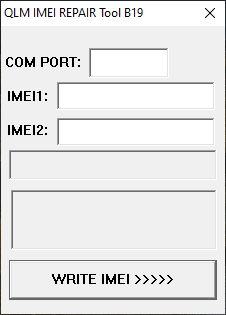
Qualcomm IMEI repair tool b19 - free
What is Qualcomm IMEI Repair Tool B19 v0.0.1?
Qualcomm IMEI Repair Tool B19 v0.0.1 is a freeware application meticulously crafted to enable users to write or restore the original IMEI on Android phones powered by Qualcomm chipsets. It operates by leveraging Qualcomm DIAG Mode, a crucial diagnostic interface on these devices. This tool is an invaluable asset for both individual users and mobile repair technicians grappling with IMEI-related complications that often arise after flashing custom ROMs, replacing motherboards, or performing various hardware repairs.
Key Features That Make This Tool Stand Out
Qualcomm IMEI Repair Tool Features Table
| Feature | Benefit |
|---|---|
| Qualcomm DIAG Port Support | Direct modem communication for effective repair |
| One-Click IMEI Write | Simple operation suitable for beginners |
| Single & Dual SIM Support | Works with all modern phone configurations |
| No Dongle Required | 100% software solution, no hardware costs |
| Lightweight Application | Only 21KB file size, minimal system impact |
| Free No Activation | No subscriptions, payments, or licenses |
| Multiple Brand Support | Xiaomi, Vivo, Oppo, Pixel, Lenovo, etc. |
| Windows 7-11 Compatible | Broad operating system support |
Essential Requirements for Successful Operation
Before you proceed with using the Qualcomm IMEI Repair Tool B19 v0.0.1, ensure you have the following prerequisites in place:
Windows PC: Compatible with Windows 7, 8, 10, or 11 (both 32-bit and 64-bit versions).
Installed Qualcomm USB Drivers: Crucial for your PC to recognize and communicate with your Qualcomm device.
Standard USB cable: For connecting your phone to your computer.
Enabled DIAG port access on your phone: This is a vital step for the tool to function correctly.
Download Qualcomm IMEI Repair Tool B19 v0.0.1
Tool Specifications
| Specification | Details |
|---|---|
| Tool Name | Qualcomm IMEI Repair Tool B19 v0.0.1 |
| Version | 0.0.1 (B19) |
| Platform | Windows (32-bit & 64-bit) |
| File Size | 21 KB |
| Format | ZIP Archive |
| Password | gsm6.com |
| License | Freeware |
| Price | Free |
| Release Date | September 2025 |
Download Sources
| Source | Link | Status |
|---|---|---|
| Google Drive (Primary) | Download Link | Active |
| Alternative Mirror | Coming Soon | - |
| Direct Download | EXE Version Available | Verified |
Official Download Link: https://drive.google.com/file/d/1y3om-lA5rSOTIK2UJqJWJ_PsAeYtuD85/view
Password: gsm6.com
How to Use the Tool “ Step-by-Step Guide
Important Legal Notice: This tool is designed exclusively for restoring your device’s original IMEI number. Modifying or changing IMEI numbers illegally is a serious criminal offense in many jurisdictions and can lead to severe legal consequences. Please use this tool responsibly and in accordance with local laws.
IMEI Repair Process Flow
| Step | Action | Details |
|---|---|---|
| 1 | Download & Extract | Get tool from official source, extract ZIP file |
| 2 | Install Drivers | Install Qualcomm USB Drivers on Windows PC |
| 3 | Enable USB Debugging | Activate Developer Options > USB Debugging |
| 4 | Activate DIAG Mode | Dial ##717717## or use ADB command |
| 5 | Connect Device | Use quality USB cable to connect phone to PC |
| 6 | Select COM Port | Choose correct port in tool interface |
| 7 | Enter Original IMEI | Input 15-digit IMEI from device box/sticker |
| 8 | Click Write | Initiate IMEI writing process |
| 9 | Reboot Device | Manually restart phone to apply changes |
| 10 | Verify IMEI | Dial *#06# to confirm successful repair |
Download & Extract: Download the tool from the provided link and extract its contents to a convenient location on your Windows PC.
Install Qualcomm USB Drivers: If you haven’t already, install the necessary Qualcomm USB Drivers on your computer.
Enable USB Debugging: On your Android phone, navigate to Developer Options and enable USB Debugging.
Activate DIAG Mode: This is a critical step. You can usually activate DIAG Mode by:
Dialing
*#*#717717#*#*in your phone’s dialer, ORUsing an ADB command from your PC:
adb shell setprop sys.usb.config diag,adb
Connect Your Phone: Connect your Android phone to your PC using a high-quality USB cable.
Open the Tool: Launch the Qualcomm IMEI Repair Tool B19 v0.0.1 application.
Select COM Port: Within the tool’s interface, select the correct COM port corresponding to your connected phone.
Enter Original IMEI: Carefully enter your phone’s original IMEI number into the designated field. You can usually find your original IMEI on the phone’s packaging, a sticker under the battery (for removable batteries), or by dialing
*#06#on a working device.
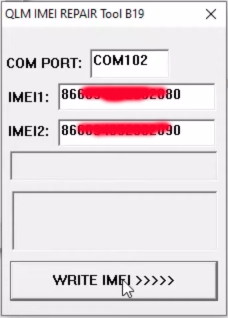
- Click “Write”: With the IMEI entered, click the “Write” button to initiate the repair process.
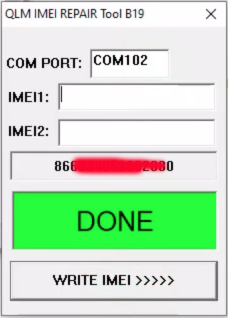
- Reboot Manually: After the tool indicates completion, manually reboot your phone. Upon restart, your correct IMEI should be restored, and network services should be functional again.
Video Tutorial Guide
here is step by step video guide, in this video i did repair imei numbers on google pixel 4 xl by using qualcomm imei repair free tool b19 v.0.0.1.. requirementsfor for this tutorial.
- Windows 10 64bit (works with 7 to 11 all windows)
- Qualcomm android usb drivers
- Android Paltform Tools
- Android USB drivers
Video Tutorial
Watch this guide for visual instructions
Uploaded: September 19, 2025
Supported Devices & Chipsets (Examples)
This versatile tool extends its support to a broad spectrum of phones equipped with Qualcomm chipsets, including but not limited to:
Supported Brands and Models
| Brand | Popular Models | Chipset Examples |
|---|---|---|
| Xiaomi | Redmi Note series, Poco series | Snapdragon 7xx, 8xx |
| Vivo/iQOO | Vivo V/Y series, iQOO Z/Neo | Snapdragon 6xx, 7xx |
| Oppo/Realme | Realme GT, Oppo Reno | Snapdragon 7xx, 8xx |
| Google Pixel | Pixel 3, 4, 5 series | Snapdragon 845, 855, 765G |
| Lenovo/Motorola | Moto G/E series | Snapdragon 4xx, 6xx |
| Other Brands | ZTE, Coolpad, Infinix | Various Qualcomm chipsets |
Why You Might Need This Tool
You should consider using the Qualcomm IMEI Repair Tool B19 v0.0.1 if you are experiencing any of the following issues:
Your phone is displaying a “Null IMEI” or “Invalid IMEI” error.
Your IMEI was inadvertently lost after performing a firmware flash or ROM update.
You are consistently facing “No Network” or “Emergency Calls Only” service limitations.
You have recently replaced your phone’s mainboard or baseband chip.
You are a mobile repair technician in need of a fast, reliable, and legal solution for IMEI writing.
Legal Notice and Disclaimer
Warning: Altering or modifying IMEI numbers is strictly prohibited and illegal in numerous countries worldwide. This tool is provided solely for the legitimate purpose of restoring your phone’s original IMEI after a valid repair or replacement. gsm6.com unequivocally does not endorse, promote, or support any illegal activities. Users are solely responsible for ensuring their actions comply with all applicable local, national, and international laws and regulations.
Related Tools & Guides for Enhanced Knowledge
To further assist you in resolving mobile device issues, we recommend exploring these related resources:
How to Enable DIAG Port on Qualcomm Devices: Learn the essential steps to unlock the DIAG port on your Qualcomm phone.
Qualcomm USB Driver Download (All Versions): Access a comprehensive collection of Qualcomm USB drivers for various modes.
Final Thoughts
The Qualcomm IMEI Repair Tool B19 v0.0.1 stands out as one of the most user-friendly and rapid solutions available for repairing a corrupted or missing IMEI on Qualcomm-powered Android phones. It eliminates the need for complex setups or expensive professional equipment. Simply connect, write, and resolve your IMEI issues with ease.
œ… Free to Use
œ… Thoroughly Tested
œ… Easy for Beginners to Master
œ… Trusted by Mobile Repair Experts Worldwide
For more invaluable IMEI tools, comprehensive unlocking guides, and the latest flashing tips, make sure to bookmark gsm6.com and stay informed with our regular updates!
Frequently Asked Questions
What exactly is IMEI and why is it important?
IMEI stands for International Mobile Equipment Identity. It’s a unique 15-digit serial number that identifies your specific mobile phone on a global scale. It’s crucial for network identification, theft tracking, and ensuring your phone can connect to mobile networks. A null or invalid IMEI means your phone won’t be able to make calls, send texts, or access mobile data.
Is Qualcomm IMEI repair tool truly free? Are there any hidden costs or premium features?
Yes, the Qualcomm IMEI Repair Tool B19 v0.0.1 is genuinely 100% free to download and use. There are no hidden costs, subscriptions, paid activations, or premium features. It’s designed to be accessible to everyone who needs it for legitimate IMEI restoration.
Is Qulcomm imei repair tool legal to use this tool?
It is legal to use this tool only for the purpose of restoring your phone’s original IMEI number. For example, if your phone’s IMEI became null after a software flash or mainboard replacement, you can legally use this tool to write back the original IMEI. However, deliberately changing or modifying your IMEI to a different, non-original number is illegal in many countries and can carry severe penalties.
My phone’s IMEI is showing “Null” or “Invalid.” Can this tool fix it?
Yes, qualcomm imei repair tool is specifically designed to address “Null IMEI” or “Invalid IMEI” issues on Qualcomm-based Android devices, provided you have access to the original IMEI number.
What if I don’t know my phone’s original IMEI number?
You must have your original IMEI number to use this tool. Without it, you cannot restore your IMEI. You can usually find your original IMEI: On the phone’s original packaging box. On a sticker under the battery (for phones with removable batteries). On the purchase receipt or warranty card. If you backed up your phone’s EFS/NVRAM partition before the issue, the IMEI might be recoverable from there.
Do I need root access to use Qualcomm IMEI Repair tool?
Generally, no. qualcomm imei repair tool operates through the Qualcomm DIAG port, which is a diagnostic mode and doesn’t always require full root access. However, you do need to enable USB Debugging and successfully activate DIAG mode as per the instructions.
The tool isn’t detecting my phone’s COM port. What should I do?
This usually indicates a driver or DIAG mode issue. Ensure Qualcomm USB Drivers are correctly installed on your PC. Verify that you have successfully enabled DIAG mode on your phone using the provided codes or ADB commands. Try a different USB port or USB cable. Temporarily disable any antivirus software that might interfere (remember to re-enable it afterward).
Can this tool fix network issues not related to IMEI (e.g., SIM card not detected, weak signal)?
This tool specifically addresses IMEI-related network issues (like “No Service” due to an invalid IMEI). If your network problems are due to a faulty SIM card reader, antenna damage, or carrier issues, this tool will not resolve them.
Is it safe to use this tool? Can it brick my phone?
When used correctly and according to the instructions (especially regarding entering the original IMEI), the tool is generally safe. However, improper use, entering incorrect IMEI numbers, or interrupting the process can potentially cause further software issues. Always proceed with caution and ensure you follow every step accurately.
Where can I find the latest version of this tool or similar tools?
You can always find the latest updates and related tools on gsm6.com. We regularly update our resources to provide the best solutions for mobile device repair and unlocking.
What Qualcomm chipsets does this tool support?
The tool supports most Qualcomm Snapdragon chipsets including 4xx, 6xx, 7xx, and 8xx series. It works with devices using Qualcomm modems that have accessible DIAG ports.
How do I enable DIAG mode if dialer code doesn’t work?
If ##717717## doesn’t work, try alternative codes: ##13491##, ##3646633##, or use ADB command: adb shell setprop sys.usb.config diag,adb. Some devices may require root for DIAG mode activation.
Can I use this tool for multiple phones?
Yes, you can use the same tool installation for multiple Qualcomm devices. Just ensure you’re entering the correct original IMEI for each specific device.
What should I do if tool shows “Write Failed” error?
Check these: Ensure DIAG mode is active, use correct COM port, verify Qualcomm drivers are installed, try different USB cable/port, ensure phone battery >50%, run tool as administrator.
Does this tool backup original IMEI before writing?
No, this tool doesn’t include backup feature. Always manually note down or backup your original IMEI before any repair operations using other tools like QPST.
Can this tool fix IMEI on locked bootloader devices?
Usually yes, if DIAG mode can be activated. Some carriers may lock DIAG access on bootloader-locked devices, requiring bootloader unlock first.
What Windows versions are supported?
Windows 7, 8, 8.1, 10, and 11 (both 32-bit and 64-bit). May require compatibility mode settings on newer Windows versions.
Is internet connection required for this tool?
No, the tool works completely offline once downloaded. No internet connection is needed for IMEI writing operations.
How do I find my phone’s COM port number?
Connect phone in DIAG mode, open Windows Device Manager > Ports (COM & LPT). Look for “Qualcomm HS-USB” or similar entry with COM number.
Can I repair dual IMEI with this tool?
Yes, the tool supports both single and dual SIM devices. Enter IMEI1 for SIM1 slot and IMEI2 for SIM2 slot if applicable.
What’s the difference between this and paid IMEI repair boxes?
This tool provides basic IMEI writing via DIAG port for free. Paid boxes often offer more features like direct NV item editing, cert writing, and support for more security levels, but for basic IMEI restoration, this free tool is sufficient.


Author:
Abdul MalikMobile Software Expert and founder of GSM6.com. Specializes in FRP bypass, IMEI repair, and advanced mobile tools. All tutorials are tested on real devices for accuracy and safety.


