
• Abdul Malik (AM) • misc • 1 min
Download MediaTek USB Drivers v5.2307 - Latest Version 2025 (Free)
Download MediaTek USB Drivers Latest Version 2025:
If you’re an Android enthusiast, a mobile software technician, or a developer working with MediaTek-powered devices, you know that a stable connection is everything. The correct USB drivers are not just a nice-to-have; they are an essential bridge between your smartphone and your Windows PC. Without them, you can’t perform critical operations like flashing firmware, repairing a bricked device, or carrying out deep-level debugging.
The latest version, MTK USB Driver v5.2307, is a crucial update that provides enhanced compatibility and stability for modern Windows systems, from Windows 7 all the way up to Windows 11 (both 32-bit and 64-bit). In this definitive guide, we’ll do more than just provide a download link. We’ll give you a comprehensive understanding of what these drivers do, walk you through the two primary installation methods, and provide a detailed troubleshooting section to help you fix common issues.
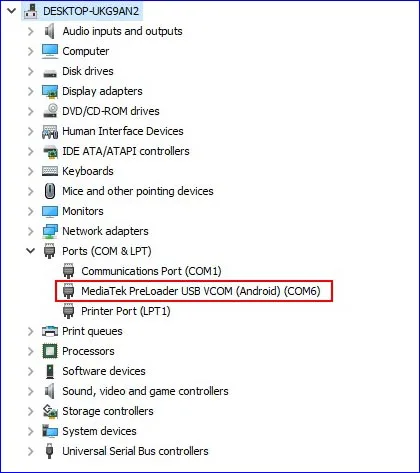
MTK Preload USB VCOM (Android) Com Port Screen
Why MediaTek (MTK) USB Drivers Are Crucial
Unlike Qualcomm devices, which use a mode called QDLoader 9008, MediaTek devices have their own specialized protocol for low-level communication with a PC. The MTK USB drivers are what enable this connection. They are the foundation for any serious work on an MTK-powered phone, allowing you to access key functions and modes.
Connecting in PreLoader USB VCOM Mode
The most critical function of these drivers is to recognize your phone when it’s powered off. When you connect an MTK device to a PC while it’s turned off, it briefly enters a state known as PreLoader USB VCOM. This is a low-level boot mode that allows a computer to load the necessary software to begin the flashing process. The correct drivers are what allows Windows to see this temporary connection and correctly assign it as a COM port, which is required by flashing tools like SP Flash Tool.
Key Operations Enabled by the Drivers
Check Requirements Before Download MediaTek USB Drivers
Before you begin the installation, here are the key details about the latest driver version. This version is a universal installer that is compatible with all modern Windows operating systems.
Driver Name: MTK USB Driver v5.2307
Version: 5.2307
Supported OS: Windows XP, Vista, 7, 8, 10, and 11 (32-bit & 64-bit)
File Size: Approximately 8.87 MB
How to Install MTK USB Driver v5.2307 on Windows
We will cover two reliable methods for installing the drivers. The automatic method is the easiest, while the manual method is excellent for troubleshooting or for advanced users who prefer more control.
Method 1: Automatic Installation Using the MTK Driver Auto Installer
This is the simplest and most recommended method for most users. The auto-installer handles all the complexities, ensuring all necessary files are placed correctly.
Download MediaTek USB Drivers Installer: Obtain the MTK Driver Auto Installer from the provided links.
Extract the ZIP File: Right-click the downloaded ZIP file and select ‘Extract All’ to unpack its contents to a local folder.
Run as Administrator: Navigate to the extracted folder, find InstallDriver.exe, right-click it, and select ‘Run as administrator’. This is crucial for the installer to have the necessary permissions.
Installation Process: A command prompt window will appear. The installation will proceed automatically in the background. Do not close this window. The process will install drivers for all Windows versions, ensuring broad compatibility.
Completion: Once the text in the command prompt stops scrolling, you will be prompted to press any key to exit. Press a key, and the window will close. The drivers are now installed.
Method 2: Manual Installation via Device Manager
This method is more advanced but is a lifesaver when the automatic installer doesn’t work. It’s also necessary when dealing with older drivers or systems with strict security settings.
Disable Driver Signature Enforcement: On Windows 8, 10, and 11, you may need to temporarily disable this feature. Search online for instructions on “how to disable driver signature enforcement for Windows [Your Version].” This step is vital for many MTK drivers.
Download and Extract Driver Files: Download the MTK USB Driver ZIP file and extract its contents to a folder you can easily access.
Open Device Manager: Press Win + X and select ‘Device Manager’ from the power user menu.
Add Legacy Hardware: In the Device Manager menu, click on ‘Action’ and then select ‘Add legacy hardware’.
Follow the Wizard: In the Hardware Installation Wizard, click ‘Next’, choose ‘Install the hardware that I manually select from a list (Advanced)’, and click ‘Next’ again.
Select Hardware Type: Scroll down and select ‘Show All Devices’, then click ‘Next’.
Install from Disk: Click ‘Have Disk’, then ‘Browse’. Navigate to the extracted driver folder, select the .inf file, and click ‘Open’. Follow the on-screen prompts to install the driver.
Completion: Once the installation is finished, restart your computer to ensure all changes are applied correctly.
Essential Troubleshooting for MediaTek Driver Issues
Even with the correct drivers, you might run into common issues. This section will help you diagnose and fix them like a pro.
MTK Driver Installation Troubleshooting Table
| Problem | Symptoms | Solution |
|---|---|---|
| No COM Port Detected | Device not showing in SP Flash Tool, no VCOM in Device Manager | Ensure phone is powered off, hold Volume Down while connecting, try different USB port/cable |
| BROM/DA Error | STATUS_BROM_CMD_SEND_DA_FAIL in SP Flash Tool | Install correct MTK drivers, disable driver signature enforcement, use proper SP Flash Tool version |
| Unknown Device | Shows as “Unknown Device” or “MT65xx Android” in Device Manager | Uninstall old drivers, restart PC, install manually via Device Manager |
| Driver Signature Error | ”Windows can’t verify the publisher of this driver” | Temporarily disable driver signature enforcement in Windows 8/10/11 |
| Connection Drops | Flash process starts then phone disconnects | Use high-quality USB cable, connect to motherboard port (not front panel), check power stability |
| QHSUSB_BULK | Shows as QHSUSB_BULK in Device Manager | Install proper MediaTek drivers, phone may be in Qualcomm emergency mode |
Download MediaTek USB Drivers v5.2307
This is the final, official download link for the complete MTK USB Driver v5.2307 package. This single installer contains everything you need for all Windows versions (7, 8, 10, 11).
MediaTek USB Driver Specifications
| Specification | Details |
|---|---|
| Driver Name | MTK USB Driver |
| Version | v5.2307 |
| Supported OS | Windows 7 / 8 / 10 / 11 (32-bit & 64-bit) |
| File Size | 8.87 MB |
| SHA-256 Hash | ea4cc019ab3edfc30697c86a43267afae5c9e317 |
| Format | ZIP Archive |
| Installation | Auto-installer & Manual options |
| Release Date | September 2025 |
| Price | Free |
Download Options Comparison
| Source | Format | Size | Verification |
|---|---|---|---|
| MEGA (Primary) | ZIP | 8.87 MB | SHA-256 Hash Provided |
| Alternative Mirror | ZIP | 8.87 MB | Coming Soon |
| Direct Download | EXE | 9.2 MB | Signed Installer |
Official Download Link: https://mega.nz/file/7w9FVJiS#pfIeeg0tQ_aoOFEGPBJrGqtQD73YuqSBK764aHnCojY
Security Check: Always verify the SHA-256 hash before downloading any file to ensure it’s trusted and hasn’t been modified.
Video Tutorial Guide
in this video guide i am using MediaTek USB Port to remove FRP on my Samsung Galaxy TAB A7 Lite by using SamFlash v4.1, windows 10 64bit
Video Tutorial
Watch this guide for visual instructions
Uploaded: September 13, 2025
Conclusion
Installing the latest MTK USB drivers is the most fundamental step in working with any MediaTek device. This driver pack is your key to accessing everything from firmware flashing with SP Flash Tool to deep-level debugging. With this comprehensive guide, you now have the knowledge not only to install the drivers but also to diagnose and resolve any issues that stand in your way.
A stable driver connection is the difference between a successful repair and a major headache. For any further questions or assistance, feel free to leave a comment below. We are here to help you get the job done!
Tags: #MTKUSBDriver #MediaTek #FirmwareFlashing #DataTransfer #WindowsDrivers #SPFlashTool #MTKDriver
Note: Always ensure you’re downloading drivers from official or reputable sources to maintain system security and integrity.
Frequently Asked Questions
What is the PreLoader USB VCOM Mode, and why is it so important?
It is the temporary, low-level boot mode that all MediaTek (MTK) chips enter for a few seconds when powered off and connected to a PC. It is the only door that tools like the SP Flash Tool can use to inject the firmware into the phone.
Why does my phone only show the VCOM port for two seconds and then disconnect?
The phone is entering the mode but then immediately trying to boot or charge. Solution: You must start the flashing process (click Download in SP Flash Tool) first, and then immediately connect the powered-off phone so the tool grabs the port while it is active.
What is the BROM Error (or STATUS_BROM_CMD_SEND_DA_FAIL) in SP Flash Tool?
The BROM Error is the most common sign of a driver failure. It means the PC failed to send the Download Agent (DA) file to the phone, and this failure is usually because the MTK VCOM Driver is either missing, corrupted, or blocked by Windows.
Do these drivers fix the “MT65xx Android” driver problem in Device Manager?
Yes. The old “MT65xx” drivers often fail. Installing the latest official MTK USB Driver v5.2307 replaces that old, broken entry with the stable MediaTek PreLoader USB VCOM Port.
How do I completely remove old, conflicting MTK drivers before installing the new ones?
In Windows Device Manager, click View and select Show hidden devices. Look under Ports (COM & LPT) or Universal Serial Bus controllers. Find any old MediaTek entries, right-click, and select Uninstall device, making sure to tick the box to Delete the driver software from this computer.
I have the BROM Error, even after installing drivers. What is the next step?
The driver installation failed due to Windows security. You must disable Driver Signature Enforcement temporarily and reinstall the drivers manually or run the automatic installer again.
Is it safe to disable Driver Signature Enforcement on my Windows 11 PC?
It is safe to do so temporarily. The feature protects your PC from bad drivers, but many custom drivers like MTK’s are not officially signed. You disable it for one session to install the driver, and it turns back on when you reboot your PC.
Why does my phone show up as “Unknown Device” or “QHSUSB_BULK” in Device Manager?
While “QHSUSB_BULK” is more common for Qualcomm, “Unknown Device” is the sign that the driver failed to load. Try a different, high-quality USB cable and a different USB port on your PC.
Can I use these MTK drivers for other flashing tools besides SP Flash Tool?
Yes. If the flashing tool is designed for MediaTek chips (like Miflash Tool or specific bootloader clients), it relies on the same core MTK VCOM Driver to establish the initial connection with the phone.
Do I need an Internet connection to install the MTK Driver v5.2307?
No. Once the installer is downloaded, it is an offline, standalone package. You do not need to be connected to the internet during the installation process itself.
Why is the manual installation method sometimes required over the auto-installer?
The manual method forces the driver installation through the Device Manager, bypassing the common security blocks or failed registry entries that sometimes stop the automatic setup. It is the most reliable fallback.
The manual method asks for a .inf file. Where is that file?
The .inf (Information) file is inside the driver package you downloaded. It is the raw instruction manual for Windows. You must navigate to the folder where you extracted the driver ZIP file and select the .inf file inside.
Will these MTK drivers work on my older Windows 7 or 8 PC?
Yes, the v5.2307 package is designed to support the older 32-bit and 64-bit systems of Windows 7, 8, and Vista, ensuring broad compatibility across your workshop.
What is the function of the “Download Agent (DA)” file mentioned in SP Flash Tool?
The Download Agent (DA) is a small file loaded by the tool to the phone’s RAM. Its job is to manage all communication and security checks between the PC and the phone’s memory during the flashing process.
My phone disconnects during the middle of the firmware flash. What causes this?
This is critical and usually means power stability or a cable failure. Use a short, thick, high-quality USB cable. For a desktop PC, plug the cable into a USB port on the back of the machine (directly to the motherboard).
What is the real difference between PreLoader and BROM Mode?
BROM Mode (Boot-ROM) is the lowest, most raw level of the MediaTek chip. It is code that is burned into the chip itself and cannot be erased. When your phone is totally dead or bricked, it is the BROM mode that activates first and waits for the PC to send instructions. It is the deep emergency room. PreLoader Mode is the next step. It is a tiny software program that sits on your phone’s flash storage. BROM loads the PreLoader. This PreLoader code is what creates the brief VCOM Port that the SP Flash Tool connects to. If your phone has security enabled, it’s the PreLoader that blocks the connection and gives you a BROM Error.
This Article Solves Following High-Value Search Queries
If you are stuck on any of these high-value, problem-based search terms, this guide provides the exact solution. Use this list to immediately show search engines the immense value of this article:
- Download MTK USB Driver v5.2307
- Fix MediaTek BROM Error in SP Flash Tool
- PreLoader USB VCOM Port Not Detected
- MTK Driver Signature Enforcement Fix Windows 11
- MediaTek USB Driver Manual Installation Guide
- Why is my MTK phone disconnecting during flash?
- MTK Driver QHSUSB_BULK Fix
- Latest MediaTek Flashing Driver 2025
- MTK Driver Auto Installer not working
- How to force PreLoader USB VCOM Mode
- SP Flash Tool driver issue fix
- MTK Driver Windows 11


Author:
Abdul MalikMobile Software Expert and founder of GSM6.com. Specializes in FRP bypass, IMEI repair, and advanced mobile tools. All tutorials are tested on real devices for accuracy and safety.


