
• Abdul Malik (AM) • apple • 1 min
Create Apple ID in 2025 - Without OTP Verification Final Solution (FREE)
How to Create Apple ID in 2025 (Fix Verification Failed, OTP & Phone Number Issues)
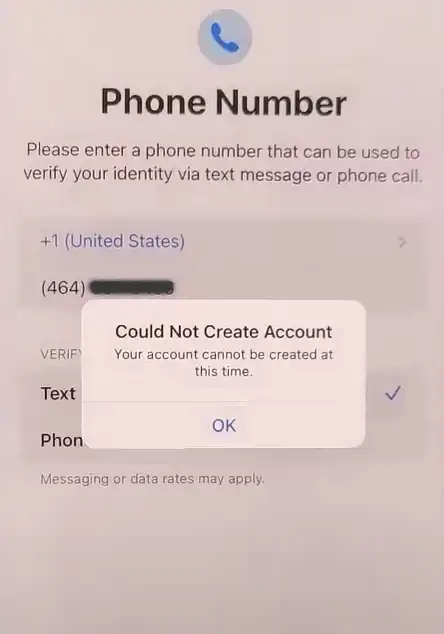
For anyone who owns an iPhone, iPad, or any other Apple device, getting an Apple ID is a must. It’s like the main door to everything Apple offers: you need it to download apps from the App Store, keep your files safe with iCloud, listen to music on Apple Music, and use many other important services. But in 2025, many people are finding it very hard to create an Apple ID. They are facing frustrating problems, especially with verification during the sign-up process. If you are stuck with constant “Apple ID verification failed”, “could not create account” messages or “OTP not received” issues, know that you are not alone. This is a common problem right now.
Apple ID error “Could Not Create Account”
This complete guide will dig deep into why these Apple ID verification errors are happening in 2025. We will explain the main reasons, which countries are seeing the most problems, and give you clear ways to get around or fix these issues. By the time you finish reading, you will have a full, step-by-step plan to successfully create Apple ID without phone number verification headaches and access the full Apple ecosystem.
Why Apple ID Verification Fails in 2025?
In recent years, Apple has become much stricter with its security and rules. This is because of more fraud, misuse of accounts, and new laws in different countries. While these changes are meant to protect all users, they have also caused unexpected problems for honest people trying to create an Apple ID. Here are the main reasons why you are seeing more “Apple ID verification failed” messages and “OTP not received” issues in 2025:
Stricter Verification Processes: Apple now asks for stronger proof that you are who you say you are. This is very true for phone numbers, email addresses, and your date of birth. This means if you use old numbers, numbers from online services, shared emails, or fake birthdays, Apple’s system will immediately flag them as suspicious and reject your attempt to create an account. This is why many users are looking for ways to create Apple ID without phone number verification.
Regional Restrictions and Laws: Some countries face extra difficulties because Apple has put in place tighter rules. This is due to local laws, government rules, or high risks of fraud in those areas. Countries in South Asia (like Pakistan, India, Bangladesh), the Middle East (like UAE, Saudi Arabia, Kuwait), and parts of Africa (like Nigeria, Kenya) are more likely to get “verification failed” messages when trying to create an Apple ID in 2025.
Server Overload & Technical Bugs: Sometimes, during busy times, Apple’s verification servers simply cannot handle all the requests. This can lead to the well-known error, “Your account cannot be created at this time.” It is a temporary issue on Apple’s side, and it can be very frustrating when you just want to set up your device.
Existing Apple Ecosystem Conflicts: If the email or phone number you are trying to use is already linked to another Apple ID, even one you made years ago and forgot about, Apple will likely reject your new attempt. The system sees it as a conflict, even if that old account is not active anymore.
Privacy & Compliance Laws: In countries where Apple has to follow strict local laws”such as needing government IDs for account creation or specific formats for phone numbers”you will see verification errors more often. This is Apple trying to obey the laws of that country.
Common Apple ID Verification Errors in 2025 and How to Fix Them
Here are the most common problems you will hit when trying to Create Apple ID in 2025, along with straightforward solutions:
“Your account cannot be created at this time”
What it means: This error often points to temporary problems with Apple’s servers. It can also happen if you try to make too many accounts from the same device, or if the account details look like they are being used more than once.
How to fix it: Your best bet is to wait a few hours (at least 2-3 hours, sometimes longer) before trying again. Make sure to clear your web browser’s cache, restart your device (iPhone, iPad, or computer), and then try to create the Apple ID again. Sometimes using a slightly different email address or phone number can help, too. Check Apple’s System Status page online to see if their services are having problems.
Phone Number Verification Failed / OTP Not Received
What it means: Apple is very strict with phone numbers. They might reject numbers from certain phone companies or even entire countries. This is a huge problem in places like Pakistan, Bangladesh, Nigeria, Egypt, and some Middle Eastern countries, where Apple has tight rules on SMS (text message) verification for Apple ID creation. You might also see “OTP not received” if the message simply isn’t getting through.
How to fix it:
Try an alternate carrier or international SIM: If your local phone company’s number is not working, try a number from a different carrier within your country, or if possible, an international SIM card from a country known to have fewer issues.
Ask a trusted friend/family member abroad: If you have someone you trust in a country like the USA or Canada, ask if you can use their number just for the initial verification code.
Use the iTunes/PC method: Many users find that creating their Apple ID on a computer through the iTunes application can bypass some mobile phone number verification issues. This method often focuses more on email verification first. You can also try creating your Apple ID directly on Apple’s website (
appleid.apple.com) using a computer.
Apple ID Verification Failed Error (General)
What it means: This can be a broad error covering many things. Common causes include a bad internet connection, using a VPN (Virtual Private Network), or Apple’s servers being too busy.
How to fix it: First, check your internet. Make sure you are on a strong, stable Wi-Fi connection (not weak mobile data). Turn off any VPNs or proxy services you are using, as Apple’s systems are very sensitive to mismatched IP addresses and might see them as suspicious. Wait a while (an hour or two) and then try again.
Invalid Date of Birth
What it means: Apple has strict age rules to protect children. If you enter a birth date that makes you under 13 (or under 18 in some regions, like Korea or certain European countries), your account will be rejected instantly.
How to fix it: Make sure you enter a valid date of birth that clearly meets Apple’s age requirements. Generally, this means being at least 13 years old, but for some countries, it’s 18. If you made a mistake and your account gets locked because of age, you will likely need to contact Apple Support directly to fix it.
Email Address Already in Use
What it means: The email you are trying to use is already connected to an Apple ID. You might have made it years ago and forgotten, or someone else in your family used it.
How to fix it: Do not try to force it. Use Apple’s iForgot service on their website (
iforgot.apple.com) to see if you can get access to the old account. If you cannot get it back, the simplest solution is to use a completely new email address for your Apple ID.
Countries Most Affected by Apple ID Verification Errors in 2025
While these verification issues can happen anywhere, Apple’s policies and local regulations make it especially hard for users in certain regions to create Apple ID accounts:
| Region | Affected Countries | Common Issues |
|---|---|---|
| South Asia | Pakistan, India, Bangladesh | Phone verification failures, OTP not received |
| Middle East | UAE, Saudi Arabia, Kuwait, Qatar | Stricter regulations, verification blocks |
| Africa | Nigeria, Kenya, South Africa | SMS delivery issues, anti-fraud checks |
| East Asia | China | Government ID requirements |
| Eastern Europe | Russia, Belarus | International sanctions, local restrictions |
How to Create Apple ID Without Phone Number (2025 Workaround)
If you are facing repeated problems, especially with phone number verification, follow this proven workaround. This method helps to create Apple ID without phone number verification for many users:
Apple ID Creation Methods Comparison
| Method | Success Rate | Phone Number Required | Difficulty |
|---|---|---|---|
| iPhone/iPad Direct | Medium | Usually Yes | Easy |
| iTunes (Windows PC) | High | Sometimes Skippable | Moderate |
| Apple Website | Medium | Usually Yes | Easy |
| Friend’s Apple Device | High | Depends on Region | Easy |
Step-by-Step iTunes/PC Method (Recommended)
Prepare a Valid, Fresh Email:
- Choose an email address that you have never used before for any Apple ID. Using common services like Gmail or Outlook is often best.
Use the iTunes/PC Method:
- On a computer, download and install iTunes (for Windows) or open the App Store (for Mac).
- Open iTunes/App Store, then try to “Sign In” or “Create New Apple ID” (you might need to try to download a free app first to trigger the “Create New Apple ID” option).
- During this process, Apple often prioritizes email verification and may give you an option to choose “None” for a payment method and sometimes even “Verify Later” or “Skip” for the phone number.
Use a Reliable Internet Connection:
- Always use a strong, stable broadband internet connection. Avoid using weak Wi-Fi or mobile data during signup, as interruptions can cause errors.
Avoid VPNs or Proxies During Signup:
- Do not use a VPN or proxy when creating your Apple ID. Apple’s security systems will flag mismatched IP addresses and might block your attempt, thinking it is fraud.
Choose an Accurate Date of Birth:
- Make sure you enter a real date of birth that meets Apple’s age requirement (usually 13+, but sometimes 18+ depending on the country). Do not use a fake or very young age.
Follow Up With Email Verification Promptly:
- Once you get the verification email from Apple, open it and click the verification link immediately. Do not wait, as delays can sometimes cause issues.
Watch the Tutorial for Advanced Fixes:
- If you are still hitting roadblocks, especially with stubborn phone number verification, watch the detailed video tutorial below. It shows advanced fixes and demonstrates how to bypass restrictions effectively.
USA/Canada Available Numbers to Use While Creating Apple ID: (For Verification Only)
Note: These numbers are provided for informational purposes as they have been found in public domain discussions and by users for verification. Use at your own risk and for legitimate purposes only. These are generally used as a temporary solution if your primary number is failing verification.
Verification Numbers Reference
| Country | Number Format | Status | Notes |
|---|---|---|---|
| Canada | 6472252xxx | Reported Working | xxx = random 3 digits |
| USA | 6462252xxx | Reported Working | xxx = random 3 digits |
| UK | 447xxx | Limited Success | Use with caution |
| Australia | 614xxx | Mixed Results | Depends on carrier |
you can try different numbers, no need to use the number that i haved used in the video.
Why Apple Enforces These Strict Measures to Create Apple ID?
It is important to understand that Apple is not trying to make things hard for no reason. Their tough verification steps are there for very good reasons:
Security: To stop hackers or spammers from creating fake accounts and harming the system.
Fraud Prevention: To prevent people from using stolen credit cards for purchases or trying to get around App Store rules.
Regional Compliance: Apple must follow local laws in every country, including telecom rules, age restrictions, and digital data regulations.
Data Protection: To make sure that only real, legitimate users can get into Apple’s private ecosystem and their personal information.
Finding the right balance between strong security and an easy user experience is hard. This balance often means that normal users sometimes struggle, especially when facing “Apple ID verification failed” errors in 2025.
Pro Tips to Avoid Future Apple ID Issues
After you successfully create Apple ID in 2025, follow these tips to keep your account safe and avoid problems later:
Keep Your Recovery Information Updated: Always make sure your backup email and phone number are current and that you can access them.
Stick to One Primary Account: Avoid making too many Apple IDs if you do not need them. One main account is usually best and easier to manage.
Update Your Region if You Move: If you change countries, update your Apple ID region settings to prevent problems with payment methods and services.
Save Security Details Safely: Write down your security questions and answers, or save them in a secure password manager. This helps if you forget your password.
Contact Apple Support for Persistent Errors: If you keep having errors, do not just keep trying and failing. Contact Apple Support directly. They can sometimes fix issues on their end.
Final Thoughts: Your Apple ID Journey in 2025
Creating an Apple ID in 2025 has become more complex, especially for users in countries with strict rules. But with the right way of thinking”understanding why problems happen, knowing which countries are affected, and using smart workarounds”you can successfully create your Apple ID without phone number verification and get full access to the Apple ecosystem.
If you have been struggling with “Apple ID verification failed” or “OTP not received” issues, do not panic. Use the solutions above, try alternative methods like the iTunes/PC setup, and make sure to watch the detailed video tutorial for real-world demonstrations of these fixes. With patience and the correct steps, you will get through the verification maze and set up your Apple ID without error.
Watch the Tutorial for Advanced Fixes & Workarounds
If you are still facing difficulties, especially with phone number verification and OTP issues, watch this step-by-step video tutorial. It demonstrates how to bypass restrictions and resolve phone number verification issues effectively. in this guide i have used iphone 13 pro max with ios 18 to create apple id. it may work on older ios 15 & 16 as well, you can test & feedback.
Video Tutorial
Watch this guide for visual instructions
Uploaded: September 10, 2025
Stay Connected & Support My Work
Subscribe to my YouTube Channel: For more helpful tutorials and solutions, subscribe to Learn Mobile Software: https://www.youtube.com/@Learn_Mobile_Software
Support Me: If this guide was helpful, consider supporting my work: https://buymeacoffee.com/am19x
More iPhone-related Useful Tutorials:
- Visit GSM6.com for more guides.
Frequently Asked Questions
What is the main reason Apple ID creation fails in 2025?
The main reasons are stricter verification processes, regional restrictions in countries like Pakistan and Nigeria, server overloads during peak times, and conflicts with existing Apple ecosystem accounts.
Can I create Apple ID without phone number in 2025?
Yes, using the iTunes/PC method often allows skipping phone verification. Create Apple ID through iTunes on Windows or App Store on Mac, choose “None” for payment, and you might get “Skip” option for phone number.
Which countries have most Apple ID verification problems?
South Asia (Pakistan, India, Bangladesh), Middle East (UAE, Saudi Arabia), Africa (Nigeria, Kenya), and China face the most verification issues due to local regulations and carrier restrictions.
How to fix “Your account cannot be created at this time” error?
Wait 2-3 hours, clear browser cache, restart device, check Apple System Status page for server issues, and try using different email or phone number.
What if OTP SMS is not received during Apple ID creation?
Try alternative carriers, use international SIM, ask trusted friend abroad for temporary number, or use iTunes/PC method which relies more on email verification.
Does VPN affect Apple ID creation?
Yes, VPNs often cause verification failures. Apple flags mismatched IP addresses as suspicious. Disable all VPNs and proxies during Apple ID creation process.
Can I use temporary numbers for Apple ID verification?
Some users report success with Canadian (6472252xxx) and US (6462252xxx) numbers, but these may not work long-term. Use at own risk for legitimate verification only.
How long should I wait after verification failed error?
Minimum 2-3 hours, sometimes 24 hours if multiple failed attempts. Apple imposes temporary blocks on repeated failed verification attempts.
Is iTunes method better for creating Apple ID?
Yes, iTunes/PC method has higher success rate as it sometimes bypasses phone verification and focuses on email verification first.
What age is required for Apple ID creation?
Minimum 13 years old in most countries, but 18+ in regions like Korea and some European countries. Entering younger age will cause immediate rejection.
Can I create Apple ID on someone else’s device?
Yes, using a friend’s or family member’s Apple device (with permission) can help bypass some regional restrictions affecting your own device.
Why does Apple reject certain phone numbers?
Apple maintains blacklists of numbers from carriers with high fraud rates, virtual numbers, and numbers from specific high-risk regions to prevent spam and fraud.
How to check if Apple servers are down?
Visit Apple System Status page (apple.com/support/systemstatus) to check if Apple ID, iCloud, or App Store services have reported outages.
Can email verification fail too?
Yes, if email is already associated with Apple ID, from disposable email services, or if verification link expires (usually within 24 hours).
What’s the best email service for Apple ID?
Gmail, Outlook, iCloud, and Yahoo have highest success rates. Avoid temporary/disposable email services as Apple often blocks them.
Should I use real birth date for Apple ID?
Always use real, accurate birth date meeting age requirements. Fake dates can cause account locking and recovery difficulties later.
How many Apple IDs can I create from one device?
Technically unlimited, but creating multiple IDs in short period may trigger Apple’s anti-fraud systems and temporary blocks.
What if “Verify Later” option doesn’t appear?
This depends on region and Apple’s current policies. Try different creation methods (iTunes vs device) or wait and retry later.
Can I change phone number after Apple ID creation?
Yes, you can add, remove, or change verified phone numbers later in Apple ID account settings on appleid.apple.com.
Is creating Apple ID free?
Yes, Apple ID creation is completely free. You only need payment method if purchasing apps, subscriptions, or media from Apple services.
What’s the difference between Apple ID and iCloud?
Apple ID is your account username for all Apple services. iCloud is Apple’s cloud storage service that uses your Apple ID for access.
Can I use same Apple ID on multiple devices?
Yes, one Apple ID can be used on all your Apple devices (iPhone, iPad, Mac, Apple Watch) for syncing data and purchases.
How to recover forgotten Apple ID?
Use Apple’s iForgot service (iforgot.apple.com) with registered email or phone number to reset password or recover account.
Does Apple ID work without iPhone?
Yes, you can create and use Apple ID on iPad, Mac, Windows PC with iTunes, or via web browser at appleid.apple.com.
What if verification email doesn’t arrive?
Check spam/junk folder, ensure email address was entered correctly, wait 15-30 minutes, then request new verification email.
Can businesses create Apple IDs?
Yes, Apple offers Apple IDs for businesses through Apple Business Manager with different verification requirements.
Is 2-factor authentication mandatory?
For new Apple IDs created in 2025, 2-factor authentication is usually required for enhanced security.
How to bypass age restriction?
You cannot bypass age restrictions. Enter accurate birth date making you at least 13 (or 18 in some regions). Parental setup required for younger users.
What payment methods work for “None” option?
When choosing “None” for payment, you can still download free apps. For paid content, you’ll need to add payment method later.
Can I create Apple ID with Yahoo email?
Yes, Yahoo emails work for Apple ID creation, but ensure the email is active and you can access it for verification.
How long does Apple ID verification take?
Usually instant if everything is correct. Email verification links expire in 24 hours. Phone OTPs typically arrive within 2-5 minutes.
What’s the best time to create Apple ID?
Off-peak hours (early morning or late night in your region) when Apple servers are less busy may improve success rates.
Can I use Google Voice number?
Sometimes works, but Apple often blocks VOIP and virtual numbers. Real mobile numbers from major carriers have highest success rate.
How to contact Apple Support for verification issues?
Visit getsupport.apple.com, choose “Apple ID” > “Account Security” > “Verification issues” to chat, call, or schedule callback.
Will Apple ID work after changing country?
Yes, but you need to update region in account settings. Some content/services may change based on new region’s availability.
What if “Create New Apple ID” option doesn’t appear?
Sign out of existing Apple ID first, restart device, then try accessing App Store or iTunes to trigger creation option.


Author:
Abdul MalikMobile Software Expert and founder of GSM6.com. Specializes in FRP bypass, IMEI repair, and advanced mobile tools. All tutorials are tested on real devices for accuracy and safety.


