
• Abdul Malik (AM) • apple • 1 min
How to Jailbreak iOS with Checkn1x | Ultimate Lightweight Checkra1n Solution (2026)
A Comprehensive Guide to Lightweight Jailbreaking
The world of iOS customization and circumvention has always been a cat-and-mouse game between Apple’s security measures and the ingenuity of the jailbreak community. Among the various tools and techniques developed over the years, Checkn1x stands out as a unique and highly efficient solution for devices vulnerable to the checkm8 exploit. This article will delve deeper into Checkn1x, exploring its technical underpinnings, practical applications, security considerations, and its place within the broader jailbreaking ecosystem.
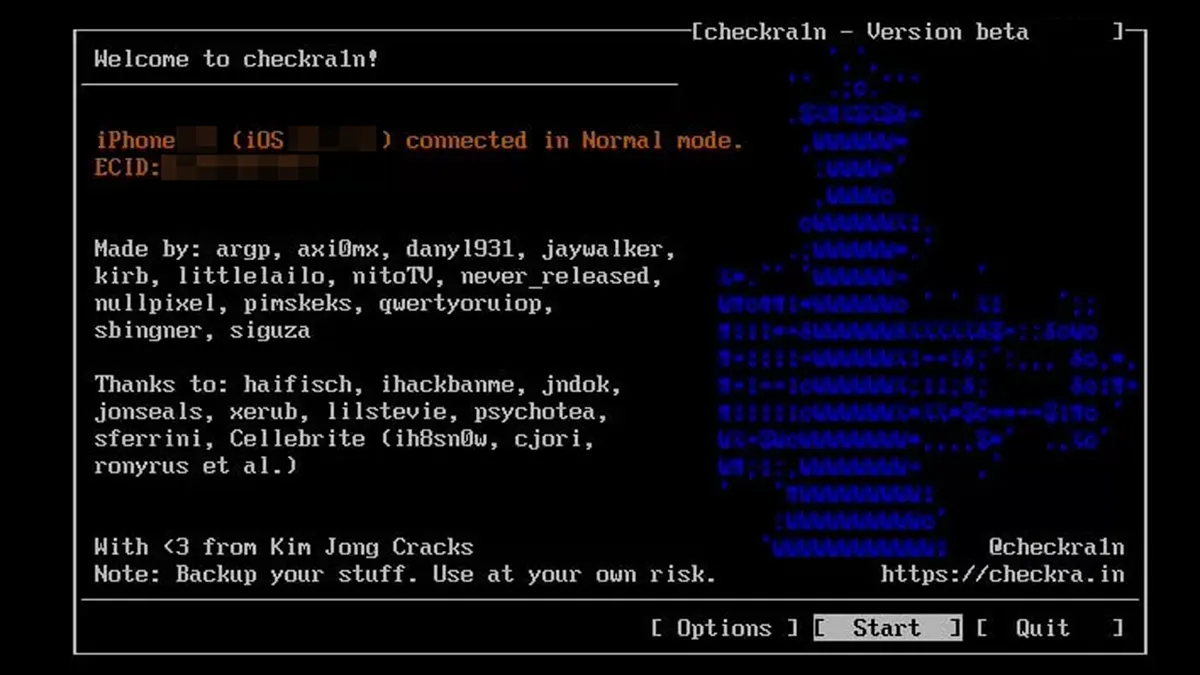
Checkn1x - Checkra1n USB tool
What is Checkn1x? Beyond the Basics
At its core, Checkn1x is a specialized, minimalist Linux-based operating system. Its design philosophy is rooted in simplicity and efficiency, specifically tailored to host and execute Checkra1n, one of the most significant and enduring iOS jailbreak tools. Unlike full-fledged Linux distributions such as Ubuntu or Fedora, which come packed with a vast array of software, libraries, and desktop environments, Checkn1x is meticulously stripped down. It contains only the essential components required to boot a system and run the Checkra1n application, whether through its command-line interface (CLI) or graphical user interface (GUI).
This “barebones” approach is precisely what gives Checkn1x its edge. Weighing in at under 50MB, it’s remarkably small, allowing for extremely fast boot times and minimal resource consumption. This makes it ideal for situations where a quick and dedicated jailbreaking environment is needed without the overhead of a full operating system. It’s designed for portability, meaning it can be easily written to a USB drive, CD, or even a small SSD, transforming virtually any compatible PC into a dedicated jailbreaking station. The “no installation” aspect is also crucial; Checkn1x runs entirely from the bootable media, leaving no trace on the host computer’s hard drive, ensuring a clean and secure operation.
Why Checkn1x Reigns Supreme for Checkm8 Devices
The advantages of using Checkn1x for jailbreaking are multifaceted and directly address common pain points experienced with other methods:
Unparalleled Lightweight Design: The core strength of Checkn1x lies in its minimalism. By eliminating unnecessary components, it ensures that system resources are dedicated entirely to the jailbreaking process. This translates to quicker execution, fewer potential conflicts, and a more stable environment for Checkra1n to operate. For users with older or less powerful PCs, this is a significant benefit, as it circumvents the need for robust hardware that a full Linux distro might demand.
Exceptional Speed and Portability: Imagine needing to jailbreak a device on the go, or perhaps at a friend’s house. Checkn1x, residing on a small USB drive, makes this effortlessly possible. It boots up in mere seconds, allowing users to quickly access Checkra1n and perform the necessary steps. This level of portability and speed is unmatched by other jailbreaking methods that might require installing a full OS, setting up virtual machines, or relying on network connections.
True Offline Operation: One of the most critical security and privacy benefits of Checkn1x is its complete independence from an internet connection once the bootable media has been created. This “air-gapped” approach minimizes potential attack vectors and ensures that the jailbreaking process is isolated from external threats. In an era where digital security is paramount, the ability to perform sensitive operations offline provides immense peace of mind. Users can be confident that no data is being transmitted or received during the jailbreak, enhancing the overall security of their device and personal information.
Broad Cross-Platform Compatibility: Checkn1x’s Linux foundation ensures a high degree of compatibility across a wide range of computer hardware. Whether you’re running a legacy Windows XP machine, a modern Windows 10/11 PC, a macOS system (through specific boot methods), or even another Linux distribution, Checkn1x is designed to boot and function effectively. This broad compatibility eliminates the frustrating “my computer isn’t supported” scenarios often encountered with platform-specific tools. It democratizes the jailbreaking process, making it accessible to a larger user base regardless of their primary operating system.
The Power of Checkm8: Devices and iOS Versions Supported
Checkn1x’s utility is inextricably linked to the Checkra1n exploit, which leverages a hardware vulnerability known as “checkm8.” This bootrom exploit is unpatchable by Apple through software updates, meaning devices vulnerable to it will remain jailbreakable indefinitely, regardless of future iOS versions (within certain practical limits).
The checkm8 exploit specifically affects devices equipped with A5 to A11 Bionic chips. This translates to:
iPhone Models: iPhone 5s through iPhone X.
iPad Models: iPad Mini 2, iPad Mini 3, iPad Mini 4.
Other Devices: Various iPad Air models, iPad 5th, 6th, and 7th generation, and the iPod Touch 6th and 7th generation.
In terms of iOS versions, Checkra1n (and thus Checkn1x) officially supports iOS 12.0 up to iOS 14.8.1. However, due to the hardware-based nature of the checkm8 exploit, community efforts have often extended its functionality to newer iOS versions for supported devices, with some models even being jailbreakable on iOS 16.x. It’s crucial to note that support for newer iOS versions often comes with caveats, such as the need for specific workarounds or partial functionality.
A critical point to remember: Newer A12+ devices, including the iPhone XR, iPhone XS, iPhone 11 series, iPhone 12 series, and beyond, are not vulnerable to the checkm8 exploit. Therefore, Checkn1x and Checkra1n cannot jailbreak these devices. This distinction is vital to manage expectations and avoid wasted effort.
Device Compatibility Table
| Device | Chip | Supported iOS | Jailbreak Status |
|---|---|---|---|
| iPhone 5S | A7 | iOS 12-14 | œ… Fully Supported |
| iPhone 6/6 Plus | A8 | iOS 12-14 | œ… Fully Supported |
| iPhone 6S/6S Plus | A9 | iOS 12-14 | œ… Fully Supported |
| iPhone 7/7 Plus | A10 | iOS 12-14 | œ… Fully Supported |
| iPhone 8/8 Plus | A11 | iOS 12-16 | œ… Fully Supported |
| iPhone X | A11 | iOS 12-16 | œ… Fully Supported |
| iPhone XR | A12 | Not Supported | ΠNot Compatible |
| iPhone 11+ | A13+ | Not Supported | ΠNot Compatible |
Checkn1x Specifications
| Specification | Details |
|---|---|
| Tool Name | Checkn1x |
| Based On | Checkra1n Jailbreak |
| File Size | Under 50MB |
| Operation | Bootable USB/Live OS |
| Internet Required | No (Offline Operation) |
| Platform | Windows/Mac/Linux |
| Latest Version | Checkn1x v1.1.7+ |
Unlocking Possibilities: Practical Applications of Checkn1x
The primary purpose of Checkn1x is to facilitate the jailbreaking process, which in turn opens up a world of possibilities for iOS users:
Customization and Tweak Injections: This is perhaps the most popular reason for jailbreaking. Once jailbroken, users can install Cydia (or alternative package managers like Sileo) and access a vast repository of “tweaks.” These tweaks can fundamentally alter the appearance and functionality of iOS, allowing for custom themes, enhanced multitasking, system-wide ad-blocking, advanced gesture controls, and much more. Checkn1x provides the stable foundation for these customizations to be applied.
iCloud Bypass (A Step in the Process): While Checkn1x itself doesn’t directly bypass iCloud Activation Lock, jailbreaking is often the crucial first step in methods used to circumvent it. For devices stuck on the iCloud Activation Lock screen, jailbreaking allows access to the device’s file system, which is necessary for certain bypass tools to operate. It’s important to stress that these bypass methods often rely on exploits separate from checkm8 and may require additional software and expertise.
Downgrading iOS via SHSH Blobs: For advanced users, jailbreaking with Checkn1x can be a prerequisite for downgrading iOS versions. This process typically involves saving “SHSH blobs” (cryptographic signatures of specific iOS firmware versions) when Apple is still signing them. With a jailbroken device, tools like FutureRestore can be used to flash an older, unsigned iOS version onto the device, provided the correct SHSH blobs are available. This is particularly useful for users who prefer older iOS versions for performance, specific jailbreak compatibility, or other reasons.
Forensic Analysis and Data Recovery (Specialized Use Cases): In specialized fields like digital forensics, the ability to gain low-level access to an iOS device’s file system is invaluable. A jailbroken device, facilitated by Checkn1x, can allow forensic investigators to extract data that would otherwise be inaccessible, aiding in investigations or data recovery efforts. This is a highly technical application and generally not relevant for the average user.
A Step-by-Step Guide: Mastering Checkn1x
Using Checkn1x is straightforward, even for those new to Linux or jailbreaking. The process can be broken down into four key steps:
Step 1:
Download the Checkn1x ISO The Checkn1x ISO file is the core component. It’s an image file that contains the entire Checkn1x operating system. Always download the latest stable version to ensure compatibility and access to the most recent Checkra1n updates. As of the current information, Checkn1x v1.1.7 or newer is recommended. Ensure you download from a trusted source, and it’s good practice to verify the MD5 checksum provided to ensure the file’s integrity and authenticity.
Step 2:
Create a Bootable USB Drive This step transforms your USB drive into a portable Checkn1x boot environment.
For Windows Users: Rufus is the recommended tool. It’s a free and open-source utility that excels at creating bootable USB drives. Simply download Rufus, select your Checkn1x ISO file, choose your USB drive (ensure it’s at least 512MB, though 1GB or more is safer to avoid any potential issues), and click “Start.”
For macOS Users: Balena Etcher is a user-friendly, cross-platform tool suitable for creating bootable drives. Download and install Etcher, then select the Checkn1x ISO, choose your USB drive, and flash it.
For Linux Users: The
ddcommand-line utility is the most direct and efficient method. Open a terminal and use the command:sudo dd if=checkn1x.iso of=/dev/sdX bs=4M status=progress && sync. Crucially, replace/dev/sdXwith the correct device identifier for your USB drive. Using the wrong identifier can overwrite your main hard drive, leading to data loss. Always double-check your device names usinglsblkorfdisk -lbefore executing this command.
Step 3:
Boot into Checkn1x With the bootable USB created, the next step is to instruct your computer to boot from it.
Plug in the USB: Insert the Checkn1x bootable USB drive into an available USB port on your PC.
Reboot PC: Restart your computer.
Enter BIOS/UEFI: As your computer boots up, you’ll need to press a specific key repeatedly to enter the BIOS (Basic Input/Output System) or UEFI (Unified Extensible Firmware Interface) settings. Common keys include F2, F10, F12, Del, or Esc. The exact key varies by motherboard manufacturer. Consult your PC’s manual or look for on-screen prompts during startup.
Boot from USB: Once in BIOS/UEFI, navigate to the “Boot Options” or “Boot Order” menu. Locate your USB drive in the list and set it as the primary boot device. Save your changes and exit BIOS/UEFI. Your computer should now boot directly into Checkn1x.
Step 4:
Launch Checkra1n and Jailbreak Upon successful boot, Checkn1x will automatically launch the Checkra1n application.
CLI Interface: By default, Checkra1n typically starts in its command-line interface. The instructions will be displayed on the screen.
Connect Device: Connect your iPhone or iPad to your computer using a reliable USB cable.
Follow On-Screen Instructions: Checkra1n will guide you through the process, which usually involves putting your device into DFU (Device Firmware Update) mode. This is a critical step that requires precise timing. Checkra1n will provide visual cues and countdowns to help you.
Initiate Jailbreak: Once your device is successfully in DFU mode, Checkra1n will automatically begin the jailbreaking process. Do not disconnect your device or interrupt the process until it’s complete. Your device will reboot, and you should see the Checkra1n loader app on your home screen.
Downloads and Resources (Current as of 2025)
Checkn1x Downloads
| File | Download Link | Size | MD5 Checksum |
|---|---|---|---|
| Checkn1x ISO | MediaFire Download | ~50MB | 4f5b34e5f5d55e8be13401986aXXXXXX |
| Rufus (Windows) | Official Website | ~1.3MB | - |
| Balena Etcher | Official Website | ~140MB | - |
USB Creation Tools by Platform
| Platform | Recommended Tool | Command Alternative |
|---|---|---|
| Windows | Rufus | Win32 Disk Imager |
| macOS | Balena Etcher | Terminal dd command |
| Linux | dd command | Balena Etcher GUI |
BIOS Boot Keys by Manufacturer
| Manufacturer | BIOS Key | Boot Menu Key |
|---|---|---|
| Dell | F2 | F12 |
| HP | F10 | F9 |
| Lenovo | F2/Fn+F2 | F12 |
| ASUS | Del/F2 | F8 |
| Acer | F2/Del | F12 |
| MSI | Del | F11 |
Beyond the Jailbreak: Responsible Use and Ethical Considerations
While Checkn1x provides a powerful gateway to customizing and unlocking the full potential of compatible iOS devices, it’s imperative to approach jailbreaking with a sense of responsibility and an understanding of the associated risks.
Voiding Warranty: Jailbreaking almost universally voids your device’s warranty with Apple. If something goes wrong with your device while it’s jailbroken, Apple will likely refuse to provide warranty service.
Security Risks: While Checkn1x and Checkra1n are secure, installing untrusted tweaks or applications from unverified sources on a jailbroken device can introduce security vulnerabilities. Malicious tweaks could potentially steal data, install malware, or compromise your device’s stability. Always download tweaks from reputable repositories like BigBoss, Packix, Dynastic, and Chariz, and exercise caution with unknown sources.
Stability Issues: Some tweaks can conflict with each other or with the iOS system, leading to crashes, battery drain, or unexpected behavior. It’s crucial to research tweaks before installing them and to be prepared to troubleshoot if issues arise.
Data Loss: While rare, there’s always a theoretical risk of data loss during any system-level modification. Always back up your device to iCloud or iTunes/Finder before attempting to jailbreak.
Legal and Ethical Considerations: The legality of jailbreaking varies by region. While generally legal for personal use in many places (e.g., in the US under DMCA exemptions), certain actions performed on a jailbroken device, such as pirating apps or bypassing security features for malicious purposes, are illegal and unethical. GSM6.com, as stated in its disclaimer, emphasizes that this guide is for educational and research purposes only and does not endorse misuse.
The Future of Checkn1x and Jailbreaking
The landscape of iOS jailbreaking is constantly evolving. While the checkm8 exploit, which underpins Checkra1n and Checkn1x, is unpatchable at a hardware level, newer iOS versions and devices continue to introduce challenges. Apple’s relentless focus on security, coupled with the diminishing number of actively used checkm8-vulnerable devices, means that the user base for Checkn1x might shrink over time.
However, for those who still own an iPhone X or older, Checkn1x remains an indispensable tool. Its elegant simplicity, speed, and offline capability make it the go-to solution for reliable jailbreaking. As long as these older devices are in use, Checkn1x will likely retain its relevance in the jailbreaking community, serving as a testament to the power of a well-designed, purpose-built operating system. The community around Checkra1n and Checkn1x continues to maintain and update the tools, ensuring compatibility with new iterations of iOS on supported hardware. This ongoing support ensures that Checkn1x remains a viable and valuable resource for enthusiasts and developers alike.
Frequently Asked Questions
Is Checkn1x safe to use?
Yes, Checkn1x is considered very safe for its intended purpose. Its design as a read-only, live operating system means it does not install any software or make permanent changes to your computer’s hard drive. It runs entirely from the bootable USB, leaving no residual footprint once your computer is rebooted without the USB. Furthermore, Checkra1n itself is a semi-tethered jailbreak, meaning that after a normal reboot, the device will revert to a non-jailbroken state until Checkra1n is re-run. This offers an additional layer of safety in case of issues. The primary risks associated with jailbreaking stem from the tweaks and applications you install after jailbreaking, not from Checkn1x or Checkra1n themselves.
Does Checkn1x work without an internet connection?
Absolutely. Once you have successfully downloaded the Checkn1x ISO and created the bootable USB drive, an internet connection is no longer required for the jailbreaking process. This is a significant advantage for users with limited or no internet access, or those who prioritize maximum security by isolating the jailbreaking process from network vulnerabilities.
Can I jailbreak iPhone XR or newer devices with Checkn1x?
No, definitively not. This is a common misconception. Checkn1x relies on the Checkra1n jailbreak, which in turn exploits the checkm8 bootrom vulnerability. This vulnerability is exclusive to devices with Apple A5 through A11 Bionic chips. The iPhone XR, XS, 11, 12, 13, 14, 15, and all subsequent models feature newer A12 or later chips that are not affected by checkm8. Therefore, Checkn1x cannot be used to jailbreak these devices. For newer devices, users must look for other, often less stable or temporary, software-based jailbreaks that exploit vulnerabilities found within iOS itself.
Can I remove iCloud Activation Lock using Checkn1x directly?
No, Checkn1x and Checkra1n are tools for jailbreaking. While jailbreaking is often a prerequisite for certain iCloud bypass methods, Checkn1x itself does not provide the functionality to remove iCloud Activation Lock. iCloud bypass typically involves using additional software tools after the device has been jailbroken, often by manipulating system files or exploiting specific flaws in Apple’s activation servers. These bypass methods can be complex, are often considered a gray area legally, and their effectiveness can vary. Users should exercise caution and understand the implications before attempting such procedures.


Author:
Abdul MalikMobile Software Expert and founder of GSM6.com. Specializes in FRP bypass, IMEI repair, and advanced mobile tools. All tutorials are tested on real devices for accuracy and safety.


