
• Abdul Malik (AM) • misc • 1 min
Android Utility Tool V187.00.8024 | Download Latest Version (FREE)
The Android Utility Tool V187.00.8024 is a revolutionary software solution designed specifically for Android technicians, repair centers, and enthusiasts who need a reliable, feature-rich tool to service a wide range of devices. Released in 2025, this tool has quickly become a favorite in the mobile repair industry due to its comprehensive capabilities, ease of use, and compatibility with multiple Android brands and chipsets.
Why Android Utility Tool V187.00.8024 Stands Out
1. Extensive Device Support
The tool supports a wide array of Android smartphones and tablets, including popular brands like Samsung, Xiaomi, Oppo, Realme, Vivo, Tecno, Infinix, Itel, Motorola, and more. Its compatibility extends across multiple chipsets such as MediaTek (MTK), Qualcomm, Unisoc, and Exynos, making it one of the most versatile Android repair tools available today.
2. Comprehensive Functionality
Android Utility Tool V187.00.8024 is not just an IMEI writing or FRP removal tool; it is an all-in-one Android repair solution. Key features include:
FRP (Factory Reset Protection) removal
Bootloader unlocking
Firmware flashing and updates
IMEI repair and restoration
Boot repair
MI account reset
Meta Mode operations for advanced troubleshooting
Anti-crack removal and bypass features
This extensive feature set allows technicians to handle virtually any repair or modification task with speed and precision.
3. Unisoc T820 and New Chipset Support
The latest version introduces full support for Unisoc T820 processors and other newer chipsets, enabling technicians to service the latest models without compatibility issues. This feature alone significantly expands the tool’s usefulness in modern repair environments.
4. Enhanced Stability and Reliability
The Android Utility Tool V187.00.8024 is designed for professional use, with major improvements to stability and performance. Each module has been refined to minimize crashes, reduce errors during flashing, and ensure smooth operation even on older Windows machines. Users report consistent success rates for IMEI writing, FRP removal, and firmware updates across supported devices.
5. User-Friendly Interface
The software boasts a clean, intuitive graphical interface that is easy to navigate. Unlike command-line based tools, this GUI-driven tool requires minimal training, making it suitable for both novice technicians and experienced repair professionals. Features are logically organized, enabling quick access to the most commonly used functions.
6. High-Speed Operations
Efficiency is critical for repair centers. Android Utility Tool V187.00.8024 performs key operations such as IMEI writing and firmware flashing in minutes, significantly reducing turnaround time for customers. The tool is lightweight, consuming minimal system resources, so it can run smoothly even on PCs with limited hardware capabilities.
7. Comprehensive System Compatibility
The tool is compatible with Windows 7, 8, 10, and 11, both 32-bit and 64-bit versions. Additionally, it supports all necessary MTK and Qualcomm USB drivers, ensuring seamless device detection and operation. Users do not need to install complex driver packs manually, as the tool guides them through any required setup steps.
8. Security and Safe Usage
Officially developed and maintained, Android Utility Tool V187.00.8024 is malware-free and safe to use. There is no need for device rooting, reducing the risk of accidental bricking. Additionally, the tool adheres to legal repair practices, and technicians are encouraged to always work on devices they own or have explicit permission to service.
9. Detailed Step-by-Step Guide
To use the tool effectively:
Ensure Windows PC meets system requirements (Windows 10 recommended, 4GB RAM, 500MB free disk space).
Install the latest MTK, Qualcomm, or Unisoc USB drivers.
Download and extract Android Utility Tool V187.00.8024 from a trusted source.
Launch the software.
Connect the Android device in Meta/Preloader mode.
Select the desired operation (e.g., FRP removal, IMEI repair, firmware flash).
Follow on-screen instructions for each module.
Wait for the completion message before disconnecting the device.
10. Legal Disclaimer and Best Practices
While Android Utility Tool V187.00.8024 is powerful, technicians must follow ethical and legal practices:
Use original IMEI numbers from the device sticker or packaging.
Only service devices you own or have authorization to repair.
Always back up device data before performing operations that could result in data loss.
Do not use the tool for illegal IMEI manipulation or bypassing security measures without consent.
11. Performance Metrics
IMEI writing: typically under 1 minute per slot
FRP removal: 2-5 minutes depending on device
Firmware flashing: depends on file size but optimized for speed
CPU/RAM Usage: Minimal, ensuring other system tasks remain unaffected
12. Download and Updates
The latest version, Android Utility Tool V187.00.8024, can be downloaded from official forums, trusted software blogs, and repair community websites. Users are advised to regularly check for updates to maintain compatibility with new devices and chipsets.
13. Community Feedback and Reliability
Many technicians and repair professionals have praised the tool for its reliability, speed, and extensive functionality. Online forums report a high success rate for FRP removal, IMEI writing, and firmware flashing, making it a trusted solution in the repair industry.
14. SEO-Friendly Keywords
To ensure maximum visibility online, the following keywords should be used naturally throughout the article and meta data: Android Utility Tool V187.00.8024, Android repair tool, FRP removal tool, IMEI writing software, Unisoc T820 repair tool, MTK flash tool, Qualcomm Android utility, Android firmware repair, TECNO/Infinix/itel repair software, professional Android technician tool.
Conclusion
Android Utility Tool V187.00.8024 is an all-in-one powerhouse for Android technicians and service centers. Its wide device and chipset support, fast operations, intuitive interface, and enhanced stability make it a must-have tool for modern Android repairs. By adopting this tool, technicians can streamline their workflow, ensure accurate repairs, and handle even the most complex issues efficiently.
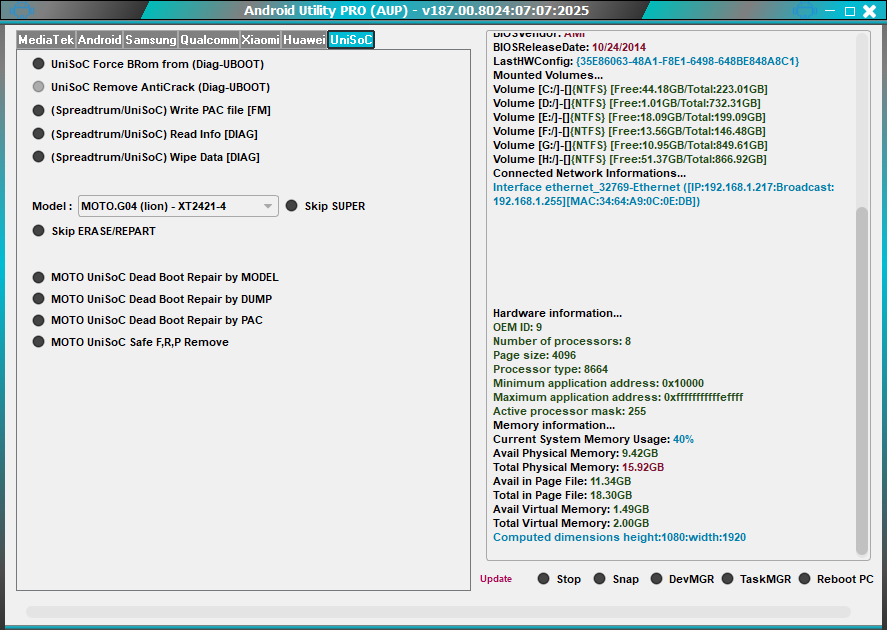
AIO Android Utility Tool Download V187.00.8024
Android Utility Tool Specifications
| Specification | Details |
|---|---|
| Tool Name | Android Utility Tool V187.00.8024 |
| Version | 187.00.8024 |
| Release Date | August 2025 |
| Platform | Windows 7/8/10/11 (x86/x64) |
| File Size | ~300 MB |
| License | Freeware |
| Price | Completely Free |
| Download Source | Official Link |
| System Requirements | 4GB RAM, 500MB Space, .NET 4.8 |
Supported Brands & Chipsets
| Brand Support | Chipset Support |
|---|---|
| Samsung | MediaTek (MTK) |
| Xiaomi | Qualcomm |
| Oppo | Unisoc |
| Realme | Exynos |
| Vivo | Spreadtrum |
| Tecno | Allis |
| Infinix | - |
| Itel | - |
| Motorola | - |
Feature Comparison
| Feature | Android Utility Tool | Other Tools |
|---|---|---|
| FRP Removal | œ… Yes | š ï¸ Limited |
| IMEI Writing | œ… Yes | œ… Yes |
| Bootloader Unlock | œ… Yes | Œ No |
| Firmware Flashing | œ… Yes | œ… Yes |
| Unisoc T820 Support | œ… Yes | Œ No |
| GUI Interface | œ… Yes | Œ CLI Only |
| Free Access | œ… Yes | Œ Paid |
| Driver Management | œ… Auto | Œ Manual |
Download Link: https://www.mfdl.io
Note: GSM6.com does not host this tool, link will lead you to their official webpage.
Frequently Asked Questions
Q1: What is Android Utility Tool V187.00.8024?
Android Utility Tool V187.00.8024 is a comprehensive Android repair and servicing software for technicians. It supports IMEI writing, FRP removal, firmware flashing, boot repair, and more across multiple brands and chipsets.
Q2: Which Android brands are supported?
The tool supports popular brands such as Samsung, Xiaomi, Oppo, Realme, Vivo, Tecno, Infinix, Itel, Motorola, and many others.
Q3: Which chipsets are compatible with this tool?
It supports MediaTek (MTK), Qualcomm, Unisoc, and Exynos chipsets, including the latest Unisoc T820.
Q4: Do I need to root my device to use this tool?
No. The tool works without rooting and connects to devices in Meta/Preloader mode for safe operations.
Q5: Can I write dual SIM IMEIs?
Yes, it supports writing IMEI for both SIM slots simultaneously.
Q6: What are the system requirements?
Windows 7/8/10/11 (32/64-bit), 4GB RAM minimum, 500MB free disk space, and .NET Framework 4.8 installed.
Q7: How fast is IMEI writing or FRP removal?
IMEI writing usually takes under a minute per slot. FRP removal typically takes 2“5 minutes depending on the device.
Q8: Is Android Utility Tool V187.00.8024 safe?
Yes, it is officially developed, malware-free, and safe when used on devices you own or have permission to repair.
Q9: Can it be used on non-Transsion devices?
Yes, it works on a wide range of Android devices beyond Transsion, including Samsung, Xiaomi, and Oppo devices.
Q10: Where can I download the latest version safely?
Download from official forums, trusted repair community websites, or verified software blogs to avoid counterfeit or malware-infected versions.
Q11: Are there tutorials available?
Yes, many online tutorials and video guides are available to help technicians use each feature effectively.
Q12: Can this tool handle firmware flashing?
Absolutely. Android Utility Tool V187.00.8024 supports full firmware flashing for compatible devices, restoring functionality or updating software versions safely.


Author:
Abdul MalikMobile Software Expert and founder of GSM6.com. Specializes in FRP bypass, IMEI repair, and advanced mobile tools. All tutorials are tested on real devices for accuracy and safety.


