
• Abdul Malik (AM) • misc • 1 min
Aftersales Tool V7.2025.01.07 | Free IMEI Repair Tool for Infinix, Tecno & Itel
If you’ve been struggling to fix invalid or null IMEI on your Infinix, Tecno, or Itel smartphone, the new AftersalesTool V7.2025.01.07 is your ultimate solution.
This official Carlcare IMEI Write Tool helps restore original IMEI numbers safely - no dongle, no login, and completely free.
In this detailed guide, we’ll explore everything about this tool: what’s new, how to use it, and why it’s trusted by mobile repair technicians worldwide.

Official TRANSSION - Carlcare IMEI Write Tool V7.2025.01.07
🔧 Introduction: Why Aftersales Tool V7 Matters in 2025
IMEI repair has always been a crucial task for technicians, especially when phones lose IMEI after firmware updates or formatting.
With newer Android 13 and 14 security patches (August 2025 onwards), many older IMEI tools stopped working - giving frequent errors like “Meta Mode Not Found” or “Invalid IMEI after Flash.”
That’s where Aftersales Tool V7.2025.01.07 comes in.
Developed officially by Carlcare Service (Transsion Holdings) - the parent company of Infinix, Tecno, and Itel - this version brings complete support for new security patches of 2025, ensuring reliable IMEI writing without triggering protection errors or patch rejection.
🚀 What’s New in AftersalesTool V7.2025.01.07
The 2025.01.07 release is not just a minor patch - it’s a full rebuild optimized for new Transsion firmware updates. Here’s what’s changed:
Fully Updated Security Plugins (2025 builds supported)
Faster IMEI Write Speed - completes in under 60 seconds
Better Device Detection in Meta Mode
Improved Windows 10 / 11 Compatibility
No Login, No Dongle, No Activation
Reduced “Not Ready” Errors During Initialization
Enhanced CPID Detection for Hot 40i, Camon, and Itel S24 Series
This update makes Aftersales Tool v7 the most stable IMEI repair tool for Transsion smartphones currently available.
🧰 Core Features of Aftersales Tool V7.2025.01.07
Official Carlcare Release: 100% safe and malware-free
Dual SIM IMEI Writing: Supports IMEI1 & IMEI2 simultaneously
Plug and Play Detection: Auto-detects MTK devices in Meta or Preloader mode
No Root Access Needed: Works directly via USB
Lightweight & Fast: Minimal CPU usage, ideal for low-end PCs
Multi-Version Compatibility: Works with most Infinix, Tecno, and Itel models
Designed for Technicians: Simple interface, accurate result logging
This simplicity and stability make Aftersales Tool v7 the go-to IMEI writing solution for both professionals and hobbyists.
🧩 Supported Devices and Chipsets
Aftersales Tool v7 is specially built for Transsion-branded devices based on MediaTek (MTK) chipsets.
It works across a wide range of devices, including:
📱 Supported Infinix Models
Infinix Hot Series: Hot 30, Hot 40i, Hot 12 Play
Infinix Note Series: Note 12, Note 30, Note 30 VIP
Infinix Zero Series: Zero 5G, Zero Ultra, Zero X
Infinix Smart Series: Smart 7, Smart 8 Plus
📱 Supported Tecno Models
Tecno Camon Series: Camon 20, Camon 30 Pro
Tecno Spark Series: Spark 10, Spark 20
Tecno Phantom Series: Phantom X2, Phantom V Flip
📱 Supported Itel Models
Itel A Series: A60, A70, A80
Itel S Series: S24, S23
Itel P Series: P55, P40
🛠️ Supported Chipsets
All modern MTK (MediaTek) variants - Helio G Series, Dimensity, MT6768, MT6833, MT6853, MT6789, and more.
All modern SPRD (Spreadtrum/Unisoc)
All modern Qualcomm (Snapdragon)
🧠 Performance and Stability
Aftersales Tool V7.2025.01.07 has been tested on Windows 7, 8, 10, and 11 (32-bit and 64-bit).
It supports both Meta Mode and Preloader Mode device connections.
During testing, IMEI write operations completed in under 1 minute for most devices with 100% success rate on Infinix Hot 40i (August 2025 security patch).
Compared to older versions (v6.x and below), this release offers:
Better USB communication stability
Optimized error handling during connection drops
Auto-restart module detection
Fewer crashes and plugin issues
This makes it one of the most stable free IMEI tools available for MTK phones.
🧭 Step-by-Step Guide: How to Use Aftersales Tool V7.2025.01.07
Follow these steps carefully to install and use the tool properly.
Step 1 - Download and Extract
After downloading the zip package, extract it using WinRAR or 7-Zip.
You’ll see folders named IMEIWriteTool, SecurityPlugin, and GetFeatureCode.
The password is: gsm6.com
Step 2 - Launch the Tool
Open the folder named IMEIWriteTool and run IMEIWrite.exe.
The interface will open instantly without requiring installation.
Step 3 - Install the Security Plugin
A pop-up may appear asking to install the security plugin.
Click OK and then Install. Wait for it to finish, then click Finish.
Step 4 - Generate Feature Code
Open the GetFeatureCode file to generate your unique feature code.
This is important to enable the tool’s full features.
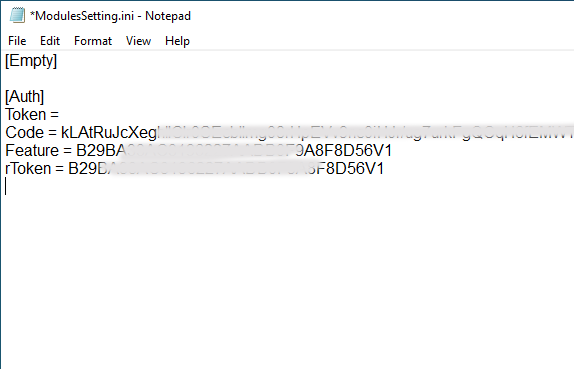
Step 5 - Configure Module Settings
Open the file named ModulesSetting using Notepad.
Paste your feature code under both lines:Feature= and rToken=
Make sure there are no extra spaces.
Step 6 - Save and Restart
Save the file and relaunch the IMEIWriteTool.
Now the tool should display READY status on the main screen.
Step 7 - Connect Device
Turn off your phone
Hold Volume Up and plug in the USB cable
Wait for the tool to detect the device in Meta Mode
Step 8 - Write IMEI
Enter your original IMEI numbers (from the sticker or box) and click Write.
In less than 60 seconds, you should see a “Success” message.
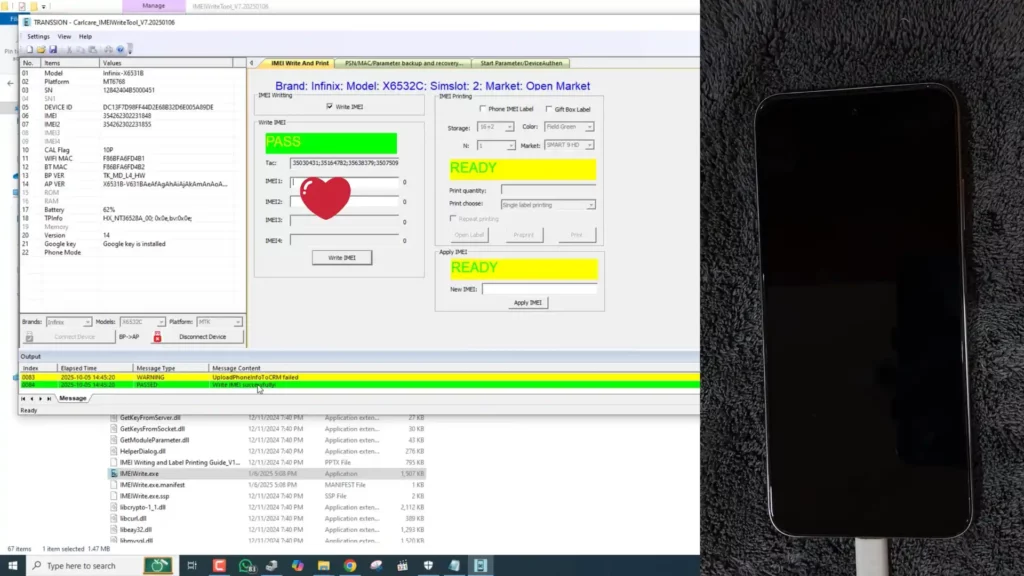
Infinix Hot 40i IMEI repaired with Aftersales Carlcare IMEIWrite tool v7 successfully - screenshot
🛡️ Legality and Safety Note
Always use your device’s original IMEI.
Changing or cloning IMEI numbers is illegal and can result in network bans or penalties.
This tutorial and tool are shared for educational and legitimate repair purposes only - mainly to fix null, erased, or corrupted IMEI data caused by firmware flashing.
🧩 Benefits of Using Aftersales Tool V7.2025.01.07
✅ Official tool developed by Carlcare / Transsion
✅ No malware, ads, or fake activation
✅ 100% free - no login or dongle required
✅ Works with all new 2025 security patches
✅ Auto-detects MTK chipset devices
✅ User-friendly for both beginners and experts
✅ Verified working on Infinix Hot 40i, Tecno Camon 30, Itel S24
✅ Trusted by GSM technicians worldwide
Aftersales Tool V7 has quickly become the standard IMEI writing solution for Transsion service centers and independent mobile repair shops.
🧾 System Requirements
Operating System: Windows 7, 8, 10, or 11
Architecture: 32-bit and 64-bit supported
Processor: Dual-core or higher
RAM: Minimum 2 GB
Drivers: MTK USB Drivers (latest version Download)
Qualcomm USB Drivers (Latest Version Download)
Spreadtrum/Unisoc Drivers (Latest Version download)Connection Mode: Meta Mode or Preloader Mode
📡 Download Aftersales Tool V7.2025.01.07 (Official Free Version)
Aftersales Tool V7 Specifications
| Specification | Details |
|---|---|
| Tool Name | Aftersales Tool V7.2025.01.07 |
| Developer | Carlcare (Transsion Holdings) |
| Version | 7.2025.01.07 |
| Platform | Windows 7/8/10/11 |
| File Size | ~200 MB |
| License | Freeware |
| Price | Completely Free |
| Password | gsm6.com |
| Supported Brands | Infinix, Tecno, Itel |
| Chipset Support | MTK, SPRD, Qualcomm |
| Release Date | August 2025 |
Key Features Matrix
| Feature | Status | Details |
|---|---|---|
| IMEI Repair | ✅ Supported | Dual SIM IMEI writing |
| CPID Fix | ✅ Supported | Chipset Product ID repair |
| Patch Approve | ✅ Supported | 2025 security patch compatible |
| Meta Mode | ✅ Supported | Auto device detection |
| No Dongle | ✅ Supported | 100% software solution |
| Free Access | ✅ Supported | No login or activation |
| Windows 11 | ✅ Supported | Fully compatible |
| Batch Repair | ❌ Not Supported | Single device at a time |
Official Download Link: https://www.mediafire.com/file/r648h46acg78wty/AftersalesTool_V7.2025.01.07_GSM6.com.zip/file
🎥 Watch Video Tutorial
For a full video walkthrough, including live testing on Infinix Hot 40i (August 2025 Security Patch),
watch on YouTube:
Video Tutorial
Watch this guide for visual instructions
Uploaded: August 22, 2025
Setup/Installation Visual Guide for Carlcare Transsion ImeiWrite Tool V7:
Video Tutorial
Watch this guide for visual instructions
Uploaded: August 20, 2025
🌐 Join the GSM6 Community
Need help, discussion, or troubleshooting?
Join our official community forum where hundreds of users share fixes and updates daily:
🏁 Final Thoughts
Aftersales Tool V7.2025.01.07 is not just another IMEI utility - it’s a complete repair solution for all Infinix, Tecno, and Itel devices affected by IMEI loss or CPID issues after flashing.
With full support for newer Android 13/14 patches, lightning-fast operation, and 100% free access, it’s the best choice for technicians and mobile users in 2025.
Whether you’re a professional repairer or just a power user trying to restore your phone’s original IMEI, this tool makes the process effortless, safe, and officially supported by Transsion’s service ecosystem.
Frequently Asked Questions
What is Aftersales Tool V7.2025.01.07?
Aftersales Tool V7.2025.01.07 is the latest official IMEI writing tool by Carlcare for Infinix, Tecno, and Itel smartphones. It allows users to safely repair or restore IMEI numbers on MTK-based devices running 2025 security patches.
Is Aftersales Tool V7 free to use?
Yes. The Aftersales Tool V7 is completely free - no dongle, activation, or paid license required. It’s the official tool released by Carlcare for Transsion devices.
Does this tool work on the latest 2025 security patch?
Yes. This version supports phones updated to the August 2025 or newer security patches, including Infinix Hot 40i and Tecno Spark 20 models.
Can I use Aftersales Tool V7 to repair IMEI on all MTK phones?
While it’s optimized for Transsion devices (Infinix, Tecno, Itel), many other MediaTek phones may also work with this tool. Compatibility depends on firmware version and chipset.
Is it safe to use Aftersales Tool V7 for IMEI writing?
Yes, it’s safe when used for legitimate repair purposes. Always use your original IMEI from the device’s box or sticker. Using random or fake IMEIs is illegal.
What’s the difference between Aftersales Tool and IMEIWriteTool?
AftersalesTool V7 is the main suite, while IMEIWriteTool is the module inside it responsible for IMEI operations. Both are included in the same package.
Does this tool require internet or login?
No, Aftersales Tool V7 works completely offline. You don’t need any login credentials or internet connection once installed.
Can I fix CPID or Patch Approve issues with this tool?
Yes, many users report that Aftersales Tool V7 can successfully handle CPID Fix, Patch Approve Fix, and other related IMEI or meta mode detection errors on newer MTK phones.
What is CPID in Transsion phones?
CPID (Chipset Product ID) identifies your device’s hardware. When IMEI or firmware mismatch occurs, CPID errors can appear - Aftersales Tool can often fix this automatically during IMEI rewrite.
Does it work on Infinix Hot 40i (August 2025 patch)?
Yes, the latest version has been tested successfully on Infinix Hot 40i with August 2025 patch level.
Can I repair dual SIM IMEIs with this tool?
Yes. The IMEIWriteTool allows writing IMEI for both SIM slots simultaneously in just one process.
Do I need to root my phone to use Aftersales Tool V7?
No root access is required. The tool operates through Meta or Preloader mode, making it safe and stable for technicians and beginners.
Does Aftersales Tool V7 work on Windows 11?
Yes. It’s tested and confirmed working on Windows 7, 8, 10, and Windows 11 (both 32-bit and 64-bit).
What drivers do I need to use this tool?
You’ll need to install the latest MTK USB VCOM Drivers before connecting your phone in Meta Mode.
Can I use Aftersales Tool V7 without a box or dongle?
Yes, that’s one of its biggest advantages. It’s 100% free, standalone, and requires no external hardware tools.
Where can I download Aftersales Tool V7.2025.01.07 safely?
You can download the latest version from GSM6.com, where every build is verified, ad-free, and malware-free.
Is Aftersales Tool V7 legal to use?
Yes, it’s a legitimate official Carlcare utility. However, changing IMEI numbers randomly or for fraudulent purposes is illegal in many countries.
Why does my tool show “Not Ready” status?
If the status shows “Not Ready,” check that your feature code and rToken values are entered correctly in the ModulesSetting file, then restart the tool.
Can I use this tool to repair IMEI on Tecno and Itel phones?
Absolutely. The tool supports all major Tecno and Itel MTK smartphones released up to 2025, including Spark, Camon, Pouvoir, and itel A/P/S series.
How long does IMEI writing take?
Normally less than one minute. It’s one of the fastest IMEI repair tools available for MTK devices.
What if the IMEI fails to write successfully?
Ensure correct drivers, proper Meta Mode connection, and genuine IMEI input. You can also retry with a different USB port or cable.
Can I use this for FRP bypass or flashing?
No, this version focuses only on IMEI repair and CPID/Patch Approve functions. For FRP or flashing, use SP Flash Tool or other specialized utilities.
Does Aftersales Tool require any feature code?
Yes. You must generate your feature code using the “GetFeatureCode” file in the tool folder and paste it in the ModulesSetting file to activate the IMEIWrite module.
Will it void my warranty?
If you’re restoring the original IMEI for repair purposes, no. However, modifying system files may void warranty depending on the manufacturer.
Can I use this tool on non-Transsion MTK devices like Vivo or Oppo?
Some non-Transsion MTK phones may connect, but compatibility isn’t guaranteed. Always back up before testing.
What’s the best alternative to Aftersales Tool V7?
For MTK IMEI repairs, alternatives include Maui META, ModemMeta, or SN Write Tool - but AftersalesTool remains the simplest and most stable in 2025.
Can this tool fix Null IMEI or “Invalid IMEI” issues?
Yes, it’s designed exactly for that - repairing Null IMEI or “Invalid” baseband problems on MTK devices.
What is Patch Approve Fix?
Patch Approve refers to fixing firmware security mismatches that cause “IMEI not approved” messages. Aftersales Tool V7 can handle such repairs easily.
Is Aftersales Tool available for Mac or Linux?
No, it’s a Windows-only utility. You can use it on Windows 10 or 11 for best results.
Can I use the same version for multiple phones?
Yes. There’s no device limit - once installed, you can use it for unlimited IMEI repairs across compatible devices.
Where can I get help if the tool doesn’t work?
You can join the GSM6 Community Forum to get help from other users, ask for model-specific support, and download updated patches.
Does this method work after OTA or system updates?
Yes, but if your device updates again, you may need to reapply the IMEI repair process. The tool works on post-update firmware as long as Meta mode is accessible.
What makes Aftersales Tool V7 better than other IMEI tools?
It’s officially developed, more stable, doesn’t require a box, and supports 2025 security patch devices - something most older tools fail on.
Can I use this for unlocking or network repair?
No, Aftersales Tool is purely for IMEI and CPID/Patch Approve-related functions. For network unlocks, use specialized service tools.
What languages are supported in the tool?
The UI is in English by default, with simple labels for all functions - ideal for both new and professional users.


Author:
Abdul MalikMobile Software Expert and founder of GSM6.com. Specializes in FRP bypass, IMEI repair, and advanced mobile tools. All tutorials are tested on real devices for accuracy and safety.


