
• Abdul Malik (AM) • misc • 1 min
3uTools Review: Complete iOS Management Tool Guide
3uTools Review: Introduction
Navigating the iOS Ecosystem with 3uTools
Apple’s iOS ecosystem is renowned for its intuitive design and robust security. However, for users seeking more granular control over their devices, or for technicians managing multiple iPhones and iPads, the standard iTunes and Finder applications can sometimes feel limiting. This is where third-party utilities like 3uTools step in, offering a comprehensive suite of features designed to simplify and enhance iOS device management.
3uTools has gained significant popularity as an all-in-one solution for Windows users interacting with their iOS devices. From firmware flashing and data migration to app management and unique customization options, it aims to consolidate numerous functionalities into a single, user-friendly interface. This comprehensive review will delve into the core features of 3uTools, explore its advantages and potential considerations, and help you determine if this versatile tool is the right addition to your iOS management toolkit.
Understanding 3uTools: More Than Just a Management Utility
At its core, 3uTools is a free-to-use software application for Windows PCs that serves as a multi-functional management tool for iOS devices. It provides a robust alternative or complement to Apple’s native software, offering a broader range of functionalities accessible through a streamlined graphical user interface. Unlike simpler file transfer tools, 3uTools integrates a wide array of capabilities that appeal to both general users seeking convenience and advanced users or technicians requiring powerful diagnostics and repair features.
The philosophy behind 3uTools seems to be about empowering users with greater control and insight into their iOS devices. It achieves this by presenting complex operations, such as firmware flashing or data migration, in an accessible manner, often with clear visual indicators and simplified processes.
Core Features - A Deep Dive into Its Capabilities
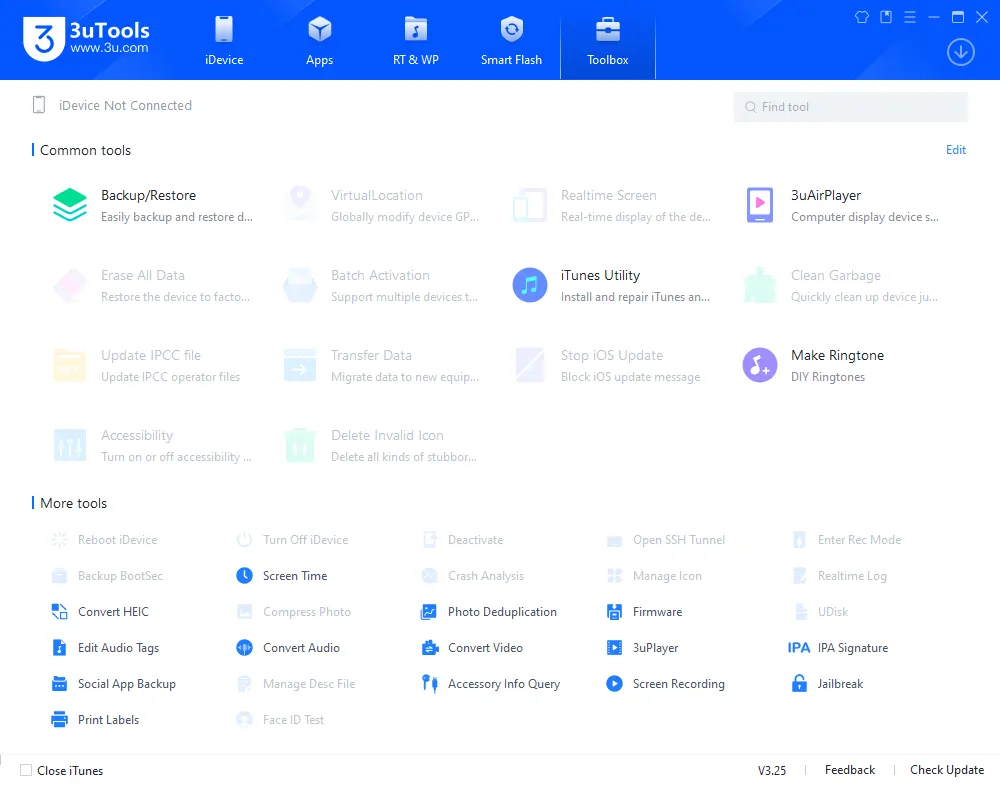
3uTools stands out due to its extensive feature set, covering almost every aspect of iOS device management. Let’s break down its primary functionalities:
3utools review toolbox
1. Device Information and Status Monitoring
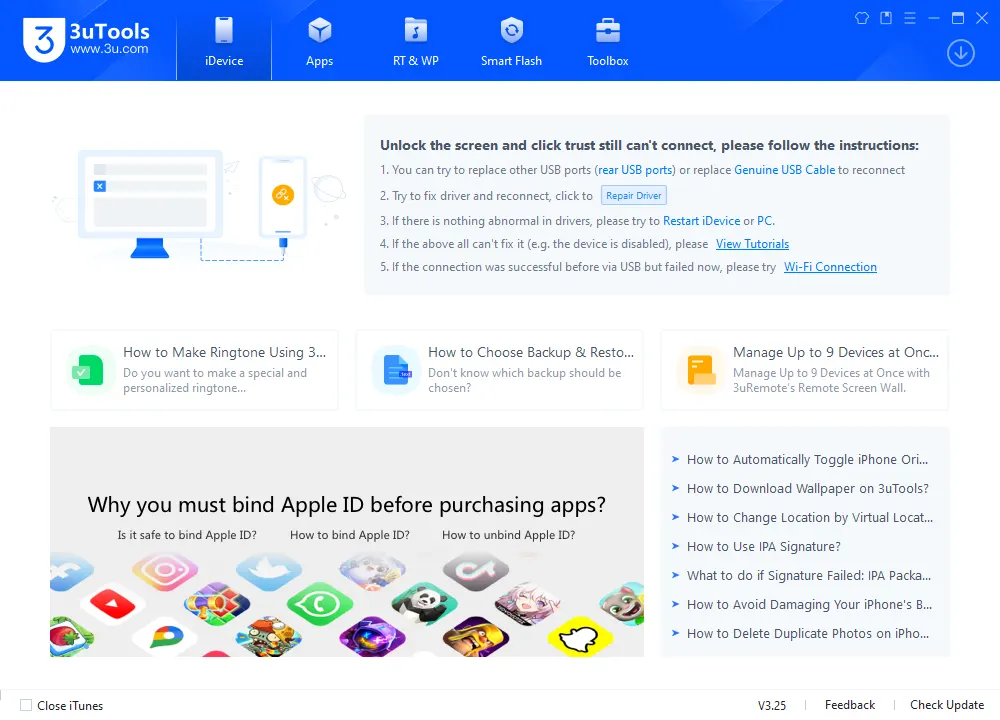
Upon connecting an iOS device, 3uTools immediately presents a detailed overview. This dashboard provides comprehensive information about the device, including:
Model Identification: Precise model number, color, storage capacity.
iOS Version: Current operating system version.
Hardware Information: Serial number, IMEI, UDID, ECID, CPU, and NAND details.
Battery Status: Cycle count, design capacity, actual capacity, which can be invaluable for assessing battery health.
Activation Status: Indication of whether the device is activated.
Jailbreak Status: Information regarding the device’s jailbreak status, if applicable.
Detailed Diagnostics: Ability to run quick diagnostic tests to check for common hardware issues or software anomalies.
This feature alone makes 3uTools a valuable diagnostic tool for users and repair technicians, providing a quick glance at the device’s vital statistics.
2. Firmware Management and Flashing
One of 3uTools’ most powerful and frequently used features is its robust firmware management system. This allows users to:
Download Firmware (IPSW files): Access and download signed firmware files directly from Apple servers through 3uTools. This ensures the integrity and authenticity of the software.
Easy Flash: Simplify the process of flashing firmware onto an iOS device. This is particularly useful for:
Restoring Devices: Returning a device to factory settings, which can resolve software glitches, performance issues, or prepare a device for sale.
Updating/Downgrading (if signed): Easily installing specific iOS versions, provided Apple is still digitally signing them.
Repairing Bricked Devices: Attempting to revive devices stuck in recovery mode, DFU mode, or boot loops due to software corruption.
Pro Flash: Offers advanced flashing options, allowing users to preserve user data during a restore (though this option comes with specific conditions and risks).
Baseband Upgrade/Downgrade: Facilitates modem firmware management, which can be critical for cellular connectivity issues.
3. Data Backup and Restore
3uTools provides a comprehensive solution for backing up and restoring iOS device data, offering a more flexible alternative to iTunes or iCloud:
Full Backup: Create a complete backup of your device’s data, including contacts, messages, photos, apps, and settings.
Customizable Restore: Restore data to a device, with options to select specific data types for restoration, giving users more control than an all-or-nothing approach.
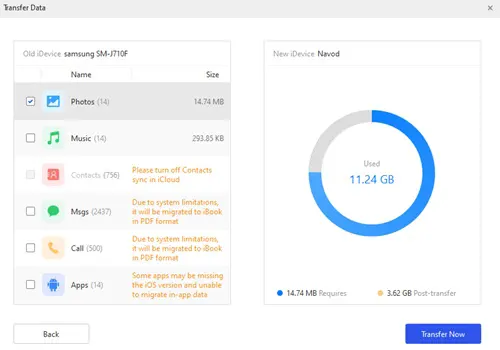
Data Migration: Facilitate the transfer of data between two iOS devices, a common need when upgrading to a new iPhone or iPad.
3utools review: data trasnfer
4. App Management
Managing applications on your iOS device becomes much more intuitive with 3uTools:
App Installation: Install, uninstall, and update apps directly from your computer.
App Backup: Backup installed apps to your computer, which can be useful for reinstalling them later without needing to download them again, or for keeping older versions.
App Library: A built-in “App Store” within 3uTools allows users to download free applications and games, often without needing an Apple ID. Users should exercise caution and ensure they are downloading apps from reputable sources to avoid potential security risks.
5. File Management and Transfer
3uTools offers robust file Browse and transfer capabilities that go beyond standard sync functions:
Photo Management: Import, export, delete, and organize photos and videos.
Music Management: Import, export, and delete music files, with support for various audio formats.
Ringtone Maker: Create custom ringtones from existing audio files, easily transferring them to your device.
File Browser: Browse the device’s file system, allowing access to app documents, downloads, and other accessible directories, simplifying the management of various file types.
Import/Export: Facilitate the transfer of various file types (documents, books, voice memos, etc.) between the iOS device and the computer.
6. ToolBox: Advanced Utilities and Customization
The “ToolBox” section is where 3uTools truly expands its utility, offering a collection of specialized features:
Jailbreak Features (Contextual Use): 3uTools includes features that assist with jailbreaking, a process that allows users to gain deeper control over their iOS devices. It is crucial to understand that jailbreaking carries significant risks, including potential security vulnerabilities, voiding the device warranty, and issues with app compatibility or stability. Users should only consider jailbreaking their own devices with a full understanding of these implications. This functionality is typically utilized by advanced users for specific customization or development purposes.
Virtual Location: Set a virtual GPS location for your device, useful for certain applications or testing.
Icon Management: Arrange, backup, and restore icon layouts on your home screen.
Deactivate iPhone: Remotely deactivate an iPhone, useful in certain recovery scenarios for legitimately owned devices.
Clean Up Garbage: Scan and remove temporary files, caches, and other unnecessary data to free up storage space.
Make DFU/Recovery: Tools to easily put devices into DFU (Device Firmware Update) or Recovery mode, essential for flashing or troubleshooting.
Realtime Screen: Mirror your device’s screen to your computer.
Convert Audio/Video: Simple converters for media files.
Advantages of Using 3uTools
User-Friendly Interface: Despite its vast array of features, 3uTools boasts an intuitive and easy-to-navigate interface, making advanced tasks more accessible to a wider audience.
All-in-One Solution: It consolidates numerous functionalities that would otherwise require multiple separate applications, saving time and simplifying workflows.
Free to Use: 3uTools is entirely free, making its powerful features accessible without any cost.
Speed and Efficiency: Many users report faster data transfer and flashing speeds compared to official Apple software for certain operations.
Detailed Device Information: The comprehensive device overview is a significant advantage for diagnostics and monitoring.
Versatile Firmware Management: The ability to easily download and flash firmware is a major draw, particularly for troubleshooting and repair.
Considerations and Potential Risks
While 3uTools offers compelling advantages, users should be aware of certain considerations and potential risks:
Third-Party Software: As a third-party application, 3uTools operates outside Apple’s official ecosystem. While generally considered safe by its user base, users should always be mindful of security best practices when using non-official tools.
Security Implications of Advanced Features: Features like jailbreaking, while providing customization options, inherently bypass Apple’s security layers. Users engaging in such activities on their own devices must fully understand the associated risks, including potential security vulnerabilities, reduced stability, and the inability to use certain apps or services.
Warranty Voidance: Engaging in advanced modifications like jailbreaking or unauthorized flashing may void your device’s warranty with Apple.
Data Loss Risk: Any advanced operation involving firmware flashing or device resets carries an inherent risk of data loss. Always back up your device before performing any major operations with 3uTools.
Source Integrity: Always download 3uTools only from its official website to avoid malicious or modified versions that could compromise your computer’s security.
3utools Review: Home Screen
How to Obtain 3uTools (Official Source) - Download Link
To ensure the safety and integrity of the software, it is crucial to download 3uTools exclusively from its official developer website. Avoid unofficial mirrors or third-party download sites, as these may distribute modified or malicious versions of the software.
3uTools Specifications
| Specification | Details |
|---|---|
| Software Name | 3uTools |
| Latest Version | v2.x (Auto-updates) |
| Platform | Windows 7/8/10/11 (64-bit & 32-bit) |
| File Size | ~150 MB |
| License Type | Freeware |
| Price | Completely Free |
| Official Source | https://www.3u.com/ |
| Languages | English, Chinese, and others |
| System Requirements | 2GB RAM, 1GB Free Space, iTunes Components |
| Supported Devices | iPhone, iPad, iPod Touch (iOS 7+) |
| Release Date | 2013 (Initial) |
Key Features Summary
| Feature Category | Available Tools |
|---|---|
| Firmware Management | Flash, Update, Downgrade, Restore |
| Data Management | Backup, Restore, Transfer, Migration |
| App Operations | Install, Uninstall, Update, Backup |
| File Management | Photos, Music, Videos, Documents |
| Device Tools | Battery Info, Screen Mirror, Virtual Location |
| Advanced Tools | Jailbreak Assistant, DFU Mode, Repair Tools |
Download Link: https://www.3u.com/
How to use 3u-Tools? - Step-by-Step Video Guide.
Video Tutorial
Watch this guide for visual instructions
Uploaded: June 15, 2024
Conclusion: A Powerful Tool for iOS Device Management
3uTools has firmly established itself as a robust and versatile utility for managing iOS devices on Windows. Its comprehensive feature set, ranging from detailed device information and firmware management to file transfer and app installation, makes it an attractive option for a wide spectrum of users. Whether you’re an everyday iPhone user seeking more control over your data and apps, or a technician requiring powerful diagnostic and flashing capabilities, 3uTools offers a compelling alternative to standard Apple software.
While it empowers users with advanced functionalities, it is imperative to approach 3uTools with an understanding of its capabilities and the associated risks, particularly concerning features that modify core device software. By obtaining the tool from its official source and exercising caution with its more advanced options, users can leverage 3uTools to enhance their iOS device management experience significantly. It stands as a testament to the thriving ecosystem of third-party tools that continually push the boundaries of what’s possible with mobile devices.
Frequently Asked Questions
What is 3uTools used for?
3uTools is a free Windows application designed for managing iOS devices. It provides features like data backup, app installation, firmware flashing, file transfers, and device information viewing.
Is 3uTools free to use?
Yes, 3uTools is completely free to download and use. There are no subscription fees or hidden charges.
Can I use 3uTools to update my iPhone?
Yes, 3uTools allows users to flash and update iOS firmware manually. It supports both standard and advanced flashing modes.
Does 3uTools work with all iPhone and iPad models?
3uTools supports most iPhone, iPad, and iPod models running iOS 7 through the latest iOS versions. However, some advanced features may vary by device and iOS version.
Is 3uTools safe to use on my device?
Yes, 3uTools is widely considered safe when used properly. It does not contain malware and uses official Apple firmware files. Always download it from the official website or trusted sources.
Do I need iTunes to use 3uTools?
Yes, 3uTools requires iTunes components to communicate with your iOS device. It will prompt you to install them during setup if they are missing.
Can 3uTools back up and restore my iPhone data?
Absolutely. 3uTools can back up contacts, photos, apps, messages, and more. You can also use it to restore this data later or transfer it to a new device.
Is 3uTools available for macOS?
No, 3uTools is currently only available for Windows. Mac users need to use other alternatives or run it through a virtual machine.


Author:
Abdul MalikMobile Software Expert and founder of GSM6.com. Specializes in FRP bypass, IMEI repair, and advanced mobile tools. All tutorials are tested on real devices for accuracy and safety.


