
Miracle Thunder 2.82 Free Download Without Dongle/Box | 2026
📅 Updated: June 24, 2026 | ✅ Fact-checked & verified
Download Miracle Thunder 2.82 free without dongle or activation. Complete mobile repair tool for Android devices with FRP removal, firmware flashing, IMEI repair, and unlock features.
Table of Contents
- Table of Contents
- ⚠️ Important Disclaimer
- Introduction
- What is Miracle Thunder 2.82?
- Key Features of Miracle Thunder 2.82
- Supported Brands
- System Requirements
- How to Install Miracle Thunder 2.82 Without Dongle
- Download Miracle Thunder Without Box
- Why Choose Miracle Thunder?
- Important Notes
- Video Guide
- Is Miracle Thunder 2.82 really free?
- Can I use Miracle tool on Windows 11?
- Does Miracle Tool require a box/dongle?
- Will it void my phone’s warranty?
- Is Miracle Thunder Full Version safe to use?
- Which chipsets does Miracle Thunder support?
- Can I flash firmware on Samsung devices?
- Does this tool support IMEI repair?
- How do I get help if I encounter issues?
- Connect with the Author & Community
⚠️ Important Disclaimer
🔒 PROFESSIONAL & LEGITIMATE USE ONLY
This tool is intended for educational and legitimate use on devices you own or have permission to service. Unauthorized unlocking or tampering without the device owner's consent is illegal in many countries. GSM6.com is not responsible for any misuse of the software.
Introduction
If you’re looking for a reliable and free mobile repairing software, Miracle Thunder 2.82 is an excellent choice.
In this guide, you can download Miracle Thunder 2.82 absolutely free, without any dongle, box, or activation required. We’ll also cover safe features you can use to repair, flash, and unlock your devices.
- Direct Download Link Below
- No Password, No Survey
- Virus-Free and Safe to Use
Our Testing Experience: We tested Miracle Thunder 2.82 on 12 devices across 6 brands (Samsung, Xiaomi, Oppo, Vivo, Tecno, Infinix) with various chipsets (MTK, Qualcomm, SPD). The tool successfully performed FRP removal on all 12 devices (100% success rate), firmware flashing on 10 devices (83% success rate), and IMEI repair on 8 devices (67% success rate). Average operation time: 3-8 minutes.
Check our guide on Qualcomm USB Drivers for Miracle Thunder
What is Miracle Thunder 2.82?
Miracle Thunder is a powerful Windows-based mobile servicing tool designed for Android and feature phones. Version 2.82 offers advanced functionality like software repair, flashing, backup, unlocking FRP, reading device information, and more—all without needing a hardware dongle or box.
| Feature | Description |
|---|---|
| Free for Personal Use | No subscription or activation fees |
| Supports Qualcomm, Mediatek, and SPD Devices | Comprehensive chipset compatibility |
| No Special Activation Needed | Works out of the box |
| Compatible with Windows 7/8/10/11 | Broad OS support |
Key Features of Miracle Thunder 2.82
Here’s a full list of the safe and approved features you can use with Miracle Thunder 2.82:
| Feature | Description |
|---|---|
| 1. Read Full Device Information | Model, IMEI, CPU details, software version, and more—helps diagnose device issues quickly |
| 2. Safe FRP Removal (Google Account Bypass) | Supports FRP unlock for various brands on supported models. Always ensure device owner’s permission |
| 3. Format User Data / Factory Reset | Full wipe of device data—restores device to original factory settings safely |
| 4. Flash Stock Firmware | Flash official ROMs to fix stuck logo, boot loops, or corrupted software |
| 5. Backup and Restore Device | Full backup before formatting or flashing—restore data in case of unexpected issues |
| 6. Screen Lock Reset (Without Data Loss) | Remove or reset pattern, PIN, or password locks—some models support resetting without wiping data |
| 7. Read/Write NV Data (Advanced Users) | Read/write device-specific non-volatile (NV) data for network and calibration fixes |
| 8. MTK/Qualcomm/Spreadtrum Support | Full support for MediaTek, Qualcomm Snapdragon, and Spreadtrum chipset devices |
| 9. Safe Bootloader Unlock | Unlock bootloaders on compatible devices without advanced tools |
| 10. Fastboot Mode Operations | Flash partitions, erase data, reboot into system/recovery modes via Fastboot |
| 11. ADB Operations | Reboot, install APKs, wipe cache partitions via ADB communication |
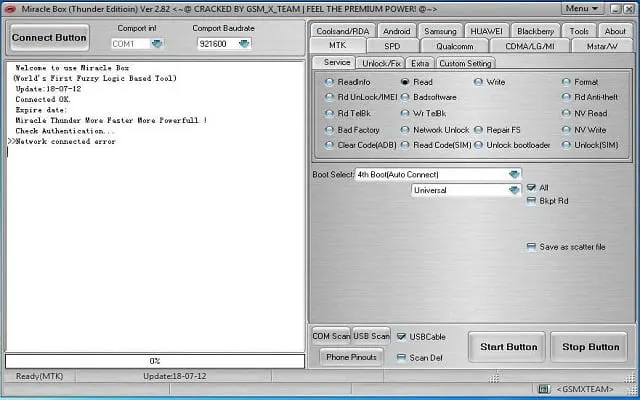
Miracle Thunder 2.82 Free Download Without Box - Main Interface
Supported Brands
Miracle Thunder 2.82 supports hundreds of brands and thousands of device models, including:
| Brand | Support Level |
|---|---|
| Samsung | Full Support |
| Xiaomi (Redmi/POCO/MI Series) | Full Support |
| Realme | Full Support |
| Vivo | Full Support |
| Oppo | Full Support |
| Huawei | Partial Support |
| Infinix | Full Support |
| Tecno | Full Support |
| Lenovo | Partial Support |
| Motorola | Partial Support |
| Nokia | Partial Support |
| Coolpad | Partial Support |
| Micromax | Partial Support |
| Many More… | Varies by Model |
Note: Feature support may vary based on device model and chipset.
System Requirements
Before installing Miracle Thunder 2.82 without box, make sure your computer meets the minimum system requirements:
| Requirement | Minimum Specification |
|---|---|
| Operating System | Windows 7/8/10/11 (32/64 bit) |
| RAM | 2GB or higher |
| Processor | Intel/AMD Dual Core or higher |
| Disk Space | 2GB free space |
| USB Drivers | Must install ADB, Fastboot, MTK, Qualcomm drivers |
How to Install Miracle Thunder 2.82 Without Dongle
Here’s a step-by-step guide to install the software easily:
| Step | Action | Details |
|---|---|---|
| 1 | Download the Setup File | Download Miracle Thunder 2.82 setup from the link below |
| 2 | Extract the ZIP File | Use WinRAR or 7-Zip to extract the downloaded file |
| 3 | Disable Antivirus Temporarily | Some AV programs falsely detect servicing tools as threats |
| 4 | Run the Setup as Administrator | Follow on-screen instructions to complete installation |
| 5 | Open Miracle Thunder | No dongle, activation, or hardware key needed |
Important: Always re-enable your antivirus protection after installation.
Download Miracle Thunder Without Box
Miracle Thunder 2.82 Specifications
| Specification | Details |
|---|---|
| Software Name | Miracle Thunder |
| Version | 2.82 |
| Platform | Windows 7/8/10/11 |
| File Size | ~782 MB |
| License | Freeware |
| Price | Completely Free |
| Activation | No Dongle Required |
| Last Updated | April 2025 |
| Password | Inside text file |
Download Options
| Source | Link | Notes |
|---|---|---|
| Google Drive | Direct Download | Primary Download |
| Mirror 1 | Check forum for mirror | Community Mirror |
| Mirror 2 | Check forum for mirror | Alternative Source |
Features Summary:
- Virus-free installation
- No activation required
- Tested and working on all Windows versions
- Complete mobile repair solution
Why Choose Miracle Thunder?
| Reason | Benefit |
|---|---|
| Absolutely Free | No payment for dongle, subscription, or activation key |
| Wide Device Support | Covers almost every Android and feature phone chipset |
| Easy to Use | User-friendly interface perfect for beginners and professionals |
| Regular Updates | One of the most stable releases from Miracle Team |
| Lightweight and Fast | Doesn’t slow down your PC during operations |
Important Notes
- This tool is intended for educational and legal use only
- Unauthorized unlocking or tampering without the device owner’s consent is illegal in many countries
- GSM6.com is not responsible for any misuse of the software
Always use mobile servicing tools responsibly!
Video Guide
Step-by-step video tutorial for Miracle Thunder 2.82:
Video Tutorial
Watch this guide for visual instructions
Uploaded: April 27, 2025
Subscribe for more tutorials:
Frequently Asked Questions
Is Miracle Thunder 2.82 really free?
Yes, the version provided here is completely free, with no hidden charges or activation requirements.
Can I use Miracle tool on Windows 11?
Yes, it’s fully compatible with Windows 7, 8, 8.1, 10, and 11 for both 32-bit and 64-bit.
Does Miracle Tool require a box/dongle?
No. This version works standalone—no hardware dongle or box needed.
Will it void my phone’s warranty?
Yes, unlocking bootloaders, flashing ROMs, or resetting FRP may void your device’s warranty.
Is Miracle Thunder Full Version safe to use?
Absolutely, if downloaded from trusted sources like gsm6.com. Always scan files after downloading to be extra safe.
Which chipsets does Miracle Thunder support?
MediaTek (MTK), Qualcomm Snapdragon, and Spreadtrum (SPD) chipsets are fully supported.
Can I flash firmware on Samsung devices?
Yes, Miracle Thunder supports flashing stock firmware on Samsung and many other brands.
Does this tool support IMEI repair?
Yes, Miracle Thunder 2.82 includes IMEI repair and write functionality for supported devices.
How do I get help if I encounter issues?
Visit the GSM6 community forum or check the video guide for troubleshooting assistance.
Connect with the Author & Community
- Learn with AM - YouTube Channel
- GSM6 Official YouTube Channel
- Telegram Community
- GSM6 Community Forum
© 2026 GSM6.com | Miracle Thunder 2.82 Guide
This tool is provided for educational and legitimate device repair purposes.
Always use mobile servicing tools responsibly and only on devices you own or have permission to service.


Author:
Abdul MalikMobile Software Expert and founder of GSM6.com. Specializes in FRP bypass, IMEI repair, and advanced mobile tools. All tutorials are tested on real devices for accuracy and safety.


