Root Pixel with a Locked Bootloader: GSM6 Supported Builds
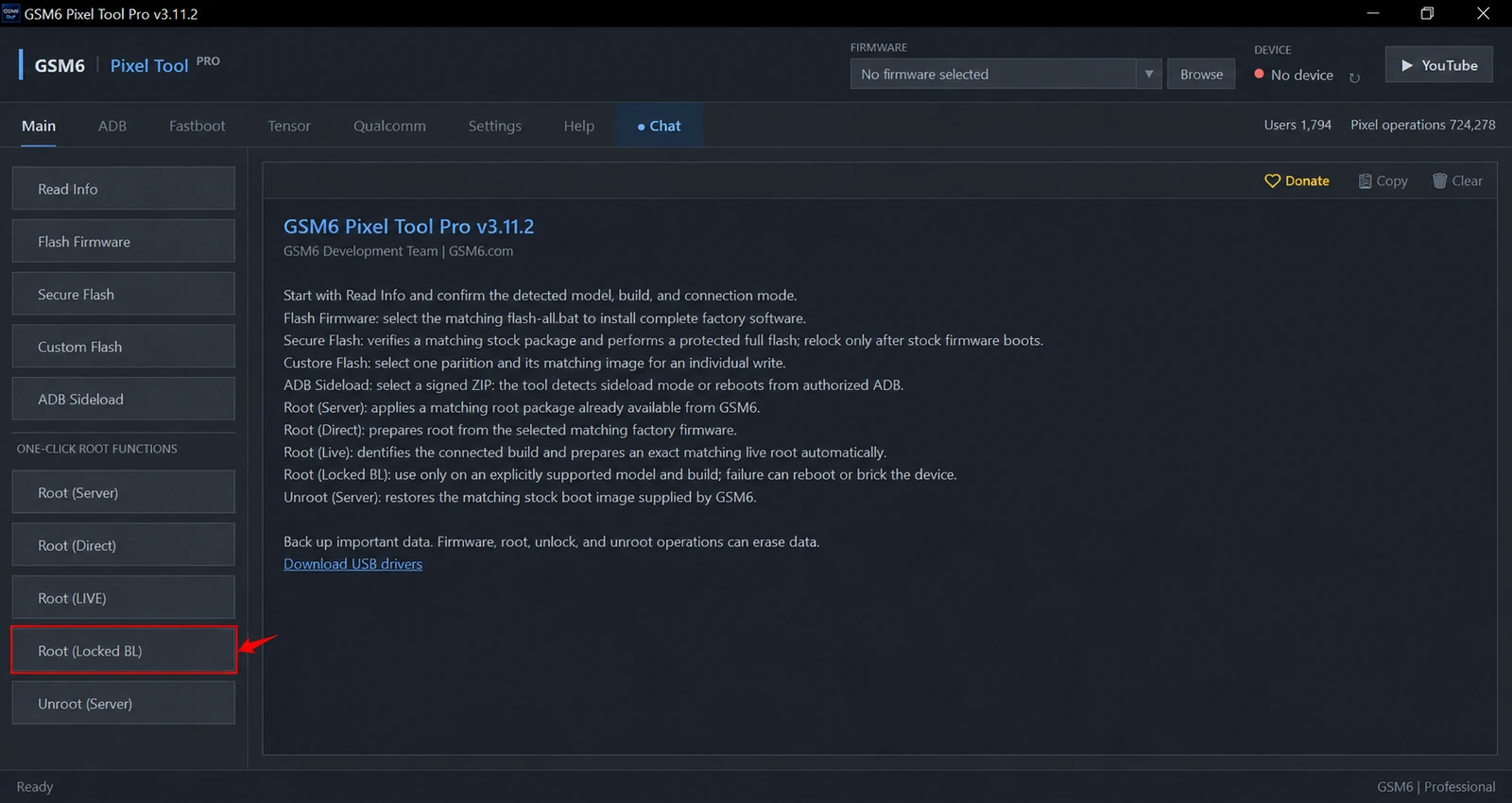
GSM6 Pixel Tool Pro can obtain temporary root on the exact supported Pixel builds listed below while the bootloader remains locked. Connect an authorized phone over USB, let the tool detect its architecture and installed build, and start Root (Locked BL) or the new Root Locked BL (New) from Main.
The tool prepares the matching profile and performs the supported device stage automatically. Users do not need a separate rooting APK or manual pairing instructions from an unrelated method. KernelSU-based access is temporary: a reboot ends the session.
Use the current GSM6 Pixel Tool Pro v3.11.7 installer (or visit the interactive feature guide) and compare the codename and full build ID before starting. Model support alone is not enough.
New in Release v3.11.7: Root Locked BL (New) Method
With the release of GSM6 Pixel Tool Pro v3.11.7, a new alternate temporary root method—Root Locked BL (New)—is now available directly on the Main tab.
[!IMPORTANT] October 2026 Security Patch Limitation: Root on a locked bootloader is NOT supported for a lot of Pixel models running October 2026 security patch builds. Security updates in October 2026 patched kernel structures on multiple Pixel devices. If your phone has taken the October 2026 update, check its exact build ID; do not attempt to force an exploit if the tool reports the build is unsupported.
How Root Locked BL (New) Works:
- 100% Free Feature: Just sign in to your GSM6 account—there is no charge for locked bootloader temporary root.
- Simple Plug & Play: Connect your phone over USB with USB debugging enabled. No manual firmware unpacking, bootloader unlocking, or data wipe required.
- Takes a Few Minutes (Longer Time): The automated sequence takes a few minutes (longer time) while the tool stages the KernelSU payload, cycles the exploit sessions, and verifies that the temporary root shell (
uid=0) responds. Keep your phone’s screen awake and keep the USB cable firmly connected throughout. - Strictly Temporary Root: Root permissions exist solely in volatile memory during the running session. On reboot, the temporary root access will be completely gone, returning the device to its normal stock state.
Direct installer link: Download GSM6 Pixel Tool Pro v3.11.7 Setup (.exe)
When locked-bootloader root is useful
A technician may need elevated access for authorized maintenance without taking the standard persistent-root route. On listed compatible profiles, temporary root can support subsequent eligible operations such as Network Unlock or partition backup and restore.
Device-management, radio and identifier service functions have their own requirements and permissions. Root access does not authorize removal of another organization’s management or alteration of a device’s identity. Diagnose each requested service separately.
This is different from Root (LIVE) and Root (Direct), whose supported workflows can involve unlocking and data erasure.
Supported models and exact builds
This table preserves the combinations in GSM6’s existing published compatibility record. It is a first-party support list, not a new independent test of every row. The current server response for the connected phone is the final check.
Some models have multiple entries. The complete identifier must match one supported build for the same codename. A similar monthly build or marketing model name is not sufficient.
| Model | Codename | Published supported build IDs and firmware references |
|---|---|---|
| Pixel 11 | cubs | CD1A.260618.001.C2 |
| Pixel 11 Pro | grizzly | CD1A.260618.001.C2 |
| Pixel 11 Pro XL | kodiak | CD1A.260618.001.C2 |
| Pixel 11 Pro Fold | yogi | CD1A.260618.001.C3 |
| Pixel 10 | frankel | CP2A.260705.006 |
| Pixel 10 Pro | blazer | CP2A.260705.006 |
| Pixel 10 Pro XL | mustang | CP2A.260705.006CP2A.260805.005 |
| Pixel 10 Pro Fold | rango | CP2A.260705.006 |
| Pixel 10a | stallion | CP2A.260705.006CP2A.260805.005 |
| Pixel 9 Pro Fold | comet | CP2A.260705.006 |
| Pixel 9 Pro | caiman | CP2A.260705.006 |
| Pixel 9 Pro XL | komodo | CP2A.260705.006 |
| Pixel 9 | tokay | CP2A.260705.006AD1A.240905.004 (unavailable) |
| Pixel 9a | tegu | CP2A.260705.006 |
| Pixel 8 Pro | husky | CP2A.260705.006 |
| Pixel 8 | shiba | CP2A.260705.006 |
| Pixel 8a | akita | CP2A.260805.005 |
| Pixel 7a | lynx | CP2A.260705.006 |
| Pixel 7 Pro | cheetah | CP2A.260705.006 |
| Pixel 7 | panther | CP2A.260705.006BP2A.250705.008 |
| Pixel 6a | bluejay | CP2A.260705.006CP1A.260405.005 |
| Pixel 6 | oriole | CP2A.260705.006 |
| Pixel 6 Pro | raven | CP2A.260705.006 |
| Pixel Fold | felix | CP2A.260605.012CP2A.260705.006 |
| Pixel Tablet | tangorpro | BP1A.250405.007CP2A.260705.006 |
Firmware links are references, not instructions to downgrade. Anti-rollback restrictions, device policy and current firmware state must be considered before changing builds. Never rename unrelated images to replace an unavailable entry.
What you need
- A device you own or are explicitly authorized to service.
- An exact supported codename/build combination.
- Windows, the current tool and a signed-in GSM6 account.
- Android running with USB debugging enabled and this computer authorized.
- One reliable data connection, sufficient battery and internet for required resources.
- A backup of important data and a recovery plan.
Follow the official Google USB driver guide if Windows detection is incomplete. USB authorization is still required when the tool automates the operation.
Root (Locked BL) is free after sign-in in the reviewed release. Follow-up specialist operations may require paid activation. Buying access does not make an unsupported root build compatible.
How to use Root (Locked BL)
- Boot Android normally and unlock the screen.
- Open GSM6 Pixel Tool Pro and connect one phone.
- Accept the computer’s USB debugging authorization.
- Use Read Info and compare the complete codename/build pair with the table.
- In Main, choose Root (Locked BL) or the new Root Locked BL (New) button.
- Read the confirmation before allowing profile staging.
- Keep the screen awake and keep USB connected throughout the process. (The new method takes a few minutes to complete its staging and exploit sessions).
- Wait for the final result, then verify temporary root (
uid=0) before starting another operation. Remember that once the phone reboots, this temporary root access is completely removed.
A progress percentage is not proof of success. If the phone reboots, loses authorization or reports a failed stage, inspect its actual state. The job is complete only when the required access is verified.
Temporary root after a restart
Temporary access belongs to the running session. A restart may remove it even if a manager icon remains. Recheck access before using partition or network-service features.
Do not describe this as permanently rooting every locked Pixel. It is a profile-specific operation, and a firmware update can change compatibility.
Likewise, beta Live Root support does not establish Locked BL support for the same beta. The methods have different requirements.
Greyed OEM Unlocking and failures
A greyed OEM Unlocking setting does not guarantee that this method works. The exact supported profile decides eligibility; root does not change a carrier policy or authorize restricted servicing.
If the profile is unavailable, copy the detected details and contact GSM6 Support. Do not force another codename or repeatedly retry a crashing operation.
Low-level root failure can cause a reboot, kernel panic, instability or data loss. Keep the full output before clearing it and report the last confirmed stage. A failed attempt should lead to diagnosis, not experimentation with a nearby firmware resource.
Video and next steps
The GSM6 locked-bootloader root and CPID video demonstrates the tool. Its example does not extend compatibility beyond the supported profiles.
For complete stock restoration see Secure Flash. Before any later lock-state change read Secure Bootloader Relock.
Does this require a separate rooting APK?
No. This guide covers GSM6 Pixel Tool Pro’s automated supported-build operation, rather than a separate APK installation workflow.
Does root remain after reboot?
Do not assume so. This is temporary root; verify that the supported session is active before a follow-up service operation.
Does a supported Pixel model mean every build works?
No. The exact codename and complete build ID must match an available supported profile.